43 Folders

43 Folders feed subscription icon - Shiny! Drowning in email? Try Inbox Zero to learn sane tips for dealing with high-volume email. And don’t miss the free Inbox Zero video. »

Login or register

Register for free on 43 Folders to comment on articles, post to our forum, customize your visits, and much more. Current users can login now.

GTD with a Mac label maker?

multipart/mixed: Turbo-Charging the Dymo LabelWriter

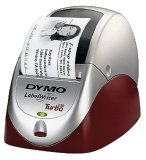
Dymo LabelWriter 330

I love my Brother PT-65, which is regarded by many as the unofficial official label maker of GTD nerds (and which, quizzically, appears to have been discontinued :-().

The PT-65 has easily paid back its modest sticker price with three years of faithful service. Trouble is, I like using it so much that it’s gotten to be kind of a pain to pull it out and Blackberry-thumb-type my bajillion labels via its teeny keys. Now, I want something that hooks up to my Mac.

Josh Carter’s gotten me interested in the Dymo LabelWriter 330 Turbo via this handy tutorial from late last year, which covers basic setup info, plus a tip on speeding up the creation of a new label with Quicksilver.

Josh has good stuff to say about the 330:

The advantages of the LabelWriter, as I see it:

  • The Dymo software is easy to configure for “power user mode” which eliminates all the extra dialog baggage, and then it’s wicked fast to use. (Doubly so with Quicksilver in the mix.)
  • You get to use your computer’s nice keyboard. This is especially important for me since I use the Dvorak key layout.
  • The Dymo labels are cheap and look totally pro, even better than a stand-alone label maker.
  • Labels are the same size, so reusing a folder is as simple as sticking a new label over the old one, and it still looks nice.
  • You can use fancy Mac OS X features like printer sharing if needed. (I tried it, it works great.)

Anybody using one of these units or similar? Care to recommend a label maker of any brand that hooks up via USB and works well with Tiger/OS X? I ♥ my little Brother, but I’m ready for Label Maker 2.0!


Comment viewing options

Select your preferred way to display the comments and click "Save settings" to activate your changes.
Gordon Meyer's picture

I own the Brother QL500...

I own the Brother QL500 label printer, which is similar to the Dymo. I picked it up super-cheap after an instant-rebate at the office store. One thing I like about it is that it takes labels up to 3” wide, which lets me use it for things other than file folders. The Brother software it comes with is a horrible WIndows port, and I don’t use it at all. The Mac OS X printer driver is just fine, and for met that’s all that really matters.

One more tip, I use Ambrosia’s Easy Envelopes with the Brother labeler, making the tedious job of addressing envelopes (or generating any kind of label, really) just a Dashboard invocation away.

Marcos Detry's picture

I use Seiko SII 450....

I use Seiko SII 450. Very nice. It works very well with Mac-OsX. Has universal drives and software. connect via USB. The Labeling software is excellent and it´s a Mac soft not a windows port.

Guy Ferraiolo's picture

I use a Dymo LabelWriter...

I use a Dymo LabelWriter Duo via USB. It does both the mailing labels, up to 2 5/16” by 4” and the permanent labels, up to 1”. I use those big shipping labels for everything from envelopes to packages. I use 1/2” permanent labels for file folders.

I particularly like that the Dymo permanent labels have a pre-split back which makes applying them very much easier than the Brother labels. I use a Brother labeller at work and it takes forever to get the backing off those labels.

The software is fine, it seems Macish to me. I got it at a considerable discount when an office superstore closed some locations near me.

http://global.dymo.com/enUS/Products/LabelWriter_DUO.html?WT.srch=1

Andrew Foster's picture

I use the Dymo LabelWriter...

I use the Dymo LabelWriter with my Mac and love it. The labels are big and clear and the Dymo software adjusts the Font size automatically so the text always fits. I also love the way that the labels are easy to get off. I have to admit to becoming quite irrational with my previous stand alone label maker because it would take me two minutes to extract the label from its backing.

Oyvind's picture

This is a little OT,...

This is a little OT, but I also need a label writer able to write bigger labels. Like the back of video tapes (Digital Betacam specifically). Anyone?

Sigurdur Armannsson's picture

I bought aDymo LabelWriter 400...

I bought aDymo LabelWriter 400 few weeks ago. It works very nicely and allows me to print from what ever application I want, plus the Dymo printer app. The salesperson tried NOT to sell it to me because he said it was for Windows only, but I showed him the opposite on the box. Dymo supports the mac fine and they have Tiger compatable drivers on their site. Great tool.

Lynette's picture

You got me thinking now....

You got me thinking now. I have one of those older CoStars (now under Dymo) LabelWriter. Despite it’s age it works beautifully. Have not ever hooked it up to the Mac - its always on the PC but I distinctly remember seeing downloads for Mac.

The only problem I find with using the label writers is having to swap the rolls - I use it to print postage 99% of the time. I saw a new one that can accommodate two types of labels. That’s nice.

Susan's picture

I picked this up at...

I picked this up at work, and thankfully I have a really decent laser printer at home. For making labels, I simply take one sheet of labels, which may or may not have been snuck out of my workplace cough, and put it into my printer. I pull up the Word template sitting on my desktop for those labels, put in whatever I please… into the one box on the label template that I intend to use. Then I hit ‘print’.

Price: Free! Er, that is, the cost of a sheet of labels. Also compatible with anything, and doesn’t require extra equipment cluttering up my desk. The key for making this usable is to be careful not to wrinkle up the page corners—if they don’t get folded over by accident at some point, you can easily run a single sheet through a laser printer for each label individually if you want to. Or do a bunch at once, if you like.

Liam's picture

I bought a newer version...

I bought a newer version (the Labelwriter 400) of these when they first came out in Australia a few months ago, and I ended up taking it back for a refund. I wanted it for file folders and CD/DVD labels. The idea is good — but the execution is lacking. When I loaded a roll of labels and launched the software, the first label would print fine, but subsequent labels would drift from centre — the feeder didn’t do a good job of keeping things aligned. For larger mailing labels it probably would be a problem (or not often), but for smaller labels like those I was using, it just didn’t do a very neat job. The print quality was adequate, though nowhere near laser quality — the labels themselves are very thin (one of the boxes I bought with the machine was actually water-damaged).

I think a cheap inkjet dedicated to the job, a pack of Avery labels, and something like a copy of BeLight Software’s Mail Factory (which lets you choose the position of the label that you’re printing to, so you can re-use partially used label sheets) would do a better job.

Chanpory Rith's picture

I just went to Staples...

I just went to Staples the other week to get another labeler, and noticed the PT-65 was gone also. Looks like they replaced it with the PT-80, which actually fixed a lot of things I didn’t like about the PT-65. The PT-80 is slightly smaller, lighter, and has a better color scheme. It also has some improvements to the interface, solving my biggest complaint with the PT-65: the lack of a “Shift” button. If it has bluetooth printing, it’d be almost perfect.

eric's picture

As a point of interest,...

As a point of interest, a Dymo labelmaker is actually what is used back-of-house at Apple retail stores. I don’t remember what model exactly, but it’s had years of service and the inventory guys didn’t seem to have any complaints.

ian's picture

I was asking about this...

I was asking about this labller on the forums a few weeks back. Thanks for bringing this question to the forefront.

Jack Stalnaker's picture

Seems awfully pricy. I guess...

Seems awfully pricy. I guess it would be justified if you made more than just GTD labels.

Dan Coulter's picture

I work at a college...

I work at a college and we’ve made extensive use of the DYMO labelwriters. We actually use them in a slightly different way. In Windows, at least, you can access their API through a variety of programming languages. One of the coolest is to be able to print from a webpage to a local DYMO printer via Javascript (and an ActiveX control in IE and a special plugin for Firefox). We’ve got about ten of these suckers around campus doing a variety of tasks from our custom web apps. I’ve had no complaints so far (except one that broke, but the 2-year warranty got us a free replacement). It’s a great way of printing information quickly and cheaply.

ZenBrayn's picture

@Liam I have the same Labeler...

@Liam

I have the same Labeler as you (LabelWriter 400) and encountered the exact same problem (and was also quite discouraged). However, I found that I was loading the labels wrong. As you know, the spool of labels fits between two plastic, cylindric holders. It turns out that you really have to jam the holders together so that they fit into the label spool. When you do this right, the label spool fits quite snug in the holders. Now, the labels feed correctly every time.

Scott's picture

I've been using the Dymo...

I’ve been using the Dymo LabelWriter printer series for over 4 years. First the Turbo, and recently the 440. While their Mac software may have improved over the years, for me I’ve used Word since the beginning to print my labels. The key is to create a few templates, totally customized to your exact specs that open up with a keystroke (QuicKeys afficionado here, but there are others). As a self-published author, I’m printing shipping labels all day, and with the Dymo, it’s beauty in motion. Good recommendation.

Chris Marsden's picture

Like Susan, I've gone a...

Like Susan, I’ve gone a different route (though no theft is involved)..

When I first read GTD, I headed to office depot to price a label maker and labels and pick up some file folders, etc… I was stoked about getting a label maker. The geek in me was crying out for one. Then I saw the price. Not of the label maker, but of the labels. So I thought about possible workarounds and came up with this.

I use the Avery File Folder labels (Avery 5202) that come 7 per 4x6 in sheet. I get the plain white ones, but you can get a rainbow pack or individual color packs for color coding (not GTD, per se, but might work for you). The price per inch for the DYMO labels came out to around $0.04. This meant that the average label would cost between $0.02-0.12 each. Office depot has a pack of 252 labels for $2.29. This puts the cost per 3.5 inch label at $0.009 each. AND, since I have a color printer, any color, any graphics, anything I want.

Now the whole point of the labeler, according to David Allen, is to make it easy so you will actually do it. But doing 7 labels at a time makes it the kind of stack until you get around it sort of thing that is anti GTD. So what about throwing away a sheet after only printing one label. That brings my cost up to $0.063 cents per sheet. Still in line with what an 1.5 inch label would cost me on a DYMO printer, and I didn’t have to buy the extra printer.

The Geek in me is still looking at the type of printer Merlin references in this post, but for now, simpler has proven to be better. And Since I rarely have just 1 label to make, sinpler has also proven to be cheaper.

Jay Wiese's picture

Just got folder labels for...

Just got folder labels for my standard-issue Dymo LabelWriter 400 at work (on a PC). Much better than my Brother labelmaker at home. Both typing and printing are faster; labels are cheaper so I don’t cringe when I misspell; and text is infinitely more formatable, even using the software included with the label printer (which is not bad, really).

jdan's picture

I have a Brother PT-1750....

I have a Brother PT-1750. I got it on sale at Fry’s for ~$37, which is a great deal, but I’ve been so happy with it I would have gladly paid full price. The buttons are MUCH larger than the smaller PT-65, yet it is still portable enough for me to transport from home to office in my backpack when necessary. The labels are also much nicer than the PT-65 labels, they have pre-split backs so are way easier to peel. Also, I have noticed that the labels for 1750 (TZ style) are far more durable than the ones for the PT-65. I have two cell phones, each labeled with its respective phone number. One is from the PT-65 and the other is from the PT-1750 (I labeled them in the same week). After about 6 months of riding around in my pocket, the PT-65 label is almost completely worn off (numbers are unreadable); the one from the PT-1750 still looks like new.

—jdan www.jdan.org

Jim Reese's picture

Office Max (www.officemax.com) is currently...

Office Max (www.officemax.com) is currently selling the Brother QL500 for $60. Brother is offering a $20 mail-in rebate until September 16 (http://www.advizia.com/brother/modelDetail.asp?PkgID=382274&User=ptouch&Rnd=953). Net price of $40 is not bad.

evariste's picture

Jim-just got back from Staples,...

Jim-just got back from Staples, where they agreed to price-matche it with Office Max after a phone call to confirm pricing and availability, and they have a $10 Easy Rebate as well (neither OMax nor Staples seemed aware of the $20 Brother rebate). Net price: $30!

evariste's picture

Oy vey...now they tell me....

Oy vey…now they tell me. I should have looked at the Brother rebate before going to Staples; it specifically excludes purchases made at Staples.

evariste's picture

Ah-as it turns out, I'd...

Ah-as it turns out, I’d bought the QL-500 EC, which is a slightly newer model. It includes the PC thermal label printer and a P-touch 2-line standalone portable labeler with a QWERTY keyboard. 2 in 1 for $10 more-not too bad!

Raman's picture

I have been using the...

I have been using the DYMO LabelWriter Duo at home and the 400 Turbo in the office, both connected to Macs with no issues whatsoever.

A dedicated label printer has been of tremendous help in setting up a GTD system. For years I had gone the Avery label sheet route, but the ability to print single labels on demand means that I can file and address everything at it comes across. I know that they are pricey, but I could swear by them.

Merlin Mann's picture

Bought the LabelWriter 400 and...

Bought the LabelWriter 400 and love it so far.

Willis Wasabi's picture

Recent Brother TZ labels have...

Recent Brother TZ labels have pre-split backs now. I haven’t had to take out that little splitter tool in months.

Mini-reviews: LabelWriter 400, Polder Vibrating Timer, &#822's picture

[...] LabelWriter 400 by Dymo...

[…] LabelWriter 400 by Dymo - Powerful and easy-to-use USB label maker works great with OS X and makes gorgeous labels. A bit on the pricey site, but possibly essential if you want a friction-free way to blast out tons of labels for folders, envelopes, etc. An excellent step-up from the Brother PT-65. 4.5 Stars. [Note: purchase was inspired by comments in this recent thread, GTD with a Mac label maker?] […]

purplegenie's picture

I went the opposite direction...

I went the opposite direction — started off with a SmartLabel printer and then tried a stand-alone. For me, there is no substitute for the computer-attached label printer.

I got the stand-alone labeler for Christmas when I switched to the Mac (my SmartLabel printer was so old it didn’t have a USB interface, but is still running flawlessly on my mom’s old PC), and I found I let labeling chores pile up because using the stand-alone is so much less convenient than the computer-attached labelers. But, (anal alert, here), the real kicker is that the stand-alone labeler makes labels of varying widths, depending on how much text you have. The SmartLabel printer makes them all a nice uniform size — even more inspiring for keeping things organized. I’ve just bought a new SmartLabel 410 and won’t ever be without a dedicated computer label printer again.

I frequently put critical info on a label and stick it on a 3 x 5 card — much easier than dealing with printing 3 x 5 cards with my desktop printer.

Moscow Joe's picture

Recently bought a Dymo with...

Recently bought a Dymo with the intention of printing on non-label stock. They make a roll of 2x3.5 business cards with no adhesive. I’ve ordered these and am awaiting shipment, but my intention is to print out same type of info that would go on a 3x5 card. 3x5 cards in my opinion are just too damn big, will not fit into shirt pocket. So rather than try to print on 3x5 with an inkjet, I’ll give this Dymo and it’s “non-label” labels a try.

Paper Bits » Blog Archive » Data Shadows - Phone's picture

[...] (Via Merlin Mann.) [...] ...

[…] (Via Merlin Mann.) […]

About Merlin Mann

Merlin Mann's picture

Bio

Merlin Mann is an independent writer, speaker, and broadcaster. He’s best known for being the guy who started the website you’re reading right now. He lives in San Francisco, does lots of public speaking, and helps make cool things like You Look Nice Today. Also? He looks like this, answers questions, and has something like a life.

 
EXPLORE 43Folders THE GOOD STUFF

An Oblique Strategy:
Distorting time


STAY IN THE LOOP:

Subscribe with Google Reader

Subscribe on Netvibes

Add to Technorati Favorites

Subscribe on Pageflakes

Add RSS feed

The Podcast Feed

Inbox Zero

The original 43 Folders series looking at the skills, tools, and attitude needed to empty your email inbox — and then keep it that way. Don’t miss the free video of Merlin’s Inbox Zero presentation.

Making Time

3-part series on attention management for artists and makers. Read Bad Correspondence, The Job You Think You Have, and One Clear Line.