43 Folders

43 Folders feed subscription icon - Shiny! Drowning in email? Try Inbox Zero to learn sane tips for dealing with high-volume email. And don’t miss the free Inbox Zero video. »

Login or register

Register for free on 43 Folders to comment on articles, post to our forum, customize your visits, and much more. Current users can login now.

Google releases iPhone-friendly gCal

Updates from Google Docs and Google Calendar

Whoa, check this out:

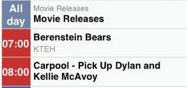
The Google Calendar team, along with the mobile team, released an upgrade to the Calendar interface on the iPhone. It is now tailored for the iPhone, and you can now see your different calendars in distinctive colors. You can see the new Calendar interface by going to http://calendar.google.com on your iPhone browser.

As an iPhone user and recent convert to gCal: Daddy like.


TOPICS: Apple, gCal, Google, iPhone

Comment viewing options

Select your preferred way to display the comments and click "Save settings" to activate your changes.
Internet Rockstar's picture

Gmail also updated

As noted on my awesome blog, they've been making updates to the mobile Gmail as well - its gone from terribly ugly and hard to use to pretty ok in the last few days. Looks like they posted another rev last night, as when I checked my mail on the phone this morning, there were shiny new buttons.

dittrich's picture

Adding calendar item

Unfortunately, it looks like the Quick Add only adds to your primary calendar. Also, you can’t edit an existing calendar item.

Merlin Mann's picture

Re: Adding calendar item

I believe QuickAdd is also (unfortunately) like that in the regular web version as well. :(

dittrich's picture

Re: Re: Adding calendar item

The iGoogle plug-in has two links: Quick Add (no calendar selection) & Create Event (calendar selection & more). I’d like to see that in the iPhone version too, it seems like a simple enough form to work on it…

cromulent's picture

I wish they’d put the

I wish they’d put the Quick Add at the top of the calendar page.

It drives me crazy if I have a quick appointment to add and have to scroll all the way to the bottom of the page. If I have to add a few new appointments in succession I feel like acting out that scene from Shogun.

iSwim's picture

My favorite way to add calendar item is using Google Toolbar

I don’t think many people know about this feature of the Google Toolbar but it is awesome!

Enter the appointment details in the search area of the toolbar “Friday 10:00 Meet with Jeff at Waffle House”. (Notice that the icons all change their appearance while your cursor is in the search box.) Click the calendar button in the toolbar. An event page will open with the appropriate information filled in. Hit save and your done!

Is that cool or what! I’ll post the other related gCal tip in my blog.

Jim

Tim's picture

iPhone was supposed to bring the "real" internet

but still, a lot of websites created pages especially for the iPhone. I’m not sure what to think about it though. No, it doesn’t sound right to have pages formatted especially for one device, but the special pages do add functionality (I should say clarity or usability probably) for iPhone users.

and yes, Merlin, as far as I can tell, I confirm that QuickAdd only adds to the main calendar

pgib's picture

Login page

Is it me, or does the Google login still stuck on the iPhone? The new calendar is nice once you login though.

codykniffen's picture

In case you were curious...

For the “poor” or “under contract” in the crowd, I bring good news. Considering the fact that Safari is the same on both the iPhone and iPod touch, it works on the latter.

One more reason I love my 16GiB iPod touch.

camkerr's picture

No support for iPod Touch?

I read about this today and thought “Hey, I’ll go see how this looks on the new iPod Touch because I live in Canada and I probably won’t be seeing an iPhone anytime soon because Ted Rogers won’t man-up and accept revenue sharing”

Doesn’t work on the iPod Touch I tried, which is weird because I thought that the iPod Touch ran the exact same Safari Web browser as the iPhone.

codykniffen's picture

Ummm, yea....

I’m not calling you a liar, but It loaded just fine for me on my iPod touch.

Maybe you’re typing in the URL wrong?

See my comment from earlier

Mattazuma's picture

Not working on my iTouch

I’m getting the “regular” version of GCal & GMail on my iTouch.

Maybe it’s something else Apple broke with the 1.1.1 update? :)

The Typepad iPhone app works fine, so maybe it’s temporary thing?

jac's picture

closer

i got no problem canceling my current cell phone contract and moving over to iPhone other than i’m slow on the draw. ok, really slow on the draw. AND i was (and still am) just a little bit paranoid about the kinks that invariably need working out when a new product hits the market. this is news that’s certainly moving me closer to making the switch.

iSwim's picture

Needed: the Ultimate iPod Touch feature

gCal is great! I use it all the time.

I’d love to get gCal on an iPod phone but just can stomach the thought being locked into AT&Ts service. Apple could add one feature to the iPod Touch that would save us all from AT&T. What might that be? Offer an iPod Touch with the iPhone headset and a bluetooth headset profile.

They could call it the iPod Wing because they would fly out of the stores and free us from our cell phones!

My apologies for being a bit off topic. :)

Jim

mattmcknight's picture

Looks okay on the BB 8830 too...

colors for calendars and all that.

It’s not quite the same as an integrated app though. The beauty of Google Cal is that you can use email as the integration point…

About Merlin Mann

Merlin Mann's picture

Bio

Merlin Mann is an independent writer, speaker, and broadcaster. He’s best known for being the guy who started the website you’re reading right now. He lives in San Francisco, does lots of public speaking, and helps make cool things like You Look Nice Today. Also? He looks like this, answers questions, and has something like a life.

 
EXPLORE 43Folders THE GOOD STUFF

An Oblique Strategy:
Distorting time


STAY IN THE LOOP:

Subscribe with Google Reader

Subscribe on Netvibes

Add to Technorati Favorites

Subscribe on Pageflakes

Add RSS feed

The Podcast Feed

Inbox Zero

The original 43 Folders series looking at the skills, tools, and attitude needed to empty your email inbox — and then keep it that way. Don’t miss the free video of Merlin’s Inbox Zero presentation.

Making Time

3-part series on attention management for artists and makers. Read Bad Correspondence, The Job You Think You Have, and One Clear Line.