43 Folders

43 Folders feed subscription icon - Shiny! Drowning in email? Try Inbox Zero to learn sane tips for dealing with high-volume email. And don’t miss the free Inbox Zero video. »

Login or register

Register for free on 43 Folders to comment on articles, post to our forum, customize your visits, and much more. Current users can login now.

Kinkless GTD .83: Enhances Quicksilver and iCal integration, much more

Kinkless GTD 0.83 [Relative Motion] | Kinkless

The wait is over, kids. Ethan Schoonover has just released his .83 version of Kinkless GTD, and, brother, does it ever bring it. (For an intro to what kGTD is, start here, then go here and of course, here.)

So, first great thing: the syncing problems people (including me) were having — getting changes in Action views and iCal to get reflected correctly back in Projects view — has been fixed most elegantly. So it’s just a lot more usable and dependable right out of the box. But that ain’t all E’s been cooking up. Among the trove of new and updated features (cribbed from Ethan):

  • Everything syncs: all changes to all columns are now synchronized across all views of a task (Projects/Actions/iCal)
  • Deletions now handled with the good old delete key on your keyboard
  • Singleton tasks section, now a full citizen
  • Better QS action… and fancy “task shorthand” to make it easy to send a task to a specific context/project
  • Task aging

Visit the kGTD .83 release page for full details

Ethan, as ever, has done a terrific screencast explaining how the app works — DO NOT MISS the video if you aren’t “getting” kGTD, because it’s super useful in showing exactly how it works — plus I’m sure there will be lots of lively discussion over on the kGTD forum, so for today I’ll just focus on my favorite improved feature: what Ethan calls “fancy “task shorthand.’”

Previously

In the previous release (.7) there was some amazing stuff in kGTD that had helped realign the way I think about doing GTD on a Mac. Kinkless made it easy to add items to an inbox via Quicksilver, and the excellent iCal integration allowed me to organize my contexts in very efficient and functional ways. Which, by themselves, would have allowed me to die happy.

But in this latest release, Ethan takes it further (yes! yet! again!) by introducing a simple syntax for taking tasks beyond the inbox — allowing you to create actions via both Quicksilver and iCal that are then placed into the correct project and context back in kGTD. Total round-trip, no-look task management. So let’s look at some examples of how it actually works in practice.

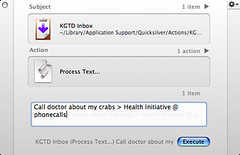
Once everything is properly installed, we start to add an action via Quicksilver, and everything works pretty much as before. I bring up QS, type to select “KGTD Inbox,” tab to the second pane and select “Process Text,” then tab to the third pane, and enter my new task via the Text Mode field. (Note, as ever, that you can make a Trigger in QS that reduces all but the actual typing into a one-click operation).

The new syntax

kGTD - Quicksilver task with Projec and ContextBack in .7, you could type in, say “Call doctor about my crabs” and your dolorous little task would be deposited neatly back in your kGTD Inbox for further processing later on. Which was great. But, in .8, let’s say you instead typed in something like “Call doctor about my crabs > Health Initiative @ phonecalls”.

Well, if you already have a kGTD project called “Health Initiative” and a context titled “phonecalls,” then you just added a new item to that project with that context; on sync, the action will be populated into your “phonecalls” list in kGTD plus, if you’re doing iCal syncing, it will be added to your “phonecalls” calendar. This is, as you can imagine, pretty insanely useful. So if you didn’t catch that exactly, in this syntax “>” precedes the name of a project and “@” precedes the name of a context; Quicksilver and kGTD take care of the rest of the heavy lifting. But wait, there’s more.

It’s smart, this syntax

You could also have entered that same item as “Call doctor about my crabs > Hea @ phon” since kGTD only needs the beginning of a string to create a match. Note that in cases of multiple matches, it just goes to the first project or context it finds (this can be helped a lot by smart, unique naming of projects and contexts).

Or, let’s say you did not yet have a top-level project for this particular action and wanted to create one. You might then type “Call doctor about my crabs > new @ phonecalls” and have kGTD automagically add the task in a new project called “new,” that you can then edit later on back in your document.

Now, let’s say you wanted to, for example, do some research on these crabs and want to capture a web address for future reference. No problem. Consider…

Visit website about crabs > Health Initiative @ web [line break] http://www.YouveGotCrabs.com/

…where the line break in the QS text field is achieved via option-return.

When you pop back over to kGTD, you’ll be pleased to see that the address of your crab portal has been neatly placed in the “notes” field of your new task. Click on it, and you’re taken right to the site.

iCal wants to play, too

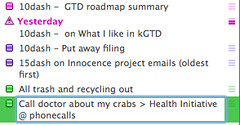
kGTD - iCal task with Projec and ContextAnd finally, here comes the extra-special sexy. As I laid out in my post about iCal and kGTD, I really like to plan in kGTD and then do out of iCal since it reduces the amount of fiddling and meta work temptation. That doesn’t mean, however, that I wouldn’t benefit from a little extra backward integration.

So imagine my joy that I can now create a new iCal task called “Call doctor about my crabs > Health Initiative @ phonecalls” and, on sync, have it create the twin item in the correct project and context back in kGTD. And after that sync, kGTD has the consideration to tidy the unsightly-looking iCal task down to just “Call doctor about my crabs” within my “phonecalls” calendar. And once again kGTD has picked up the grunt work of managing my tasks from one smart, central, easily accessible location. Ace.

Plenty more under the hood

I really do encourage you to drop by Kinkless and catch up on all the many new features (and the shiny new site), because it’s all pretty great. I know people have been clamoring for a new release, but Ethan has been a champ about making sure everything was working properly in this ground-up rewrite.

This is a terrific, innovative, and geek-centric piece of work, and I’m truly grateful for the hours he’s put into it. It’s my system, I love it, and it really just works like a sonofabitch.

Visit the kGTD .8 release page


22 Comments

Comment viewing options

Select your preferred way to display the comments and click "Save settings" to activate your changes.
Ian's picture

OK, so I'm officially a...

OK, so I’m officially a jealous windows user now. (I do own and use macs, but sadly, not for my day-to-day stuff, cuz I work as a programmer for a company that’s windows-centric).

Are there ANY programs this good out there for Windows? I use MLO and it’s good, but there are some annoyances (in particular, the inability to set future start dates without future due dates) that make it not work well for my system. I’d love to find a really killer GTD implementation for Windows.

emory's picture

I'm just glad you had...

I’m just glad you had the courage to discuss your crabs.

If more of us stood up and declared our crab-ridden condition we could remove the stigma from our debilitating condition.

Now if you’ll excuse me, I’m due for my twice-daily shaving.

Craig's picture

OK, I can't believe after...

OK, I can’t believe after my weekend of organizing my home office and wanting to muck with my GTD but not wanting to try again to implement kGTD until the new version was up and so wasting even more of Ethan’s bandwidth by viewing the same page 20 times over 2 days hoping for a release that I’m stuck here in my Windows world at work and it’s freaking available. Sweet.

Anyway, this is probably answered somewhere in the documents with the download, but can anyone tell me how to add an item to the inbox form QS, or from iCal (PDA).

kGTD 0.83 is out! - MySprawl's picture

[...] 43 Folders write up...

[…] 43 Folders write up on this new version […]

Dobschats Weblog's picture

Kinkless GTD 0.83... Eine neue Version...

Kinkless GTD 0.83…

Eine neue Version von Kinkless GTD. Benötigt OmniOutliner Pro 3.6 Beta. Einige nette neue Funktionen, vor allem das Setzen von Erinnerungen in iCal beim Synchronisieren. Dieses Update funktioniert auch ohne Umkopieren von Daten: Installer durchlau…

Rishabh R. Dassani's picture

Love the .83 release of...

Love the .83 release of KGTD; my productivity just shot up 110 percent, Yahoo !!!!

kjmcw's picture

what about Due dates in...

what about Due dates in quicksilver actions? i’m worried that if i bury a new action at the bottom of a project list (which happens if there’s no due date attached to it) then i never end up seeing it again.

Merlin Mann's picture

If you like having dates...

If you like having dates on stuff, I’d just add the event as “Call doctor about my crabs @ phonecalls” which would put it in your Inbox with no Project associated with it. You can then enter the due date (as well as the project) before your next sync.

danorama's picture

Don't forget that there are...

Don’t forget that there are some incomprehensibly stubborn LaunchBar (instead of Quicksilver) users out there. They/we can take advantage the very same action-adding coolness, with a very small modification to the supplied kGTD QS script. It’s at http://kinkless.com/node/371 .

Hawk Wings » Blog Archive » kGTD 0.83.0 released's picture

[...] Merlin Mann, who did...

[…] Merlin Mann, who did hard-core beta-testing on this version has written a nice detailed review of the new release. […]

TommyW's picture

Oh I'm in love... It...

Oh I’m in love… It works beautifully.

The QS smarts are just the business….

And then iCal having the same smarts….

This is just great. Beyond great. It actually deserves that much devalued term - awesome.

TommyW's picture

By the way... I do...

By the way… I do the QS action the other way and it’s two panes and skips the middle pane of Merlin’s method above.

So. 1. Activate QS 2. Hit the period (.) and type in your text 3. Hit Tab 4. Hit k to bring up Send to KGTD

It might be Ass Backwards but it’s a little, little faster…

Merlin Mann's picture

It might be Ass Backwards...

It might be Ass Backwards but it’s a little, little faster…

Like I said, if you make a trigger for it the way I do it you actually have fewer clicks and less typing. The trigger brings up the pane (as in the image), you type your task, hit enter and you’re done.

Roger Eberhart's picture

Well, tried the new version,...

Well, tried the new version, but still prefer Notebook. Primarily, because I never have to hit “sync”. Also, the iCal integration will be improved with Notebook 2.1, supposedly out this month (they’re running out of time). Currently it only syncs items with due dates. In 2.1 it will also sync items without due dates as well. Is there any huge advantage of kGTD over Notebook that I’m missing?

In Notebook I have a project list. I assign contexts as keywords. I make items into next actions by putting a todo checkbox on them. If I want to see all my items by context, I go to the keyword index. To see my next actions (which I have sorted by context) I go to the To Do Index. And it all works without having to hit sync all the time. Also, Notebook is $20 cheaper than OmniOutliner Pro.

TommyW's picture

Sorry for the, um, triple...

Sorry for the, um, triple post…

From your Contexts post (which I found very useful) you had this context

fallow project + - This is a weird context I use to mark projects that are dead or on-hold (it actually will be obviated by a feature in the next version of kGTD)

Does this apply? Just curious… I am busy regrouping and looking back at using iCal much as you do.

Actually I’d be keen on a blow by blow on your iCal usage.

I used to (pre-GTD/KGTD) use iCal and it’s to do list. I would simply keep punching in todos and dragging them onto the week view and map out my upcoming day/week that way.

That had it’s ‘shuffle incomplete tasks along’ problem that the David identified but it was quite satisfying and productive. It did focus me.

Allen's picture

Well, somehow my GTD Quicksilver...

Well, somehow my GTD Quicksilver trigger has gone bad with the release change. I’ll try and fix it, but so far no goodness in terms of adding to inbox with the new release script. Have no idea why not… I’ll try the launchbar version and see how it works…

Allen's picture

Ok, ok, I got to...

Ok, ok, I got to the bottom of this. Don’t Name Any Task with the beginning of: “Inbox …” This is critical. If you do, your new tasks without projects or context will be thrown below this task!! yikes. :) But, glad I’ve got it working.

Thanks for your help, Merlin! Greatly appreciated!!

TommyW's picture

Like I said,...

Like I said, if you make a trigger…

Uh uh…

Aha!

Heh heh…

Thanks for getting me off my ass and checking out triggers…

Stephen Collins's picture

Merlin I'm with TommyW... Does...

Merlin

I’m with TommyW… Does this new version affect in any way the set of context you choose to use? When I uograded my existing kGTD doc, it stripped all the @ symbols from the contexts, leaving the others as they were previously (I modelled mine heavily off your set, as they seemed a close fit; subsequent tweaking improved them for me).

It seems that the kGTD changes would determine some reexamination of contexts. Care to share the love with your audience?

Scott's picture

Aww. http://www.youvegotcrabs.com doesn't exist. ...

Aww.

http://www.youvegotcrabs.com doesn’t exist.

Peter Jaros's picture

Anyone know a good widget...

Anyone know a good widget to view and edit (or at least check off) iCal to-dos? I don’t want to keep bringing up iCal anymore than I want to keep bringing up my whole kGTD doc.

Extra points for the ability to view one calendar (ie context) at a time.

Jim Phelps - IT Architect in Academia » Kinkless Getti's picture

[...] Kinkless | Simple tools....

[…] Kinkless | Simple tools. […]

 
EXPLORE 43Folders THE GOOD STUFF

An Oblique Strategy:
Discard an axiom


STAY IN THE LOOP:

Subscribe with Google Reader

Subscribe on Netvibes

Add to Technorati Favorites

Subscribe on Pageflakes

Add RSS feed

The Podcast Feed

Inbox Zero

The original 43 Folders series looking at the skills, tools, and attitude needed to empty your email inbox — and then keep it that way. Don’t miss the free video of Merlin’s Inbox Zero presentation.

Get Started with ‘GTD’

David Allen’s popular productivity book and the system on which it’s based help turn ‘stuff’ into actions that support valuable outcomes.