43 Folders

43 Folders feed subscription icon - Shiny!Time, Attention, and Creative Work. After 4 years and a lot of productivity pr0n, we’re shifting gears. Re-learn how to use 43 Folders. Then back to work. [»]

”What’s 43 Folders?”
43Folders.com is Merlin Mann’s website about finding the time and attention to do your best creative work.

Apple Device Security: Big Temptation to Dumb-Down

Chairman Gruber recently discovered (via his sharp-eyed reader, Earl Misquitta), that the aforementioned iPhone Remote application can also be used as a virtual keyboard for entering search text, login information, and what have you on your AppleTV. Seeing the typed characters appear on the TV screen as you type them is simply magical. So, if, like me, you’re in the amazingly tiny sliver of the Venn diagram for people who own both these products, this is hugely convenient, and what a welcome trick it is.

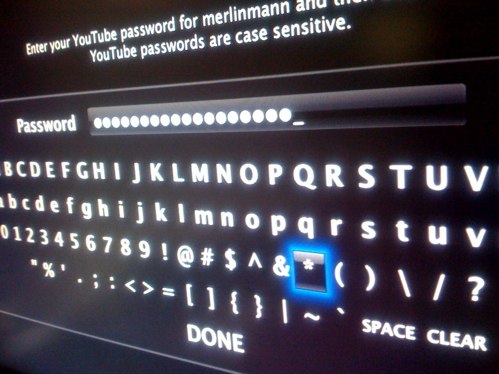
As I’ve alluded to before, the AppleTV’s torturous keyboard entry (via the hardware Apple Remote’s 4-way joystick) is abysmal. In 21 uninterrupted years of using Apple products, it’s probably the most consistently frustrating and poorly-designed interface I’ve encountered. I literally hate using it.

The ability to enter text via the superior (but far from perfect) iPhone keyboard is wonderful but it doesn’t and can’t address a deeper problem with the keyboard-challenged devices Apple are focused on vending right now: assy and annoying text entry encourages the use of crap passwords. This is bad, and here’s why.

Sliding backward

We’ve all heard the lectures about not using your ferret’s name as The Single Password™ for everything you do, and my sense is that, over the years, a lot of us have tried to get better about password hygiene — especially as more of our stuff moves into an online cloud.

But my entirely anecdotal opinion is that the iPhone, the iPod Touch, and the AppleTV each tempts their users to slide back to dumbing-down their passwords in exchange for better ease-of-use. The most annoying device in your chain ends up driving the passwords you use for everything. Right now, it’s such a pain to enter a secure password on a device like the iPhone or the AppleTV, that I’m betting a few of you have already fallen back on your ferret. Or “pencil.” Or your ATM PIN.

This is an unbelievably bad idea, but what are the options if this is a device you need to use a lot?

A real-world problem

I’m a fervent 1Password user and (unpaid) evangelist, so I don’t suffer from this conundrum quite as badly when using Safari on the iPhone. 1Password generates and remembers secure passwords for me, then lets me enter them on my phone in a few seconds via a password-protected bookmarklet. Imperfect, but a big step up over nothing.

Of course, I’m still SOL when the iTunes App Store wants me to (again again again) manually re-enter my password in order to download apps on my iPhone. I’m not made of stone. This sucks. I’ll even be the first to admit — solely on the basis of how vexing the AppleTV (and non-Safari on iPhone) password entry is — that I’ve been sorely tempted to move to a more trivial password. But I’ve held out.

If you’re using MobileMe, or Google’s apps like Gmail, or any of the other myriad cloud functionalities that store a lot of personal information, it’s just not worth assuming the risk in return for a bit of convenience.

”Four digits? What a pain.”

To make this nuttiness even more frustrating, every day I watch friends entering 4 or 5 character passwords over an iPhone that they don’t even bother to auto-lock (“Meh, I use it too much. It’d be a pain.”). Understand: this is a portable device on which all their email, contact information, and logged-in web accounts live. They’re one drunken taxi ride away from a potentially significant privacy crisis.

While leaving a phone unlocked in public does blow my mind, I think I understand how we got here. For 30 years now, banking customers have tolerated four-digit ATM PINs because a) they’re convenient, and b) our bank assumes some of the risk associated with replenishing a generic pile of money whenever anything goes wrong. After all, it’s not your money that gets stolen; it’s the bank’s electronic representation of your money. And that’s easy enough to replenish.

But is four digits (or a trivial password) enough to protect your irreplaceable private data? Are you willing to assume that risk? It’s unbelievable that the question even needs to be asked. But, I’m going to say, no. But, that’s where we are right now. In a place where ease-of-use is trumping the good sense we’ve developed to take this shit seriously.

Help a brother out, Apple

I think it’s time for Apple and its users to start treating a device such as the iPhone like the powerful little computer that it really is. That means having to risk introducing some inconvenience and complexity by looking at things like:

  • Default automatic iPhone locking - make the default an auto-lock of 15 minutes
  • Make iPhone unlocking easier - consider adding a complex gesture or other “secret knock”
  • Integrated password management - 1Password is great (I’d say it’s even essential), but Apple should step up to help with the heavy lifting from the moment a device is activated. They made the Keychain; they can make it easier to use on an iPhone
  • Look into novel text entry - Is QWERTY keyboard entry the only option people will understand? Are those alphabetical monstrosities on the AppleTV really the best they can come up with? Can the boffins in R&D not scare up some less soul-crushing options?
  • Empowering power users - Even if Apple’s devices ship with the current features exposed in the current default state, I’d love to see Advanced options that can be flipped on by nuts like me. I have to imagine that UNIX nerds, security gurus, and enterprise paranoiacs would welcome the introduction of tougher security. The best and easiest start would be the ability to allow an entirely user-configurable passcode for unlocking. Quick win.

How to Auto-Lock your iPhone

If you’re out and about right now consider doing this on your iPhone:

  • Go Home, then hit Settings > General
  • Hit Password Lock and Enter a memorable 4-digit code (then re-enter)
  • On the Passcode Lock screen set Require Password to After 5 Minutes (or whatever suits you)
  • Back in General hit Auto-Lock and set it to 5 Minutes (or, again, whatever you prefer)
  • You’re done; your phone will now lock itself automatically

At least now your screen door is latched. Go, moblog, and prosper with at least a bit more security in your life.

The Question to You

Has iPhone or AppleTV changed your practices around passwords? Any features you’d like to see to make your Apple device more secure?


Comment viewing options

Select your preferred way to display the comments and click "Save settings" to activate your changes.
CuriousG's picture

Duly Chastened

I’m very good about my passwords on my primary machine, my getting-long-in-the-tooth PowerBook. I have to admit though on the iPhone, and on all my past cells, I’ve been lazy about that. I just hate the fact that I have to enter digits every time I use the thing, which is a lot.

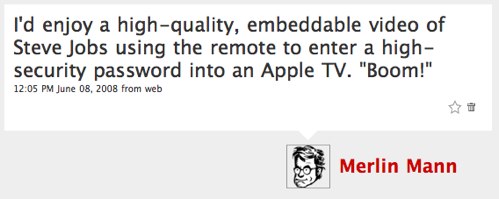
I’m heeding Merlin’s advice here and at least giving the pass code a go for the iphone. These days I work and blog enough that I don’t have any time to watch iTV, so I’m not going to have to worry about that one until I get this giant flywheel of my business over the initial momentum of moving from part to full time. Hopefully by then Steve Jobs, duly shamed by Merlin’s throwing down of the iTV video challenge gauntlet, will have directed his R & D drones to get cracking on making the iTV security a little more user friendly and, uh, Apple-like.

halostatue's picture

Yes...and no.

I’m in the process of making all of my existing passwords significantly more secure since I use 1Password for everything on my Mac and when my1Password works (it’s iffy, right now) it works well on the work computers, too. This is regardless of what the App Store on the iPhone requires, etc.

Because I’m not just entering passwords into web forms, though, I need them to be memorable at all times as well as strong — which wasn’t working when I just used 1Password’s strong password generator.

Now, I use a pattern (the pattern I’m using here isn’t the one that I use, but it’s a sample):

(sitename:hardkey)

The parentheses are part of the password and the “hardkey” is a medium strength password that I’ve been using for years that I have ingrained into my muscle memory (it’s one of three that I use). So, for 43folders, it might be:

(43f:m@Cd4ddy)

It means I have to flip keyboard arrangements on the iPhone more often than I’d like, but it’s memorable, it works, and it’s very secure overall. Now my only bane are sites that (a) don’t allow symbols in passwords and/or (b) prevent my password from being long enough to be meaningful.

joelesler's picture

Feel free to submit your ideas?

Excuse me, not trying to spam or anything, I know Merlin has alot of friends that are on the inside at Apple, which is great. But there is a site where I and my fellow bloggers are accepting ideas to write Apple about.

www.dearcupertino.com

fred.andres's picture

I'm totally out of line here, but...

You may want to visit the article just one post down on the topic of blog pimping.

surfmonkey89's picture

I'm guilty of using my bank PIN as my pwd on my iPhone

It’s just too convenient, because it’s the same number of characters, easy to remember, etc.

Regarding locking the iPhone, I had a close call a couple of months ago. I just happened to be perusing the options when I saw you could lock it. I really didn’t even know you could. I’d locked every other phone I’ve owned, mostly to avoid accidentally calling someone, but of course with this thing it’s much more important to have my data behind some kind of pwd.

Long story short, I set up the phone to auto-lock and literally 15 minutes later is was stolen. I can’t believe how lucky I was to have turned on the locking function.

I agree that ease of use is important, but now every time I see that locking screen I remind myself that I’ve already gotten a phone stolen once. Better safe than sorry.

Regarding using my bank PIN, I know it’s…sub-optimal…but I continue to do it. Guess I should look into 1Password.

funkaoshi's picture

iPhone Passcodes

The iPhone passcode would work better if you didn’t have to ‘slide to unlock’ before having to type the password in. Since you have to type something in before the phone will dump you to the home screen, the extra interaction with the interface is unnecessary. (You won’t accidentally get dumped to the home screen when your phone is in your pocket for example.) I go through phases where I have the passcode on.

CuriousG's picture

+1 on Getting Rid of Slider

funkaoshi wrote:
The iPhone passcode would work better if you didn’t have to ‘slide to unlock’ before having to type the password in. Since you have to type something in before the phone will dump you to the home screen, the extra interaction with the interface is unnecessary. (You won’t accidentally get dumped to the home screen when your phone is in your pocket for example.) I go through phases where I have the passcode on.

Unless I'm missing something, being the first day Merlin has prodded me into using my iPhone password as I mentioned above, I have to agree...unnecessary extra step that it would be nice to get rid of.

xurizaemon's picture

Re: +1 on Getting Rid of Slider

perhaps they were scared someone could knock together a robot device which could bruteforce the pin with its rubber digits, and felt this slider step might be too hard for it

ok, that's unlikely, but ... :)

hey! what's the "None" input format? hmm

Mauronic's picture

Location Aware Unlocking

I am at home most of the time so it’s not worth the unlocking hassle to secure my phone every time I run out.

Why not support a location aware locking mechanism that keeps the phone unlocked in certain safe areas like your house? Sure, it wouldn’t authenticate me, but it would authenticate my house and that’s good enough for my use.

jasonglaspey's picture

Lots of Solutions

@Mauronic: I really like the location aware automatically disabling auto-locking, that sounds elegant.

However, another idea is to track other information beyond just digits for passwords. What about tracking the timing in which a 4-digit passcode was entered? I imagine typing 2, 2, pause, 2, 2 (or whatever). A pause, or quick rapid taps, could be tracked, and this gives the simplicity of typing four characters into a number pad and makes it very hard to crack, especially via a bot.

I remember reading somewhere that people actually have typing patterns, and that some people were experimenting with the physical, syncopated patterns in which words were typed as a way to authenticate. It seems that same idea could be lent to typing into a numberpad, even if it was a short, simple password, the pattern makes it strong.

This could definitely be accomplished on the iPhone, could be accomplished with the AppleTV remote, and with javascript, I have to imagine is possible in a browser.

Also, check out Vidoop, they are doing some interesting things with passwords as well. http://www.vidoop.com/

About Merlin Mann

Merlin Mann's picture

Bio

Merlin Mann is an independent writer, speaker, and broadcaster. He’s best known for being the guy who started the website you’re reading right now. He lives in San Francisco, does lots of public speaking, and helps make cool things like You Look Nice Today. Also? He looks like this, answers questions, and has something like a life.

Merlin’s favorite thing he’s written recently is a short essay called, “Better.”

 
EXPLORE 43Folders THE GOOD STUFF

An Oblique Strategy:
Not building a wall; making a brick


STAY IN THE LOOP:

Subscribe with Google Reader

Subscribe on Netvibes

Add to Technorati Favorites

Subscribe on Pageflakes

Add RSS feed

The Podcast Feed

Inbox Zero

The original 43 Folders series looking at the skills, tools, and attitude needed to empty your email inbox — and then keep it that way. Don’t miss the free video of Merlin’s Inbox Zero presentation.

Making Time

3-part series on attention management for artists and makers. Read Bad Correspondence, The Job You Think You Have, and One Clear Line.