43 Folders

43 Folders feed subscription icon - Shiny! New to 43 folders? Here are our All-time Most Popular Posts. Want the best stuff? Here are our Classics.

Login or register

Register for free on 43 Folders to comment on articles, post to our forum, customize your visits, and much more. Current users can login now.

Procrastination hack: '(10+2)*5'

Following on the idea of the procrastination dash and Jeff’s progressive dash, I’ve been experimenting with a squirelly new system to pound through my procrastinated to-do list. Brace yourself, because it is a bit more byzantine than is Merlin 2005’s newly stripped-down habit. It’s called (10+2)*5, and today it will save your ass.

Who it’s for

(10+2)*5

  • procrastinators
  • the easily distracted
  • compulsive web-surfers
  • people with a long list of very short tasks (a/k/a “mosquitos”)
  • people having trouble chipping away at very large tasks

What you’ll need

  1. a timer
    • must be easy to reset
    • electronic kitchen timer is particularly good (pref. with multiple alarm memories), or
    • an app like Minuteur (get the newest version—several cool new features)
  2. a reduced subset of your to-do list
    • tasks that can be worked on (not necessarily completed) in blocks of 10 minutes or less
    • GTD people: next actions only, please
  3. an hour of your time (less is potentially okay, but it’s non-canonical)
  4. your sorry, procrastinating ass

How it works

It’s called “(10+2)*5” and here’s why:

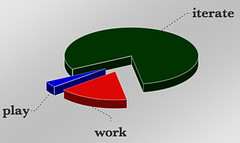
  • 10 - Work for ten minutes with single-minded focus on moving toward completion on a single task. Ten minutes, and that’s all you’re allowed to do is work, work, work. No cheating, because (DING!) you actually get a break when you’re done…
  • 2 - After ten minutes of sweaty, dedicated work you get a 2-minute break to do whatever you want—drink coffee, read 5ives, call your bookie, whatever. When the two minutes are up, it’s back to work on the next task on your list. This is important.
  • *5 - You’re going to iterate this four more times for a total of one hour’s working/breaking

Important squirrely rules

  • You do not need to finish your task or your project in ten minutes; you just need to move it forward
  • If you finish a satisfying amount of work in fewer than ten minutes, STOP, and go right to your 2-minute break, than start another 10-minute dash
  • Do NOT skip breaks! You are not allowed. Breaks cannot be missed. Period. Go surf the web. Now. Seriously. GO!

What will happen

You’ll blaze through an hour’s worth of work/not work and will find yourself looking forward to both the breaking and working parts of the cycle. (Dang, how’s that for a change?)

The MacGuffin

The Now Habit
by Neil Fiore

Okay, you caught me. That’s the hack: you can and eventually will skip breaks.

In his (extremely wonderful) The Now Habit, Neil Fiore suggests a similar habit of “unscheduling,” where you only make obligations to the things that you enjoy and that are not the source of procrastination. John Perry suggests “Structured Procrastination,” where you only give high priority to “unimportant” tasks. Of course, this is taken to a hilarious extreme with Joshua Newman’s plan for scheduling just a few minutes of work per hour, and then focusing on the “more important” tasks like DVD re-arranging.

In all these cases—each of which will surely seem ludicrous to the “Why don’t you just go do your damned work?” crowd—the trick is to snap your mind out of the inert state that’s allowing procrastination to take over. You’re breaking down whatever resistance has made you not do what your brain knows needs to be done.

Your hacks for your problems

“(10+2)*5” can be adapted in any number of ways (change any of the three numerals to your liking), but remember: these goofy hacks only work because you’re a pathetic bastard like me whose mind can be tricked into work as easily as it can be lulled into torpor. Set your rules, follow your rules, and keep moving forward. Snap that procrastination by slipping your work through the back door.

Now go take a break. You’ve earned, you hard-working hacker, you.


Related stuff


36 Comments

Comment viewing options

Select your preferred way to display the comments and click "Save settings" to activate your changes.
Nicole Lee's picture

I've done pretty much the...

I’ve done pretty much the same thing, but instead of time frames, I use “work chunks”.. It’s similar to your unit-based procrastination dash. This is a recent development, so who knows if I’ll stick to it, but this is what I’ve done: I would make it a point, for example, to set aside three or so topics that I want to write about. I would commit myself to writing just one article, then take a very short break, come back, and commit to the second article, and so forth. Before I knew it, I found that I was so jazzed that I was actually DOING shit, that I just began foregoing the small breaks and writing all three things in one sitting (they’re very short articles, in case anyone’s wondering. For longer articles, I’d divide it up into smaller chunks). I will admit that after doing this for about a couple hours, I get kinda tired, and take a rather longish break (this is unfortunately too easy when one works from home). But I try to get right back on it after that.

Your timing method will probably work really really well for organizing my unruly books and magazine collection though. And boy do I need help with that.

Sarah's picture

I just spent 1.5 minutes...

I just spent 1.5 minutes making a 10+2 playlist in iTunes. I hate beeping timers, but taking a break whenever “My Valuable Hunting Knife” comes on is totally manageable. Now to get typing, in time for some 10 minute instrumental opus. Ha!

Robert 'Groby' Blum's picture

That's all fine - what...

That’s all fine - what I need to find is a method that works with forced breaks. I’m a software engineer - that means that I have to wait for my computer from time to time.

Unfortunately, getting focus back after these breaks is hard. Any ideas? (I’ll try out setting a timer for the break, instead of waiting for the finish - I have a rough idea how long tasks take. Maybe that’ll work. But any feedback is appreciated)

Ed's picture

You could set up the...

You could set up the free utility Time-Out! to do the same. Check it out at www.dejal.com. It’s flexible, and it forces you to take breaks; the only difference is that it actually disables your computer for the defined break time. So, for instance, I have it set up to ask me to take a 15-second break every 15 minutes, then a 5-minute break every hour. You can change all intervals.

Brian's picture

I'm going to be honest...

I’m going to be honest with you. I’m actually using a very similar method to yours. This is how it works:

1) Switch on TV 2) Watch a TV show until the commercial brakes come on (usuall y takes 10 mins) 3) Do your work during the commercial breaks (usually 2 minutes) 4) Keep repeating the above, until the TV show ends.

Nice, eh?

Rex's picture

Can someone suggest a Windows...

Can someone suggest a Windows version of something similar to Minuteur? I tried looking for a konfabulator widget to do the same thing, but nothing that’s easy to reset

Stacey's picture

I love this, and this...

I love this, and this is one tactic that has worked for me, with a modification. I’ll work on something on my list for ten minutes, take a short break, then actually roll a pair of dice to indicate what to work on next. The idea of working on one project for an hour can be overwhelming at times, regardless of how many breaks one takes.

toni's picture

I have this problem, I...

I have this problem, I hate going to campuss. I know I have to do it, the reason is so obvious (I need only to deal with graduation ceremony administrative business). But still, somehow, magically I always found a reasonfor myself resisting from doing it. Any suggestion? This is procrastination as well rite? I’m an easily distracted person.

Pro Crast-Enator's picture

Meh...ill start doing this tomorrow...

Meh…ill start doing this tomorrow

Underneath the Sky's picture

Working better Courtesy of Mike, I've...

Working better

Courtesy of Mike, I’ve started using a slighlty adjusted (read: “very adjusted”) version of Getting Things Done by David Allen. The problem I was having was procrastination, until this came along [link]. Brilliant method, and seems to do the trick (as …

BigBlogLog's picture

Get Some Work Done! Heres a...

Get Some Work Done!

Heres a simple, and possibly brilliant, little system from Merlin of 43 Folders for curing your procrastination woes. Seems like it could also work wonders for the too-easily-distracted, like me. Its called (10+2)*5 &#8212…

Penguinwired.org's picture

(10+2)*5 Merlin over at 43folders.com is...

(10+2)*5

Merlin over at 43folders.com is suggesting a new way to work. Its called (10+2)*5 and he says its a procrastination hack. I dunno, I guess Ill worry about it later. But seriously, its worth a gander and perha…

hello rolo » Blog Archive » 2 Minute Break - Cod's picture

[...] Studying for PSAT, taking...

[…] Studying for PSAT, taking my 2 minute break –> (10+2) *5 –> To Elimante Procrastination and Increase Productivity. […]

Treehouse Cityguide's picture

Excellent idea. I imagine...

Excellent idea. I imagine the hard work, much of the time, is splitting your vague task list into 10 minute concrete chunks.

Greg's picture

Interesting. I went through a...

Interesting. I went through a marathon training program that used a similar approach to help people who hadn’t been runners (like myself) build endurance. We would run for 5 minutes, walk for 1 minute (or 4/2 or whatever interval is best for your condition).

They make “interval timer” stopwatches that allow you to set multiple intervals (e.g. countdown from 5 minutes, then countdown from 1 minute, repeat).

I actually looked for a Windows desktop equivalent of that “interval timer” stopwatch, because (like you) I thought that would be an effective way to “build endurance” in my work habits.

Would love to hear from anyone who knows of a desktop equivalent of an “interval timer” stopwatch.

Matti's picture

I found Workrave (www.workrave.org) to...

I found Workrave (www.workrave.org) to be very good in implementing this hack. It also prevents getting RSI :) It’s available on Linux and Windows.

pickupjojo's picture

Thank you for this nice...

Thank you for this nice work method, very useful ! :-)

If someone wants it in French : http://www.ctrlaltsuppr.com/sujet19955.html

Joel Pan's picture

This sounds like a great...

This sounds like a great tip. I’ve downloaded Workrave and I hope to find that this works well for me. If I manage to pass all my papers this semester, I’ll know who to thank.

Bob Walsh's picture

Good approach for short productivity...

Good approach for short productivity sprints, but what about when you need to get things done that are important? You might want to check out this post I did for http://to-done.com, Butterfly Stroke Productivity.

Think of it as the director’s cut of (10+2)*5

Chand's picture

temptation blocker works for me...

temptation blocker works for me really well http://www.webjillion.com/archives/2005/08/01/free-software-temptation-blocker

I can do the first part, but when I take a break its hard to stop browsing.. so blocking the browser is awsome :). Was able to finish my thesis that way.

Lance's picture

I found this handy timer...

I found this handy timer called “Take a Break” http://www.scirocco.ca/takeabreak.html

It works very well for this hack.

ams's picture

oi. thats a lot of...

oi. thats a lot of work. getting a timer and limiting everything. my method: laying in bed all day till i get too bored - so i start working for the other half of the day. works for me. =)

Dennise's picture

Another free timer that doesn't...

Another free timer that doesn’t require additional software is the Tea Timer at Adagio Teas. http://www.adagio.com/pages/timer.html

Donald's picture

Great idea, I totally agree....

Great idea, I totally agree. My girlfriend has more of a 20/20 approach and she is always straight As, top of the class kinda gal. 20 minutes working, 20 minutes on break. She swears by it and has been doing it for like 20 years. She also finds that working at night eliminates distractions. So she will crank on her thesis from 12-3 am, in these 20 minute blocks. At work she refuses distractions and meetings unless absolutely necessary. She doesn’t let herself get pulled into meeting hell.

Roy's picture

Thanks for saving my ass...

Thanks for saving my ass at work today. Today has been my most productive day in about 6 months.

Chris's picture

Wow. Yeah. I'm trying to...

Wow. Yeah. I’m trying to break down the reasons why this is working for me — I’ve been working in 10-minute chunks of time for a couple of days, now. Instead of a kitchen timer, I downloaded and installed this handy Konfabulator widget:

http://www.widgetgallery.com/view.php?widget=28040

I’ve cleared three projects off my desk, and I’m about to hammer away at a fourth one. It’s definitely not the promise of the two-minute break that motivates me, although I take them without fail. I think the psychological motivator is that I don’t have to finish a given project; I just have to work on it for 10 minutes.

Sorry if this comment is redundant; I’m just really enthusiastic about this tip.

Jeremy's picture

Absolutely amazing so far, getting...

Absolutely amazing so far, getting more done than I thought possible.

Alexey's picture

For PC I found very...

For PC I found very nice the Cool Timer application. It is very easy and effective http://www.harmonyhollow.net/download/ctimer.exe

celia's picture

This is working great -...

This is working great - I’m on a break right now… I’m just wondering what happens if I need to take a longer break - is that not supposed to happen before the hour is up or is there a way to compensate? 2 min up gtg

Desiree's picture

I'm yet to buy a...

I’m yet to buy a kitchen clock to see if it works for me

 
EXPLORE 43Folders THE GOOD STUFF

An Oblique Strategy:
Only a part. Not the whole.


STAY IN THE LOOP:

Subscribe with Google Reader

Subscribe on Netvibes

Add to Technorati Favorites

Subscribe on Pageflakes

Add RSS feed

The Podcast Feed

Inbox Zero

The original 43 Folders series looking at the skills, tools, and attitude needed to empty your email inbox — and then keep it that way. Don’t miss the free video of Merlin’s Inbox Zero presentation.

Get Started with ‘GTD’

David Allen’s popular productivity book and the system on which it’s based help turn ‘stuff’ into actions that support valuable outcomes.