Merlin’s weekly podcast with Dan Benjamin. We talk about creativity, independence, and making things you love.
How to make/send a PDF directly to email
tuqqer | Jan 16 2006
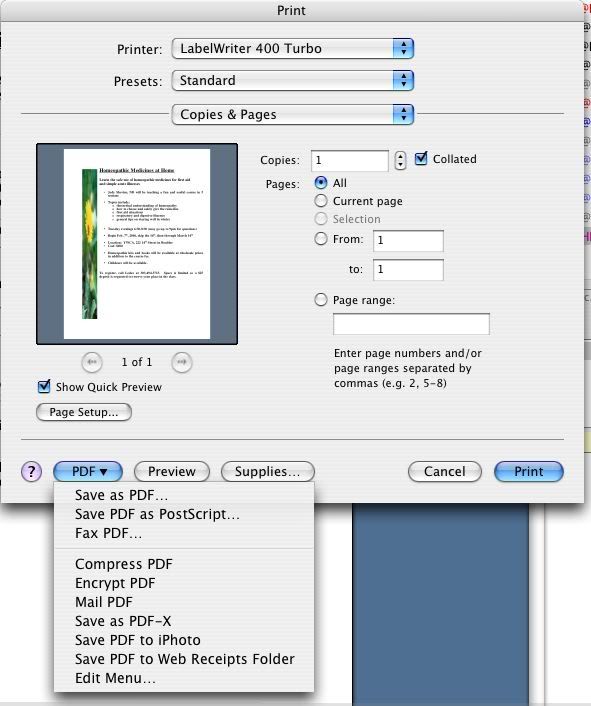
I got this one from the Entourage forum over at Google groups. OSX has a built-in feature which allows you to turn virtually any document into a PDF. Since Word docs can often contain viruses for the poor down-trodden Windows users, and PDFs are now universally read by any computer, turning ones docs into PDFs is a good thing. Sometimes, though, you just want to directly email this PDF to someone, without first saving it as a PDF (for those times when it's a one-time deal, and you have no need to keep a copy somewhere on your Mac). There's a way to do this: 1. First, become familiar with the way to make a PDF. To do this, open up any document (this very web page will do). Hit Command-P, as you ordinarily would to print something. In the resulting window, you'll see, down in the lower left corner, a little drop-down menu, like this: That first selection says Save as PDF. This is what you would select if you wanted to save your doc as a PDF on your computer. 2. However, there is a very simple way to allow you to place this PDF directly into an email. To do this, make an alias of your favorite email program (Entourage, Eudora, etc). 3. Shorten the name of this alias to just "Entourage", or "Eudora" (you could even name it "Email this PDF!" ) 4. Drag that alias into the folder called PDF Services, which is located in Macintosh HD>Library. 5. Now hit Command-P again with some document, and this time you will see an addition in that drop down menu, like this: Because I use Entourage, that's what showed up. But whatever email program you use, and whatever you named it ("Quick! Email this!"), that is what will show up. 6. Select it, and your Mac will turn your doc into a PDF, and then attach it to a new blank email. 2 Comments
POSTED IN:
About tuqqer |
|


| EXPLORE 43Folders | THE GOOD STUFF |


