Merlin’s weekly podcast with Dan Benjamin. We talk about creativity, independence, and making things you love.
iTunes: Kill the gap between tracks
Merlin Mann | Apr 4 2006
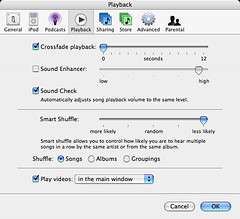
I hate the janky gap between songs when iTunes is playing an album. The transitions between "Ex-Girl Collection" and "Per Second Second" or between "Holland, 1945" and "Communist Daughter" may be subtle, but when they're replaced by a big old quarter-second silent spot, it's just maddening. So, open up your iTunes Preferences and go to the "Playback" tab, where you can set a "Crossfade playback" of "0." This effectively negates the blank spot by adding an almost imperceptible crossfade between songs. It's not perfect, but it's a damn sight better than the big blank spot. Thus endeth the dumbest iTunes trick ever. 1 Comment
POSTED IN:
 How-to write a thank-you note... Leslie...Submitted by Lifehacker (not verified) on April 4, 2006 - 10:01am.
How-to write a thank-you note... Leslie Harpold of The Morning News tells us how to write a proper thank-you note. Somewhere in between your mom making you sit down with your Peanuts® stationery and you shooting off an email, you completely lost touch with...... » POSTED IN:
|
|

| EXPLORE 43Folders | THE GOOD STUFF |


