Merlin’s weekly podcast with Dan Benjamin. We talk about creativity, independence, and making things you love.
Quicksilver: Grab a copy and play along at home
Merlin Mann | Sep 5 2004
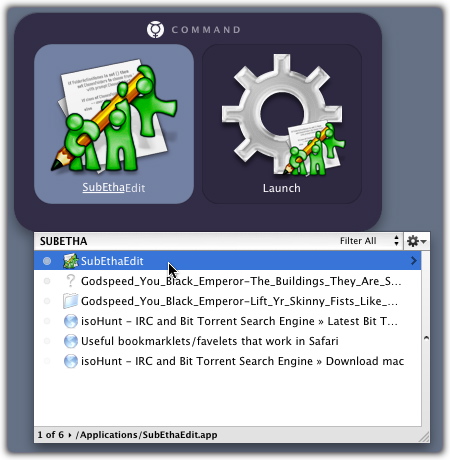
If you’re kind enough to revisit here in the future, you’ll be hearing about a program called Quicksilver that’s become an important part of how I work with my Mac. I figure since I’ll be talking about it so much, it’s probably beneficial to give you a little lead time in case you’re interested in following along. So here’s a quickish introduction as well as some information and links on getting you started with the home version. About QuicksilverQuicksilver is a free (as in beer) application made by Blacktree, Inc. It is available as a modestly sized download from the Quicksilver product page. Although it is currently in beta (as of this post, beta 28, to be exact), it’s steady enough for most users’s purposes, especially if its run in “stable” mode (the Preferences also give you the option of choosing “beta” or “alpha” functionality, depending on your tolerance for pain). Quicksilver is just an application (as opposed to low-level widget, PrefPane, haxie, etc.), so even when it runs from log-in it’s not, to my knowledge, doing much to your machine other than writing preferences and monitoring how you use it. It can, depending on how big your catalog is, be a bit of a CPU hog, but I think the developer’s working on that. In other words, as far as I know, Quicksilver’s safe as mother’s milk. What’s a “launcher?”Quicksilver is, at the heart of things, what’s known as an “application launcher.” It inhabits a competitive landscape alongside other popular OSX programs like “LaunchBar” and “Butler.” Each program’s enthusiasts tend to have a religiously zealous devotion to one app over the other, but at the heart of it, all launchers do at least one similar thing: they provide a single, intelligent interface for intuitively accessing nested information and functionality. Broken down, that means that by invoking a simple key combination, menu selection, or mouse gesture, you can tell your launcher to open other applications, access deep data (like address book info), open web pages, create email messages and even execute complex commands, scripts and macros. So, first and foremost, launchers do cool things to stuff in your world with very little effort. The “intelligent” and “intuitive” part means that a good launcher unobtrusively learns from your behavior about how you like to work. So, instead of you having to memorize a bunch of commands or install a lot of squirrely codes, the launcher simply watches you, and then builds virtual sidewalks wherever you happen to be walking a lot. (More on this in future posts.) “So,” you’re asking. “What the heck does Quicksilver actually do.” The pitch
Quicksilver’s real power comes from what you can then do to or with any of the items in your catalog. So think of a Quicksilver command sequence as a functional sentence with a subject, a verb, and, optionally, an object. Examples might include:
Quicksilver, again, accomplishes these powerful tasks by you doing nothing more than typing word fragments and hitting the TAB and ENTER keys. All from a single point of access. Like a Mac, it “just works”Quicksilver provides this single point access in a way that many people find comfortingly Mac-like (even as it routes around the hierarchical boxes that comprise the OSX Finder). It really feels like an extension of the Finder after just a few days of use. What I think makes Quicksilver so special, though, is its easy integration with many of the applications, sites and services that you already use every day. That includes Safari, iTunes, iPhoto, iChat, Address Book, and even the command-line that provides access to the UNIX brain inside your Mac. It also interacts with your favorite websites, allowing you to search Google, All-Music Guide, you name it--again, anywhere and from inside any other application. Instant access. “…and it makes julienne fries!”With your installed applications and a completed configuration, you will soon be a few keystrokes from any of these tasks:
But, first things firstSo here’s your homework assignment:
Don’t feel obligated to use it all the time unless you want to. But, most importantly, try not to get frustrated or burned out. There’s a lot of power under that hood, but some of the best tricks reveal themselves rather slowly. On the other hand, it is pretty fun and intuitive from the get-go (plus it's beautiful to look at), so who can blame you for wanting to play with it? Same bat time, same bat channelNext time out, we’ll look at a few of the cool things you can do with Quicksilver, even as a beginning user. We’ll also talk a little about interaction with other applications and look down the road to the power user tricks that’ll blow your mind. [2004-11-06 update: this post (from the fuuuuuuuu-ture) provides help and details on setting-up and troubleshooting Quicksilver.] 16 Comments
POSTED IN:
Neat program. Is there any... by Kevin Smokler (not verified)
QS is fantastic. the developer... by Musti (not verified)
what a great little app...... by asa (not verified)
Tried it on my iBook... by Nigel (not verified)
Nigel: It's called AppRocket. ... by Tyler Weir (not verified)
Somehow I've been using QS... by rob (not verified)
i've tried quicksilver and one... by Denny (not verified)
Yeah quicksilver is the best... by tones (not verified)
Denny - I'm having this... by Allan (not verified)
About Merlin Bio Merlin Mann is an independent writer, speaker, and broadcaster. He’s best known for being the guy who created the website you’re reading right now. He lives in San Francisco, does lots of public speaking, and helps make cool things like You Look Nice Today, Back to Work, and Kung Fu Grippe. Also? He’s writing this book, he lives with this face, he suffers from this hair, he answers these questions, and he’s had this life. So far. Merlin’s favorite thing he’s written in the past few years is an essay entitled, “Cranking.”
|
|


| EXPLORE 43Folders | THE GOOD STUFF |


