Merlin’s weekly podcast with Dan Benjamin. We talk about creativity, independence, and making things you love.
Unix and The Command LineBeeswax: Free Productivity App in the Spirit of Lotus AgendaMerlin Mann | Jun 28 2008
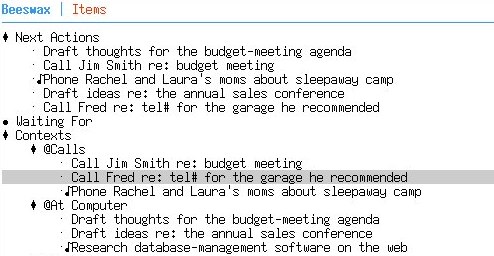
Beeswax - Mind Your Own Beeswax Wow, this looks like a really interesting project to watch — a GNU-licensed, command line productivity app that finds inspiration in a bona fide classic:
You still hear a lot of people saying Agenda is the closest they ever got to their dream productivity app. And, depending on who you ask, Agenda's endless flexibility was either incredibly powerful or infinitely fiddly. Beeswax is a very young application, but I’ll definitely be giving it a spin. There's certainly a long-standing itch for Agenda that lot of folks would love to have scratched. The Question to YouAny of the old hardcore Agenda folks tried out Beeswax yet? [via Anarchaia] read more »21 Comments
POSTED IN:
Michael Buffington: iGTD + Quicksilver + subversionMerlin Mann | Jun 28 2007This is the second entry in a multipart series about my recent obsessive love affair with GTD, the iGTD application and Quicksilver. In the last entry I put the emphasis on getting my tasks written down quickly and out of my focus into a system I could trust. I could choose to spend some time later to review my tasks and do what I like to call "iGTD gardening", where I check up on all my projects and do a bit of weeding of duplicate or irrelevant tasks, and fortify those tasks with whatever information comes to mind as I'm looking at them. Since I'm now in the habit of pushing new tasks to iGTD and immediately forgetting about them I have the refreshing ability to work on a task without ever thinking about anything else. iGTD then becomes my set of instructions to follow when I need guidance, and if I've tended my task garden well, it's a rich set of instructions with a lot of tedious thinking already finished. This system works out alarmingly well until you're possessed by SSD (severe stupidity disorder) and delete your iGTD database without even a whiff of lingering vapors. Immediately you'll be consumed by a profound and unshakable dread as you realize your tether has been severed from the mother ship and you begin to drift into outer space, your Tang to be divided up amongst your colleagues (even the ones you loathe). Luckily for most of us, iGTD makes database backups upon starting up the iGTD app and for a couple of other events, and luckier still, most of us don't suffer from SSD very often. But I often do, and don't leave anything to chance. read more »POSTED IN:
Hand-picked, artisanal, remaindered links, 2007-06-04Merlin Mann | Jun 3 2007These are lower threshold links to stuff I've recently enjoyed.
Submit your ideas for links to del.icio.us, and be sure to include the tag "for:43folders." POSTED IN:
Vi commands in all your Cocoa appsMerlin Mann | Feb 5 2007Jason Corso - Vi Input Manager Plugin Vi Input Manager seems like a godsend for Mac (or more accurately, Cocoa) users who have Vi commands permanently installed in their fingertips.
Reminds me it's about time for another round of trying to learn Vim. [ via: Vi Input Manager - The Unofficial Apple Weblog (TUAW) ] POSTED IN:
Fun and functional ways to trick out your htaccess fileMerlin Mann | Nov 22 2006This is a terrific collection of tricks for hacking on your Apache htaccess file, including some very useful ways to save bandwidth, control site access, and generally wreck havoc. read more »POSTED IN:
Undo branches in Vim 7Merlin Mann | Sep 20 2006All about Linux: A visual walk through of a couple of the new features in Vim 7.0. Version 7.0 of Vim has some sexy new features under the hood, including the ability to jump back in time -- you can undo your app to where you were a few minutes earlier, for example. As explained by All about Linux: read more »POSTED IN:
FMP: Ruby script for text listsMerlin Mann | May 2 2006For you plain text nerds, Nick Fagerlund has developed a nifty little Ruby script for managing your lists of tasks or what have you. The basic idea is to capture anything you need into one text file, with one item per line. He (and I) recommend using a Quicksilver trigger to append to that file of your choice as you work. When adding an item, you use a "category" tag (as in "^category") which you type at the beginning of each line you. read more »POSTED IN:
My txt setupMerlin Mann | Dec 12 2005The explications continue. It's been a while since I talked about how I'm using text files, and my post a while ago on Quicksilver appending reminded me of a few little changes I've made over the past year or so that my fellow text geeks might find interesting. Reviewing: Why text?Like a lot of geeks and aspirational geeks, I do as many things as possible in plain text files. I've endlessly sung the praises of text on 43F, but in a nutshell, they're portable, efficient, tiny, and almost endlessly mungible. They're the lingua franca of Unix and most of the civilized world. As you'll see, I use text files for any variety of things, although my favorite use is for making and maintaining lists. The aforementioned append functionality lets me quickly add items to any file with nothing but muscle memory and a few keystrokes. Best thing ever. I also write in text files as well as store large amounts of reference information. Text is very easy to swap into HTML (I keep almost everything in Markdown format), and text is wonderfully searchable, whether using Spotlight, Find & Replace, or just via incremental search from within the editor. Point being: I use applications like OmniOutliner, iCal, and (formerly) Entourage to organize the relationships between silos in my life; but text files are the living repositories for as much of the actual information as I can manage. Getting a systemLike everything, this text system benefits from a loose organizational framework that lets me quickly create and change files without having to worry too much about what it's called, where it goes, and how I'll find it again. So here's a few high points from my text world. read more »POSTED IN:
GeekTool's new Tiger compatibility (and using it to build your own _Batcave_)Merlin Mann | Oct 4 2005Mac Geekery - Geektool and Bash One-Liners I’m an old-school fan of GeekTool, a smart little PreferencePane that lets you trick out your Mac’s Desktop background with a variety of customizable stats, photos, and status info. Most folks’ favorite use is to display the output of shell scripts and simple CLI commands (e.g. “ To be honest, I hadn’t used GeekTool in a while, but apparently there were some Tiger compatibility issues that were vexing fans. Now Mac Geekery’s rupa deadwyler points to a branched version (2nd item) that provides fixes for Tiger. He also writes up a good post on a few of his favorite uses for GeekTool: read more »POSTED IN:
Life inside one big text fileMerlin Mann | Aug 17 2005Giles takes one of the biggest, geekiest leaps you can, moving all of his stuff into a single big-ass plain text file. read more »POSTED IN:
|
|

| EXPLORE 43Folders | THE GOOD STUFF |


