Merlin’s weekly podcast with Dan Benjamin. We talk about creativity, independence, and making things you love.
DashboardNet Net: Drill down with 'Corporate Ipsum' widgetMerlin Mann | May 9 2007Corporate Ipsum - Dashboard - Developer
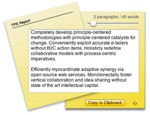
As we all learned from Equus, we don't get to choose the things in life that fascinate and repel us, and, in retrospect, if I could have chosen to avoid the avalanche of empty businessspeak I've been exposed to over the past dozen or so years, I certainly would have. Alas, I could not. And, so here I am, alternately repulsed and amused by the twisted patois of nonsense that passes for communication in offices and boardrooms today. If you share this sad affliction, you may enjoy the pleasures afforded by the Corporate Ipsum Dashboard widget, cleverly (and pointlessly) designed to generate paragraphs and paragraphs of empty insight for your next pitch, presentation, or VC meeting. In one instance, this paradigm-shifting functionality was a solution-provider for the following bit of kimono-opening stone soup:
At the end of the day: awesome. Sand Hill Road, here I come! Many thanks to jwines' bookmarks on del.icio.us POSTED IN:
Dine-O-Matic (and the Dashboard widgets we love)Merlin Mann | Sep 6 2006I finally found a "business case" for Dashboard today with the discovery of the perfectly-delightful Dine-O-Matic, a beautiful little widget from the graphical geniuses at Iconfactory that does precisely one thing: choose a random restaurant for you to eat at. read more »53 Comments
POSTED IN:
2 OS X timers to watch: Flextime & MeridianMerlin Mann | Jul 19 2006An alarmed timer is one of the most simple external systems you can employ, and many of us distracted geeks have come to rely on them as a way to improve concentration, redirect attention, and bitch-slap procrastination. Why make your brain be the time-keeper and scold when you can just make some little robot do all the heavy lifting for you? Exactly. Lucky for the Mac-scented timer geeks out there, this is an area of software development that seems to be flourishing lately, with sexy little apps like Minuteur and Dashboard widgets like ProdMe arriving on the scene to ride herd on the wandering mind. Further, in the past week, I've stumbled across a couple more new apps that look like promising additions for the time-addled brain -- and, I'm happy to note, they look especially useful for fans of the (10+2)*5 dash. read more »POSTED IN:
Paul Stamatiou on Mac productivityMerlin Mann | Jun 6 2006PaulStamatiou.com » Why I’m More Productive on a Mac Paul Stamatiou lays out some of the ways his Mac helps him be more productive.
Paul's hit parade includes:
POSTED IN:
Three OS X TimersMerlin Mann | Nov 15 2005I know I'm not the only timer nerd here -- check out three Mac-friendly ways to time your activities and make sure you stay on track. read more »POSTED IN:
GeekTool's new Tiger compatibility (and using it to build your own _Batcave_)Merlin Mann | Oct 4 2005Mac Geekery - Geektool and Bash One-Liners I’m an old-school fan of GeekTool, a smart little PreferencePane that lets you trick out your Mac’s Desktop background with a variety of customizable stats, photos, and status info. Most folks’ favorite use is to display the output of shell scripts and simple CLI commands (e.g. “ To be honest, I hadn’t used GeekTool in a while, but apparently there were some Tiger compatibility issues that were vexing fans. Now Mac Geekery’s rupa deadwyler points to a branched version (2nd item) that provides fixes for Tiger. He also writes up a good post on a few of his favorite uses for GeekTool: read more »POSTED IN:
Dashboard Widget for Unix 'Remind'Merlin Mann | Jun 3 2005A few months back Mike Harris wrote us up a great article on Remind, a very cool and flexible little UNIX app for tracking date-based events. If you enjoy Remind and are using Tiger (OS X 10.4), checkout Nick Vargish’s Remind Widget. Gives you all the power of Remind in a pretty and configurable package. Great work, Nick! read more »POSTED IN:
Calm Technology: How do I know when I need to know?Merlin Mann | May 9 2005"A calm technology will move easily from the periphery of our attention, to the center, and back...." read more »POSTED IN:
|
|

| EXPLORE 43Folders | THE GOOD STUFF |


