43 Folders

43 Folders feed subscription icon - Shiny! Drowning in email? Try Inbox Zero to learn sane tips for dealing with high-volume email. And don’t miss the free Inbox Zero video. »

Login or register

Register for free on 43 Folders to comment on articles, post to our forum, customize your visits, and much more. Current users can login now.

2 OS X timers to watch: Flextime & Meridian

An alarmed timer is one of the most simple external systems you can employ, and many of us distracted geeks have come to rely on them as a way to improve concentration, redirect attention, and bitch-slap procrastination. Why make your brain be the time-keeper and scold when you can just make some little robot do all the heavy lifting for you? Exactly.

Lucky for the Mac-scented timer geeks out there, this is an area of software development that seems to be flourishing lately, with sexy little apps like Minuteur and Dashboard widgets like ProdMe arriving on the scene to ride herd on the wandering mind.

Further, in the past week, I’ve stumbled across a couple more new apps that look like promising additions for the time-addled brain — and, I’m happy to note, they look especially useful for fans of the (10+2)*5 dash.

Meridian

Recurring Dream: Meridian

Meridian icon

Meridian is a bit of a Swiss Army app for all things time. It allows you to create custom alarms, time-zone clocks, and stopwatches that can be reused and reconfigured quite easily. You can even create nonce events that happen at some time in the future.

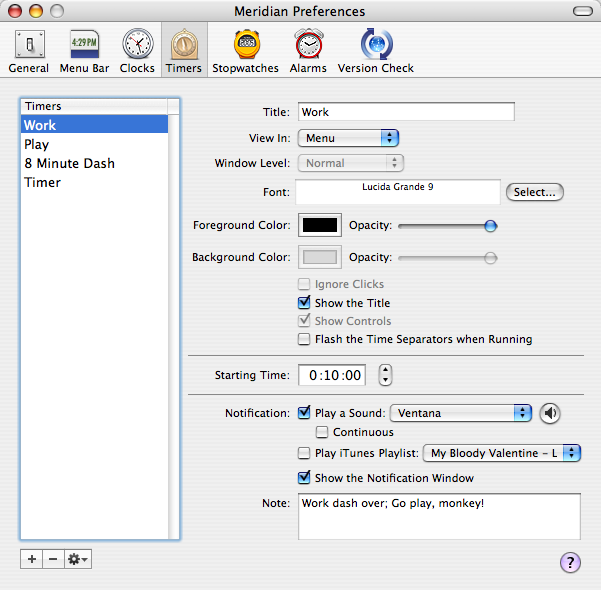
You also get some nice display options, allowing you to choose how and where your alarms and clocks live — in a floating window, on the Desktop, under a pulldown menu, etc. Also, in case you’re getting sick of “Basso” farting your reminders at you, you get some lovely new alarm sounds to choose from (I like “Ventana”).

I also like that the floating windows for timers and stopwatches afford a variety of actions and access to Preferences right from the teeny little window. It’s also easy enough to double-click any window or clock and jump right to the Preferences and configuration options. Handy.

Meridian Preferences

Meridian can be configured to pop up a notification window, which, thoughtfully, allows snoozing, although — same beef I have with iCal — I wish the snooze options were more varied and configurable. Also, it would be nice to have access to starting a different alarm right from the reminder window.

Meridian is a good option for running dashes and alternating work/play cycles, although it does require you to manually click each alarm session to start — I’d love a way to “daisy chain” and loop cycles of alarms, something that our next app, “Flextime,” seems to do fairly well.

Meridian is $19.95 shareware and comes with a 30-day trial.

Flextime

Red Sweater Blog - FlexTime Nearing 1.0

Flextime icon

Flextime is in a relatively young beta, but it might be the most promising alarm app out there right now — at least from a productivity geek’s standpoint. At heart, Flextime understands and supports the need for multiple repeating sets of alarms. As the site suggests:

  • Manage the work/play/break ratios for the time you spend at the computer.
  • Practice a stretching or martial art regimen such as Yoga or Tai Chi.
  • Set up a metronome for rhythmic exercises such as dance or music.
  • Arrange for scripts to be run at regular intervals throughout the day.
  • Just about anything that follows a schedule!

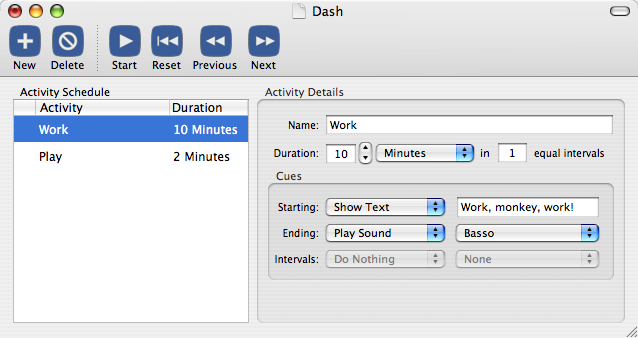
This is accomplished by creating a “Routine” that can be saved as a document for reuse. You set up each of the timed events and how you like to be notified, and then let ‘er rip. I love that the default option is to repeat the Routine. One less thing to think about and fiddle with.

Flextime Dash

Although I haven’t had time (and frankly lack the skillz) to experiment with scripting, it appears that you can associate custom AppleScript events with each alarm starting or ending. Would love to hear how people are using this (and maybe see the sorts of scripts you’re building).

While it currently offers a fraction of the configuration options of Meridian — for example, you have to make the Sophie-like choice between a text notification OR a sound OR a script etc. — Flextime should be an attractive app to watch as it matures. The developer has some interesting plans for post 1.0 (Growl integration, print support, and, via email, functions like sticky alarms), and he seems to get how people might want this app to behave.

Flextime is a beta app that is AFAIK free (as in beer); not sure what the post 1.0 license and cost will be.


Quickie wish list

For what it’s worth, here are few things I’d love to see in a next generation, productivity-centric alarm app:

  • Create and control alarm events via Quicksilver
  • Control and change environmental variables settings and Mac events, per alarm (like changing Desktop background, opening/closing apps, changing virtual desktops etc.)
  • Track usage and allow basic logging to be associated with alarm iterations (“What were you doing?” “Were you doing the thing you were supposed to be doing?”)
  • Easy way to create another future ad hoc alarm/dash when the current one completes (“Remind me to work on this code for 15 minutes starting at 10:00am”)

Got a Mac alarm you’re loving these days? What are you using to run timed dashes?


29 Comments

Comment viewing options

Select your preferred way to display the comments and click "Save settings" to activate your changes.
Mike Harris's picture

I'm a fan of both...

I’m a fan of both Pester (although author Riley once tempted me with shots of a Pester 2.0 he never developed!) and of TinyAlarm, both alluring in their freeness and in their simplicity.

PennyK's picture

Interesting read. Thanks everyone. I...

Interesting read. Thanks everyone. I like the ProdMe widget but my personal favourite is still Fob (by Leaky Puppy Software). The interface is cute and I like how it shows the countdown in in the dock. Unfortunately, it is no longer being maintained.

Here’s a link to write-up by the Mad Professor which not only mentions “Fob” but also 43folders.

http://www.madprofessor.net/archives/cat_etc.html

Paul Lagasse's picture

I, too, went looking for...

I, too, went looking for a good stopwatch app about 6 months ago. Haven’t tried the ones mentioned here, but I do want to recommend Apimac Timer 2.0.1 (http://apimac.com/timer/index.php). It has countdown, a timer, and an alarm clock. The alarms are highly configurable with multiple actions (e.g., you could have the alarm turn down the iTunes volume, sound an alarm, and speak a pre-recorded reminder message using the Mac speech synthesizer).

Apimac has lots of other useful little shareware apps too; Text Cleaner is a simple but very flexible text code stripper.

Gayle's picture

Any hints on PC timers?...

Any hints on PC timers? Us PC users need to get things done, too, y’know :)

Chet's picture

xReminder Pro is a great...

xReminder Pro is a great little shareware timer (& reminder) program for PC. The timer functions are simple compared to the Mac apps discussed above, but it gets the job done.

Don's picture

Back in October 2005 I...

Back in October 2005 I found the need for just a basic alarm clock, as I was travelling out of the country. I was torn between Meridian and Awaken (http://www.embraceware.com); Meridian for its absolutely gorgeous interface and features, Awaken for its minimalist (yet beutiful) interface and price. In the end I went with Awaken, since its $8.95 price was more in line with how much I would be using it.

mkb's picture

OK, this is very much...

OK, this is very much a nitpick but you might want to find an alternate term for what you call environmental variables. The problem is that to a Unix geek (and most Mac programmers probably qualify), “environment variable” refers to something specific which is different from what you want.

This has been your Daily Annoying Nerd Note. You may now proceed with your previously scheduled activity.

Merlin Mann's picture

Good catch, mkb -- sounds...

Good catch, mkb — sounds like I want the timer to update my bash profile, eh? :)

Kevin's picture

I have been doing the...

I have been doing the (10+2)*5 thing for about a week now (love it!), and since I am confined to a PC at my office, have been using a free timer program called “CoolTimer.” It’s not fancy, but it does the trick. I like that it hides in the system tray while it’s counting down, but then jumps right up in front of your face when it’s time to take a break.

Available at:

http://www.harmonyhollow.net/ct.shtml

Murk's picture

I'm loving a pretty little...

I’m loving a pretty little widget, Meditation Timer

http://meditationresources.com/

because it’s simple, can be set for any amount of time you like, has a ‘wait’ function, so if you’re feeling squirrelly you can set a 1-3 minute wait time just to calm your mind before starting, and it has a really nice ‘ring’ to begin and end. In a perfect world, I would use it daily actually to meditate. But for now, it’s working to motivate me.

Chanpory's picture

I've been using Meridian for...

I’ve been using Meridian for the (10+2)*5 hack and wrote a little tutorial on how I did it here:

http://www.lifeclever.com/index.php/2006/07/15/structured-procrastination-with-the-1025-hack-and-meridian/

I had not seen Flextime before writing it, but it looks like a great app and I especially like the ability to create routines. I’m going to give it since it’s free. I had tried Minuteur but I found the metaphor of using a ruler to measure time a little odd and lacking in affordance.

Gina Trapani's picture

The one feature of my...

The one feature of my trusty kitchen timer that no computer-based timer I’ve seen yet is this: It beeps once when I’ve got 10 minutes left, then twice when I’ve got 5 minutes left. I do 60 minute “dashes” and I just love that because I know when I can start wrapping up without having to futz with anything.

Do either of these support that?

Cari's picture

Thanks for the tips. ...

Thanks for the tips. I’ve been using the interval timer on my el-cheapo running watch to set up repeating 10+2 alarms, but it’s annoying to have to change it every other day when I actually want to use it for running! I’ll have to check these out.

BTW, I have to ask, based on your link above — you do realize that Sophie’s Choice was a book first, right? The hilarious scenes at the beginning of the book where Stingo’s working at a publishing house are right up your snarky little alley, Merlin.

Nick's picture

I've just started writing this...

I’ve just started writing this reply and my mac is telling me to get back to work! Anyway, nice spot with these. I’m trying FlexTime and must admit it’s probably going to be one more of my quadzillion ‘little apps’ that I spend my hard earned pennys on. What I need now is a little app to manage all my little apps, or is that Dashboard? Yes, back to work.

John B.'s picture

thanks for the tips everyone,...

thanks for the tips everyone, I use a Mac with an Epson projector and powerpoint in my class and now with these apps I can add timers to tests and other things for my students. Not to mention I am a procrastinator par excellence and need this to get my ‘life’ finished.

The funny thing is that there was a lot of research done years ago that showed that a kind of (10+2)*5 style was the best for learning new information as most people tend to remember the first and last five minutes of a class. Chunking the information like this seems best for the human mind.

live like it..'s picture

you cannot buy time…but how...

you cannot buy time…but how about a timer?…

scheduling and time management are not muy strong suits. I have been in this constant pursuit for scheduling and time management tools, resources and how to’s. The astute and creative folks at 43 Folders always have good stuff. Since I acquired a…

nex's picture

gina, with flextime you could...

gina, with flextime you could just set up a routine that does what you described.

merlin, thanks so much for mentioning minuteur. it stopped working when i upgraded to tiger, so i just wanted to reproduce the error so i could ask for advice here. only i couldn’t reproduce the error — the newest version of minuteur works perfectly, and after just half a minute of prodding at it, i already discovered 2 new features that are really cool. can’t wait to get done with this comment, get back to the app and play with it some more; now i’m totally motivated for some hot (10+2)*5 action. next time i have some spare change in my paypal account, the minuteur author is soooo getting a donation.

my top wishlist feature: automatically setting the system preference that lets my mac wake up, say, a minute before the alarm should sound, so i can’t ever miss an alarm because my ‘puter fell asleep. anyone know of an app that does this?

sascha brossmann's picture

until now i have been...

until now i have been using alarm clock 2 [http://www.robbiehanson.com/alarmclock/index.html] which i found quite gorgeous: lean, unintrusive (unless it should be ), simple enough (but not too simple), supports multiple alarms/countdowns/…, and happens to be one of the apps that can actually wake your computer (@ nex). in short: does exactly what it ought to. flextime looks quite promising to me, though…

Robert Carter's picture

Docktimer is free (donations welcome),...

Docktimer is free (donations welcome), simple and unobtrusive. Nothing fancy—it counts down right in your dock, which means it doesn’t eat up valuable menubar space, but it’s easy to see when you’re working in any application.

http://www-public.tu-bs.de:8080/~y0007943/en/apps/index.html

nex's picture

thanks sascha, i'll give that...

thanks sascha, i’ll give that app a try. it even supports iTunes … i used to use iCal for scheduling an iTunes track to wake me up, but i always had to manually set the wake-up time for the computer as well, which got old fast.

TC!'s picture

Just wanted to comment on...

Just wanted to comment on a couple of items on your wishlist. I was hoping to be able to fire things off via quicksilver and I just downloaded the latest version of Minuteur today. The latest version comes with some scripts including starting a 10 minute countdown. That means it should be easy to create another script for 2 minutes and fire either of them off via quicksilver.

Minuteur has now added some project loggin features. You can choose a project from a list and use the stopwatch to time how long you are working on it. When you stop the stopwatch it allows you to enter a description of what you did and even calulates a cost based on what you enter in the preferences.

The only problem here is you can’t have a stopwatch and a separate countdown at the same time!

Finally the fullscreen mode is very cool.

insignificant thoughts » Blog Archive » links fo's picture

[...] 2 OS X timers...

[…] 2 OS X timers to watch: Flextime & Meridian Need a clock for OSX? Check these two out. Merlin Mann’s endorsement is all I need. (tags: clock timer osx mac macintosh apple software utilities productivity) Social Bookmark- SelectBlinkList del.icio.us Digg it Furl ma.gnolia Netvouz RawSugar Shadows Simpy Spurl Yahoo MyWeb Filed in: del.icio.us | No Comments » […]

EPAlton's picture

If anyone out there has...

If anyone out there has QuicKeys, it’s a fairly easy way to set up an automated 10+2x5 Dash:

1—Create a new shortcut

2—Scope is “All Parts of All Applications” and the trigger is the QuicKeys Menu (but you can do something else)

3—Insert a “Display Message and Play Sound” step. Have it display “Start task now” (or whatever you want) in a window. Also have it continue automatically after 600 seconds (10 minutes). “Step results” should be to “continue to next step.”

4—Insert another “Display Message and Play Sound” step but this time, make the message “Take a break” (or whatever else) and have it continue automatically after 120 seconds (2 minutes). “Step results” should be to “continue to next step.”

5—Copy/paste these two steps four times, giving you a total of five cycles. You can make the last step have the message of “Dash complete” and the “Step Results” stop the shortcut.

Hope that’s helpful to others. It works great for me!

LifeClever ;-) » FlexTime: an even better way to stop's picture

[...] After reading Merlin Mann’s...

[…] After reading Merlin Mann’s recent post on timer apps for the Mac, I’ve been trying out the (10+2)*5 procrastination hack with a new shareware application called FlexTime. FlexTime allows you set “routines” of different “activities” than can repeat indefinitely. […]

Modis's picture

How about a little motivator...

How about a little motivator for those who use time apps and are willing to spend less time procrastinating? Set countdown to your projected end of.. err.. life (120 years anyone?) on your time app of choise and look at it once it a while.

For those who are used to time increasing on clocks, this little widget might help get used to see time as actually decreasing. Then “How important is the task you’re ingaged in at the moment or plan for later?”. And “Do you still feel like putting off a truly important task?”.

Remember to relax and enjoy each moment. You still have some time.

Lucas Marchello's picture

Alarm Clock Pro from Koingo...

Alarm Clock Pro from Koingo Software (www.koingosw.com) is wayyyyy better than Meridian. I checked out Meridian and itsmessy interface and lack of features make it look like a first run through without any beta testing!

Adventures in Urban Living's picture

Shooting Muni (Not Like That!)... Why...

Shooting Muni (Not Like That!)…

Why didn’t anyone tell me there was going to be a Muni protest yesterday? I caught a story on BoingBoing last week……

annexgb's picture

Gina: Minuteur has a speech...

Gina: Minuteur has a speech function that will say the time remaining in a countdown. Default is every 15 minutes, but you can specify shorter intervals; mine says the time remaining at 10, 5, 2, 1 minutes. I’m still trying out different apps, though — if I find anything else I’ll mention it.

Scott's picture

Minuteur is rock solid, a...

Minuteur is rock solid, a perfect UI, and I’ve been using it over a year now. I looked at so many timers over the past years, at least 15, and Minuteur fits my exact needs. For most reminders, I use Entourage’s Calendar or Task reminders, which pop up a few minutes before each to-do, but for stuff like “Call Mark back in 10”, or “Leave for the dentist at 9!” that need a loud buzz to make me notice, Minuteur is perfect. Glad I finally found it after years of hunting around.

 
EXPLORE 43Folders THE GOOD STUFF

An Oblique Strategy:
Discard an axiom


STAY IN THE LOOP:

Subscribe with Google Reader

Subscribe on Netvibes

Add to Technorati Favorites

Subscribe on Pageflakes

Add RSS feed

The Podcast Feed

Inbox Zero

The original 43 Folders series looking at the skills, tools, and attitude needed to empty your email inbox — and then keep it that way. Don’t miss the free video of Merlin’s Inbox Zero presentation.

Get Started with ‘GTD’

David Allen’s popular productivity book and the system on which it’s based help turn ‘stuff’ into actions that support valuable outcomes.