Merlin’s weekly podcast with Dan Benjamin. We talk about creativity, independence, and making things you love.
2 OS X timers to watch: Flextime & Meridian
Merlin Mann | Jul 19 2006
An alarmed timer is one of the most simple external systems you can employ, and many of us distracted geeks have come to rely on them as a way to improve concentration, redirect attention, and bitch-slap procrastination. Why make your brain be the time-keeper and scold when you can just make some little robot do all the heavy lifting for you? Exactly. Lucky for the Mac-scented timer geeks out there, this is an area of software development that seems to be flourishing lately, with sexy little apps like Minuteur and Dashboard widgets like ProdMe arriving on the scene to ride herd on the wandering mind. Further, in the past week, I've stumbled across a couple more new apps that look like promising additions for the time-addled brain -- and, I'm happy to note, they look especially useful for fans of the (10+2)*5 dash. Meridian
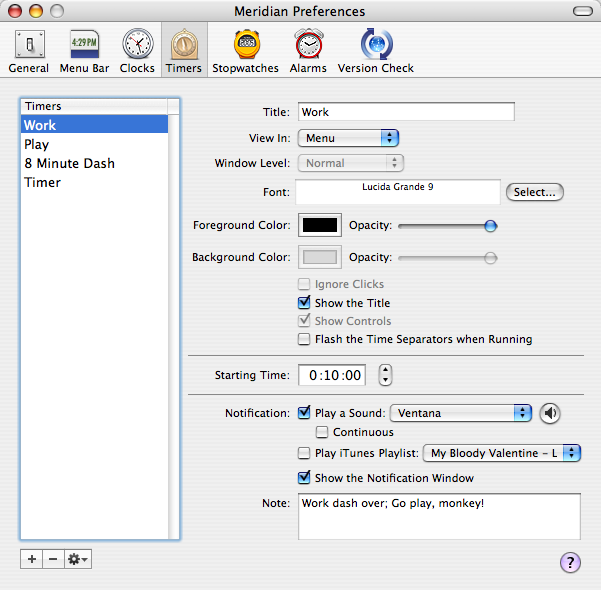
Meridian is a bit of a Swiss Army app for all things time. It allows you to create custom alarms, time-zone clocks, and stopwatches that can be reused and reconfigured quite easily. You can even create nonce events that happen at some time in the future. You also get some nice display options, allowing you to choose how and where your alarms and clocks live -- in a floating window, on the Desktop, under a pulldown menu, etc. Also, in case you're getting sick of "Basso" farting your reminders at you, you get some lovely new alarm sounds to choose from (I like "Ventana"). I also like that the floating windows for timers and stopwatches afford a variety of actions and access to Preferences right from the teeny little window. It's also easy enough to double-click any window or clock and jump right to the Preferences and configuration options. Handy.
Meridian can be configured to pop up a notification window, which, thoughtfully, allows snoozing, although -- same beef I have with iCal -- I wish the snooze options were more varied and configurable. Also, it would be nice to have access to starting a different alarm right from the reminder window. Meridian is a good option for running dashes and alternating work/play cycles, although it does require you to manually click each alarm session to start -- I'd love a way to "daisy chain" and loop cycles of alarms, something that our next app, "Flextime," seems to do fairly well. Meridian is $19.95 shareware and comes with a 30-day trial. FlextimeRed Sweater Blog - FlexTime Nearing 1.0
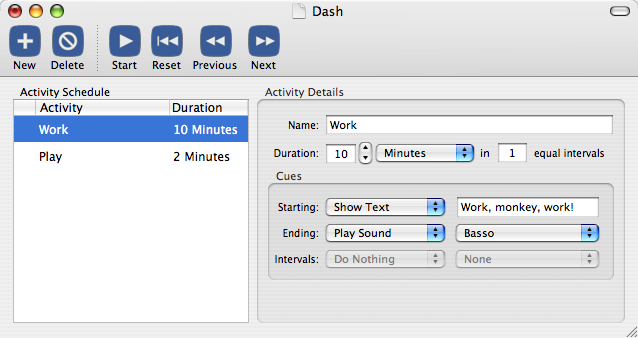
Flextime is in a relatively young beta, but it might be the most promising alarm app out there right now -- at least from a productivity geek's standpoint. At heart, Flextime understands and supports the need for multiple repeating sets of alarms. As the site suggests:
This is accomplished by creating a "Routine" that can be saved as a document for reuse. You set up each of the timed events and how you like to be notified, and then let 'er rip. I love that the default option is to repeat the Routine. One less thing to think about and fiddle with.
Although I haven't had time (and frankly lack the skillz) to experiment with scripting, it appears that you can associate custom AppleScript events with each alarm starting or ending. Would love to hear how people are using this (and maybe see the sorts of scripts you're building). While it currently offers a fraction of the configuration options of Meridian -- for example, you have to make the Sophie-like choice between a text notification OR a sound OR a script etc. -- Flextime should be an attractive app to watch as it matures. The developer has some interesting plans for post 1.0 (Growl integration, print support, and, via email, functions like sticky alarms), and he seems to get how people might want this app to behave. Flextime is a beta app that is AFAIK free (as in beer); not sure what the post 1.0 license and cost will be. Quickie wish listFor what it's worth, here are few things I'd love to see in a next generation, productivity-centric alarm app:
Got a Mac alarm you're loving these days? What are you using to run timed dashes? 29 Comments
POSTED IN:
I, too, went looking for... by Paul Lagasse (not verified)
Any hints on PC timers?... by Gayle (not verified)
xReminder Pro is a great... by Chet (not verified)
Back in October 2005 I... by Don (not verified)
OK, this is very much... by mkb (not verified)
I have been doing the... by Kevin (not verified)
I'm loving a pretty little... by Murk (not verified)
I've been using Meridian for... by Chanpory (not verified)
The one feature of my... by Gina Trapani (not verified)
About Merlin Bio Merlin Mann is an independent writer, speaker, and broadcaster. He’s best known for being the guy who created the website you’re reading right now. He lives in San Francisco, does lots of public speaking, and helps make cool things like You Look Nice Today, Back to Work, and Kung Fu Grippe. Also? He’s writing this book, he lives with this face, he suffers from this hair, he answers these questions, and he’s had this life. So far. Merlin’s favorite thing he’s written in the past few years is an essay entitled, “Cranking.”
|
|


| EXPLORE 43Folders | THE GOOD STUFF |


