43 Folders

43 Folders feed subscription icon - Shiny!Time, Attention, and Creative Work. After 4 years and a lot of productivity pr0n, we’re shifting gears. Re-learn how to use 43 Folders. Then back to work. [»]

”What’s 43 Folders?”
43Folders.com is Merlin Mann’s website about finding the time and attention to do your best creative work.

Dine-O-Matic (and the Dashboard widgets we love)

Dine-O-Matic - Dashboard - Food

I’ve never quite taken to Dashboard the way a lot of folks have. Like that completely baffling Spotlight results “window,” it seems to just kind of live off in its own little neighborhood — one that’s just far enough away to discourage frequent visits. “Jeez, Merlin, how lazy can you get about hitting F12?!?”

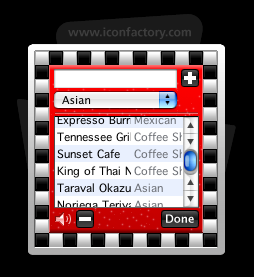
Annnnnnyhow, I finally found a “business case” for Dashboard today with the discovery of the perfectly-delightful Dine-O-Matic, a beautiful and free (as in beer) little widget from the graphical savants over at Iconfactory. This does precisely one thing: it chooses a random restaurant for you to eat at. That’s it. No more whiny rounds of “‘What do you want?’ and ‘No, what do you want?’” Because we now have comely robots to make these decisions for us. The dining-out singularity is near!

You just pop in the names and cuisine-types of all your local haunts, and then hit the big blue plate. The widget flashes and churns like a slot machine, then picks out the place you and your party will dine. Awesome. Yay, Dashboard.

setup results!
Dine-O-Matic Setup Dine-O-Matic Results

We haven’t talked too much about Dashboard around here, but I’d love to hear from you guys:

Which widgets have made you love Dashboard? Has Dashboard become an integrated part of your overall workflow? Or is it just a pretty amusement park? (not that this is bad)


Comment viewing options

Select your preferred way to display the comments and click "Save settings" to activate your changes.
Thom G's picture

I rely on a few...

I rely on a few widgets. I use the built-in weather, dictionary, and calendar widgets frequently (e.g., to get the date a week from next Tuesday). I also frequently use Locker, Network Stat (to change locations between proxied and unproxied), and WakeOnLan (to wake up my home fileserver).

pts's picture

I have a few widgets...

I have a few widgets that I use — the LiveJournal one, the the Transmit one, etc, and they’re quite nice. But the one widget without which I would be lost, adrift on the sea of discourse is… Dictionary. I use the hell out of that sucker. Plus it’s always vaguely gratifying to open Dashboard and see some 5-dollar word in the dictionary there.

Alex's picture

The widgets I use are...

The widgets I use are Album Art Amazon Art (imports album art into iTunes) Character Pal Package Tracker Pear Lyrics Dictionary

The common thing about all of these, except for Package Tracker, is that I’ll spontaneously want a small piece of information (“What’s that word mean?”, “What was he singing?”, “How do I type that?”) and get it through dashboard. Clocks, games, calendars, search bars, I have little use for.

eric's picture

Pretty amusement park. I get...

Pretty amusement park. I get a glimpse of weather once in a while through the built-in widget, and I check my Mint stats semi-frequently. That’s it. If I need a calculator I bring it up, then close it. Nothing else has proven particularly useful in my daily computing.

For a while I used the Transmit widget from Panic, but once I figured out DockSend did the same thing without sitting there, that honeymoon was over.

Gord Fynes's picture

As far as workflow goes,...

As far as workflow goes, I’m a fan of the Backpack widget. The rest are all for news and play: CPU temp., local weather, Wired News, BBC Headlines, an NPR tuner, BBC tuner, IMDB and Wiki widgets. Last, and certainly not the least…dead center of my Dashboard: Brian Eno’s Oblique Strategies. I’ve stopped visiting Apple’s widget collection on account of the clutter. I don’t think I really need the lunar phase widget.

Nate Drake's picture

I don't really use Dashboard...

I don’t really use Dashboard much. The following widgets are somewhat useful though:

Javadoc search widget - http://seriot.ch/JavaDoc TextMate Projects widget - http://lists.macromates.com/pipermail/textmate/2006-May/010279.html Remind widget (Found this on 43Folders) - http://nick.vargish.org/software/remindwidget/

Randy's picture

I have some running that...

I have some running that I could live without but the ones I USE are, iStat nano (Processes section helps a lot when my system stalls) (http://islayer.com/), Calculator (one less piece of equipment on my REAL desk), Calendar (Save your walls for pictures of your family), and White & Yellow Pages search.

iMatt's picture

I like to keep track...

I like to keep track of fast-moving storms that may flood my basement, and hitting f12 is a quick way to load weatherbug and a few other widgets (including the built in weather widget) to give me all the information I need at a glance. I also find dictionary and package tracker to be useful from time to time.

Jim Phelps's picture

I commute on my bike...

I commute on my bike 9 months out of the year. I use the Weather widget and Radar In Motion to check for storms. I also use Flytecomm to track flights (great real-time tracker with map).

Ben Saunders's picture

For any fellow procrastinators, the...

For any fellow procrastinators, the Do It! widget has done more for me than the combined works of David Allen :)

About Merlin Mann

Merlin Mann's picture

Bio

Merlin Mann is an independent writer, speaker, and broadcaster. He’s best known for being the guy who started the website you’re reading right now. He lives in San Francisco, does lots of public speaking, and helps make cool things like You Look Nice Today. Also? He looks like this, answers questions, and has something like a life.

Merlin’s favorite thing he’s written recently is a short essay called, “Better.”

 
EXPLORE 43Folders THE GOOD STUFF

An Oblique Strategy:
Not building a wall; making a brick


STAY IN THE LOOP:

Subscribe with Google Reader

Subscribe on Netvibes

Add to Technorati Favorites

Subscribe on Pageflakes

Add RSS feed

The Podcast Feed

Inbox Zero

The original 43 Folders series looking at the skills, tools, and attitude needed to empty your email inbox — and then keep it that way. Don’t miss the free video of Merlin’s Inbox Zero presentation.

Making Time

3-part series on attention management for artists and makers. Read Bad Correspondence, The Job You Think You Have, and One Clear Line.