Merlin’s weekly podcast with Dan Benjamin. We talk about creativity, independence, and making things you love.
Dine-O-Matic (and the Dashboard widgets we love)
Merlin Mann | Sep 6 2006
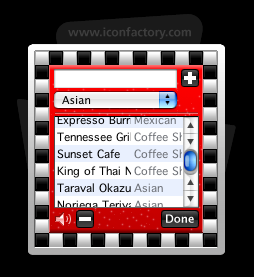
Dine-O-Matic - Dashboard - Food I've never quite taken to Dashboard the way a lot of folks have. Like that completely baffling Spotlight results "window," it seems to just kind of live off in its own little neighborhood -- one that's just far enough away to discourage frequent visits. “Jeez, Merlin, how lazy can you get about hitting Annnnnnyhow, I finally found a "business case" for Dashboard today with the discovery of the perfectly-delightful Dine-O-Matic, a beautiful and free (as in beer) little widget from the graphical savants over at Iconfactory. This does precisely one thing: it chooses a random restaurant for you to eat at. That's it. No more whiny rounds of "'What do you want?' and 'No, what do you want?'" Because we now have comely robots to make these decisions for us. The dining-out singularity is near! You just pop in the names and cuisine-types of all your local haunts, and then hit the big blue plate. The widget flashes and churns like a slot machine, then picks out the place you and your party will dine. Awesome. Yay, Dashboard.
We haven't talked too much about Dashboard around here, but I'd love to hear from you guys: Which widgets have made you love Dashboard? Has Dashboard become an integrated part of your overall workflow? Or is it just a pretty amusement park? (not that this is bad) 53 Comments
POSTED IN:
 I tend to F12 quite...Submitted by Gabe (not verified) on September 7, 2006 - 7:38am.
I tend to F12 quite a bit. Here are the Widgets I use and what for... These first two are given purpose thanks to kGTD and Merlin's suggestion to "live in iCal." DoBeDo- A iCal To Do Tracker: Two of these open. One displaying "All" and the other "@Mac" this allows me to quickly check off NAs and feel productive. iCal Events- Gives me a quick glance at what the next 7 days have in store for me. Twemco- This is a Neato looking Clock and Calendar in one. It only displays the date of today, but I often can't remember that even. Weather- You all know this one. I haven't owned a car in 4 years. This one is nice to know when to bike and when to bus. (I only bus in the rain, I love me a snowy bike ride.) Countdown Calendar- This little widget looks like those "tear a page off each day" type desk calendars. I have as many of these running as nessisary to keep deadlines/ coming dates in perspective. (right now, 16 day till school starts, and 88 days until my son's due date.) Egg Timer- This little timer is a parenting tool. Sometimes my two-year-old daughter has to "Come sit with daddy for two minutes and settle down while we talk about why mom's laptop is not the same thing as a frisbee." This gives her and I something to watch. Keeps her content watching the numbers tick, and keeps me from turning a quick talk into a long lecture. So there is my dashboard scheme. » POSTED IN:
|
|

| EXPLORE 43Folders | THE GOOD STUFF |


