43 Folders

43 Folders feed subscription icon - Shiny! Drowning in email? Try Inbox Zero to learn sane tips for dealing with high-volume email. And don’t miss the free Inbox Zero video. »

Login or register

Register for free on 43 Folders to comment on articles, post to our forum, customize your visits, and much more. Current users can login now.

Dine-O-Matic (and the Dashboard widgets we love)

Dine-O-Matic - Dashboard - Food

I’ve never quite taken to Dashboard the way a lot of folks have. Like that completely baffling Spotlight results “window,” it seems to just kind of live off in its own little neighborhood — one that’s just far enough away to discourage frequent visits. “Jeez, Merlin, how lazy can you get about hitting F12?!?”

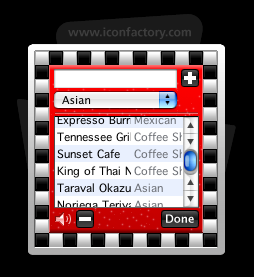
Annnnnnyhow, I finally found a “business case” for Dashboard today with the discovery of the perfectly-delightful Dine-O-Matic, a beautiful and free (as in beer) little widget from the graphical savants over at Iconfactory. This does precisely one thing: it chooses a random restaurant for you to eat at. That’s it. No more whiny rounds of “‘What do you want?’ and ‘No, what do you want?’” Because we now have comely robots to make these decisions for us. The dining-out singularity is near!

You just pop in the names and cuisine-types of all your local haunts, and then hit the big blue plate. The widget flashes and churns like a slot machine, then picks out the place you and your party will dine. Awesome. Yay, Dashboard.

setup results!
Dine-O-Matic Setup Dine-O-Matic Results

We haven’t talked too much about Dashboard around here, but I’d love to hear from you guys:

Which widgets have made you love Dashboard? Has Dashboard become an integrated part of your overall workflow? Or is it just a pretty amusement park? (not that this is bad)


53 Comments

Comment viewing options

Select your preferred way to display the comments and click "Save settings" to activate your changes.
Thom G's picture

I rely on a few...

I rely on a few widgets. I use the built-in weather, dictionary, and calendar widgets frequently (e.g., to get the date a week from next Tuesday). I also frequently use Locker, Network Stat (to change locations between proxied and unproxied), and WakeOnLan (to wake up my home fileserver).

pts's picture

I have a few widgets...

I have a few widgets that I use — the LiveJournal one, the the Transmit one, etc, and they’re quite nice. But the one widget without which I would be lost, adrift on the sea of discourse is… Dictionary. I use the hell out of that sucker. Plus it’s always vaguely gratifying to open Dashboard and see some 5-dollar word in the dictionary there.

Alex's picture

The widgets I use are...

The widgets I use are Album Art Amazon Art (imports album art into iTunes) Character Pal Package Tracker Pear Lyrics Dictionary

The common thing about all of these, except for Package Tracker, is that I’ll spontaneously want a small piece of information (“What’s that word mean?”, “What was he singing?”, “How do I type that?”) and get it through dashboard. Clocks, games, calendars, search bars, I have little use for.

eric's picture

Pretty amusement park. I get...

Pretty amusement park. I get a glimpse of weather once in a while through the built-in widget, and I check my Mint stats semi-frequently. That’s it. If I need a calculator I bring it up, then close it. Nothing else has proven particularly useful in my daily computing.

For a while I used the Transmit widget from Panic, but once I figured out DockSend did the same thing without sitting there, that honeymoon was over.

Gord Fynes's picture

As far as workflow goes,...

As far as workflow goes, I’m a fan of the Backpack widget. The rest are all for news and play: CPU temp., local weather, Wired News, BBC Headlines, an NPR tuner, BBC tuner, IMDB and Wiki widgets. Last, and certainly not the least…dead center of my Dashboard: Brian Eno’s Oblique Strategies. I’ve stopped visiting Apple’s widget collection on account of the clutter. I don’t think I really need the lunar phase widget.

Nate Drake's picture

I don't really use Dashboard...

I don’t really use Dashboard much. The following widgets are somewhat useful though:

Javadoc search widget - http://seriot.ch/JavaDoc TextMate Projects widget - http://lists.macromates.com/pipermail/textmate/2006-May/010279.html Remind widget (Found this on 43Folders) - http://nick.vargish.org/software/remindwidget/

Randy's picture

I have some running that...

I have some running that I could live without but the ones I USE are, iStat nano (Processes section helps a lot when my system stalls) (http://islayer.com/), Calculator (one less piece of equipment on my REAL desk), Calendar (Save your walls for pictures of your family), and White & Yellow Pages search.

iMatt's picture

I like to keep track...

I like to keep track of fast-moving storms that may flood my basement, and hitting f12 is a quick way to load weatherbug and a few other widgets (including the built in weather widget) to give me all the information I need at a glance. I also find dictionary and package tracker to be useful from time to time.

Jim Phelps's picture

I commute on my bike...

I commute on my bike 9 months out of the year. I use the Weather widget and Radar In Motion to check for storms. I also use Flytecomm to track flights (great real-time tracker with map).

Ben Saunders's picture

For any fellow procrastinators, the...

For any fellow procrastinators, the Do It! widget has done more for me than the combined works of David Allen :)

Stephen's picture

I think the widget concept...

I think the widget concept is flashy, but flawed. If I want to track a package, it is unlikely that I will also feel a compelling need to look at the weather loop concurrently. If I find an anomaly in a traceroute, I will want to be able to easily drag it into a mail message. It is just easier to get my weather from an applet in the menu bar (Meteorologist), have three bookmarks for tracking packages (rather than the very pretty Package Tracker widget), and use traceroute in a terminal window. To have all the widgets that I might want to have handy, my dashboard is rather cluttered. When widgets break out of the dashboard and run independently, like Desk Accessories (c. 1984), I will become much more interested in them as little applets that can be run as needed. Moreover, this will mitigate most concerns surrounding a the potential for a widget that is a resource hog.

Alistair's picture

I disabled it - machine...

I disabled it - machine is faster; could not really see the point unless I was bored…. I miss the weather and the very excellent BBC Radio widget.

Brian's picture

iStat nano is a must-have AirPort...

iStat nano is a must-have AirPort Radar is handy ScreenShot Plus I could not function without (or not as efficiently).

Like other folks, I’d prefer to be able to break them off the Dashboard without a hack workaround, though.

Kim's picture

I just got the epicurious...

I just got the epicurious widget, but when I went to use it for the first time I walked passed my 3 bookshelves of cookbooks to get to my laptop and my husband laughed at me.

Mike B's picture

Oblique Strategies! http://www.apple.com/downloads/dashboard/ref

Oblique Strategies! http://www.apple.com/downloads/dashboard/reference/oblique.html

Rob Mayoff's picture

Just two: Apple's Dictionary/Thesaurus...

Just two: Apple’s Dictionary/Thesaurus (several times a week), and Ambrosia Software’s Easy Envelopes (once every month or two).

Jestu What?!'s picture

that's spooky. I downloaded this...

that’s spooky. I downloaded this widget last week before Sabbath and have not had the chance til now to update my vegetarian listens. I love the neon category food displays and the ticking of the wheel as it suprises where you’ll be eating-out for the night. however, i’ve set it up to decidee the veggie dishes to make at home when I’m losing the battle with indecisiveness.

Kit's picture

I use Dashboard sparingly at...

I use Dashboard sparingly at best. I tend to forget about it because I use most of them so rarely that it isn’t worth a standalone applet. I suppose the Yellow Pages/White Pages, Package Tracker, and Currency Converter are my most used and all can be replaced with a quick Google search or going directly to the website from which the data is pulled. I think the place where Widgets get intriguing is in the cell phone format. I would love it if I could have applets that update in the background or when the phone is idle and I could then pull them up with a single button. Weather, Dictionary, Yellow Pages, Package Tracker, Flight Tracker even Dine-o-matic are all much more useful when you have a limited internet connection (or at least limited input capability) and are out on the town. I wonder if Apple has ever considered the cell phone biz.

Grant's picture

Uhh, Merlin, you do know...

Uhh, Merlin, you do know that you can set Dashboard (as well as Expose) to activate when you move the mouse pointer to (your choice) a corner of the screen? You don’t need to reach up and hit F12…in fact, I can’t remember ever using the key commands for Dashboard or Expose. For me, Dashboard comes up when I cursor to the lower right corner of the screen. Fast and easy.

As to favorite widgets, I use a stock tracker from Quotes.com; Gold Price; iCal Events; Unit Converter; Vela Clock. However, the hands-down all-time best widget (IMNSHO, of course) is Easy Envelopes - it prints formatted envelopes with your return address. It can take the addressee information directly from Address Book, or you can enter that information manually. For me it is a great time saver.

Jurgis's picture

I use both Dashboard and...

I use both Dashboard and Konfabulator (now Yahoo) widgets- Dahboard brings me weather forecast (important when you plan your outdoor activities), namesdays (we have this tragge tradition to celebrate our and our friends names once a year) and stickies (to put down some bits and ideas i would like to remember). And i use Konfabulator with XRStockGain widget for tracking my small personal stocks portfolio.

Craig's picture

I almost never use the...

I almost never use the dashboard. But what I have there are:

Go go redball (seems bizarre to say, but this is my favorite - try it)

Sudoku

Video Poker

Oblique Strategies

Storij

ian's picture

Another vote for Oblique Strategies....

Another vote for Oblique Strategies. Essential for us creative types to rattle the cage. But I rarely use Dashboard. Hang on the gimmicky one will REALLY abound when the Wintel crowd gets their “gadgets” in Vista. THEN we’ll see quantity not quality!

Ben Whitehouse's picture

I recently started using widgets...

I recently started using widgets after harshly shunning them. I find most of them to be useless, with a few really making a difference. My favorites are New York Times, Junior Mint (stat tracking), Weather, Calculator, Digg (sometimes).

Jeff's picture

I use the apple address...

I use the apple address book widget more times in a day than I know. It’s quicker to load the the address book app, and the “click on a phone number and it’s big enought to read across the room” feature is quite handy.

alessio's picture

The Widget-I-cannot-do-without is The Daily...

The Widget-I-cannot-do-without is The Daily Grind, in my never ceasing hunt for the perfect time tracker (not over-complicated neither over-simplified, I mean). I also use quite a lot endecoder and Email Cloaker for my daily work, plus I run iStat nano, AirTrafficControl (wi-fi), Album Art and Sing That iTune!

I’m currently checking NotePad as an alternative to Stickies on the main desktop.

falsefridays's picture

i swear, people who read...

i swear, people who read this as well as lifehacker (so, all of us) are going to think that they are payng me to pimp for them, but i assure you that this is not the case:

the soma.fm widget:

http://www.allthingsalceste.com/somatic

it’s AWESOME.

despite making my 2003-vintage iMac choke.

Gabe's picture

I tend to F12 quite...

I tend to F12 quite a bit. Here are the Widgets I use and what for…

These first two are given purpose thanks to kGTD and Merlin’s suggestion to “live in iCal.”

DoBeDo- A iCal To Do Tracker: Two of these open. One displaying “All” and the other “@Mac” this allows me to quickly check off NAs and feel productive.

iCal Events- Gives me a quick glance at what the next 7 days have in store for me.

Twemco- This is a Neato looking Clock and Calendar in one. It only displays the date of today, but I often can’t remember that even. Weather- You all know this one. I haven’t owned a car in 4 years. This one is nice to know when to bike and when to bus. (I only bus in the rain, I love me a snowy bike ride.)

Countdown Calendar- This little widget looks like those “tear a page off each day” type desk calendars. I have as many of these running as nessisary to keep deadlines/ coming dates in perspective. (right now, 16 day till school starts, and 88 days until my son’s due date.)

Egg Timer- This little timer is a parenting tool. Sometimes my two-year-old daughter has to “Come sit with daddy for two minutes and settle down while we talk about why mom’s laptop is not the same thing as a frisbee.” This gives her and I something to watch. Keeps her content watching the numbers tick, and keeps me from turning a quick talk into a long lecture.

So there is my dashboard scheme.

Gabe's picture

I almost forgot a cool...

I almost forgot a cool little implimentation that makes my Dashboard system work for me. I don’t remember where I got it from, but I have installed a screensaver called “DashSaver.” Basically, it makes your dashboard be your screensaver, with the added feature of making a colored background instead of the tranparent dimmy thing that dashboard normally does. This way, whenever I come back to my mac I get an instant reminder as to how long I was away, what I need to do next, what is coming up, all that stuff I wrote in my first post. I can also just walkby my mac and see all that, so if I am cranking out NAs that are not @Mac I can just keep going and check the screen as need be to remind myself. Check it out if you can find it through Google or something.

krew's picture

I love Dashlicious, it's my...

I love Dashlicious, it’s my preferred way to post to del.icio.us.

In fact, it’s the only widget on my dashboard.

Ed Furlong's picture

Two points: 1) I tend to...

Two points:

1) I tend to use the widget as a drawer for a few tools that are useful for my main desktop-Unit Conversions, calculator. I think it is a handy collection tool that way. I like that it can be moved in and out of the foreground while remaining readily available.

2) My 15-year old son (I’m 51) uses tons of widgets and it is a primary way he interacts with his mac. Very differentfrom me. I have been a skeptical but very engaged computer user since PDP 11/73 days and further back. I see this box as a tool, not as an end in itself. I am sure it has been said many times that those growing up with personal computers (Apple and others) have a whole different relationship to the technology; the fascination many have with Widget world is just the most current wrinkle.

 
EXPLORE 43Folders THE GOOD STUFF

An Oblique Strategy:
Discard an axiom


STAY IN THE LOOP:

Subscribe with Google Reader

Subscribe on Netvibes

Add to Technorati Favorites

Subscribe on Pageflakes

Add RSS feed

The Podcast Feed

Inbox Zero

The original 43 Folders series looking at the skills, tools, and attitude needed to empty your email inbox — and then keep it that way. Don’t miss the free video of Merlin’s Inbox Zero presentation.

Get Started with ‘GTD’

David Allen’s popular productivity book and the system on which it’s based help turn ‘stuff’ into actions that support valuable outcomes.