Merlin’s weekly podcast with Dan Benjamin. We talk about creativity, independence, and making things you love.
Features“Distraction,” Simplicity, and Running Toward ShitstormsMerlin Mann | Oct 5 2010
Context: Last week, I pinched off one of my typically woolly emails in response to an acquaintance whom I admire. He’s a swell guy who makes things I love, and he'd written, in part, to express concern that my recent Swift impersonation had been directed explicitly at something he'd made. Which, of course, it hadn’t—but which, as I'll try to discuss here, strikes me as irrelevant. To paraphrase Bogie, I played it for him, so now I suppose I might as well play it for you. read more »POSTED IN:
Death and Underachievement: A Guide to Happiness in WorkRyan Norbauer | Dec 31 2007
The trite wisdom of contemporary folklore instructs us that the arrival of the New Year is a time to reflect on the achievements of the preceding 365 days and to bear down and "resolve" to achieve more in those to come. Over time, we learn what a hydra-headed beast this is: no matter how many projects or actions we may whack off our ineluctable lists, it seems that yet more (often increasingly ambitious) commitments spring up in their place. With each new year come self-recriminations for our failure to meet the unlikely goals we've set for ourselves—lose weight, read through those piles of books and RSS feeds, start picking up our socks—and a stultifying brainstorm of new projects we'd like to take on. This New Year as I contemplate my resolutions, it's the underlying concepts of achievement and productivity that are on my mind—and by extension the still grander issues of purpose and meaning in work. I invite you then, patient reader, on a desultory First Night journey with me as I take our mutual favorite hobby—the idle navel-gazing contemplation of productivity—to its most absurd yet logical conclusion: to ask whether eradicating the need for achievement itself might not be the key to happiness in work. read more »38 Comments
POSTED IN:
Dear Me: Get to workEthan Schoonover | Sep 24 2007The ProblemGTD is all about rapid, intuitive selection of what you need to be working on now. Whip out your context list appropriate for the time-place-opportunity-space you are in now. Scan through it, then do. For the longest time I was having a problem with this. I'd scan through my context lists and I'd see things like: read more »POSTED IN:
How I Made My Presentations a Little BetterMerlin Mann | Aug 23 2007Since my Google Tech Talk (previously) caught fire last month (it's gotten over 100,000 views so far), I've been receiving a lot of really nice email, comments, and questions about how I put my presentations together. I'm happy to oblige. read more »POSTED IN:
43f Feature: Michael Buffington's "How I use iGTD"Merlin Mann | Jun 19 2007Michael Buffington is a pal of mine who's a talented developer and all-around swell fellow. I got to work with him a bit on the Stikkit project and, in some of our offline talks on productivity stuff, I was intrigued to learn about some of his ninja geek skillz. I asked Michael to write up a series on some of his favorite tricks to get his stuff done, and he kindly obliged. Here's part one. --Merlin How I use iGTDThis is the first part in a multipart series about using iGTD with Quicksilver and how it's changed my life, allowed me to grow hair where I never thought it possible, and more importantly, spend more quality time with my children (who are, as you might know, super humans with indescribable special abilities). I'm a recent and somewhat enthusiastic convert to GTD. I have had the good fortune of starting to manage my digital life with GTD the same day Merlin first mentioned a great application for OS X called iGTD. I have to admit though that I'm not a very hard core GTD follower yet. The most important parts of GTD for me are getting my tasks out of my head the moment they pop into existence, and putting them into some sort of system I can trust. iGTD allows me to do exactly that in a very intuitive way, but if I'm having a good day I only ever bring iGTD into focus when I'm not sure what's next on my list. read more »POSTED IN:
43 Folders Series: Inbox ZeroMerlin Mann | Mar 13 2007
These are posts from a special 43 Folders series looking at the skills, tools, and attitude needed to empty your email inbox — and then keep it that way. You can visit each of the posts by clicking the title. And don’t miss the “Related Articles” for our all-time popular posts on productively dealing with email. read more »POSTED IN:
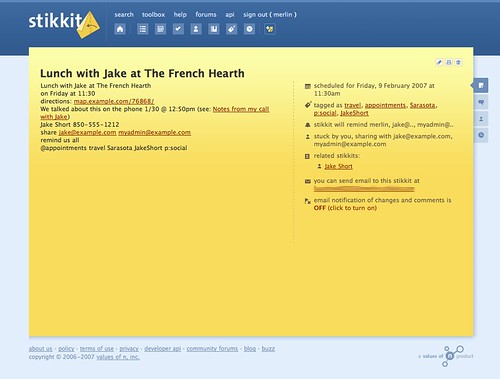
Stikkit: Magic words, functional emails, and a handy cheat sheetMerlin Mann | Feb 7 2007(Disclosure: I’m a proud member of Stikkit’s advisory board) As promised, I wanted to start sharing some of the reasons I’ve been digging Stikkit, so I thought I’d begin at the beginning: Stikkit’s use of “magic words” to do stuff based on your typing natural (albeit geeky) language into a blank note. There's a lot more to Stikkit than magic words, but this is a great place to start. (And, yeah, future posts will be more about how to implement stuff with Stikkit, but it's worthwhile to start with the mechanics.) [Note: this is one of those posts that you might want to print out] So let’s say I want to schedule lunch with my old roommate, Jake, during a notional trip to Sarasota later this week. I might create a new blank stikkit then add the following contents:
Ok, first — and as usual with my infamously over-the-top demos — there’s a lot more going on here than is strictly necessary (e.g., I could have just typed “
After the cut are a couple more detailed pics, followed by an explanation of what’s happening in my example, as well as an Unofficial Stikkit Cheat Sheet. read more »POSTED IN:
6 powerful "look into" verbs (+ 1 to avoid)Merlin Mann | Oct 15 2006
In one of the recent podcast interviews I did with David Allen, we talked about procrastination and how he tries to get people -- especially knowledge workers -- back to just "cranking widgets." I love this term, because, in his humorous way, David captures how any thing we want to accomplish in this world eventually has to manifest itself in an intentional physical activity. Seemingly over-huge super-projects like "World Peace," "Cancer Cure," or "Find Mutually Satisfying Vehicle for Jim Belushi" all still come down to physical actions, such as picking up a phone or typing an email. And David is wise, in that interview, also to highlight the importance of what he refers to as a "'look-into' project," which just means that even deciding if a project is interesting and useful to undertake can be a project in itself. It also means that, even with an outcome of "deciding," that meta-project still consists solely of physical actions. In this case, it's the physical actions that help you locate the additional information you'll need to make a timely and wise decision about whether to proceed at all. In sum, no matter what, it all still should come back to widgets and how they get cranked. Like a lot of you, I've struggled with how you turn "thinky work" into physical action widgets, but here are a few of my favorite task-verbs to get you started in the right direction. They're presented here in a rough approximation of the order in which I use them in my own "look-into" projects: read more »POSTED IN:
GTD: Priorities don't exist in a vacuumMerlin Mann | Oct 1 2006If you're a fan of Getting Things Done, you're familiar with the Four Criteria Model for choosing tasks. It's where the rubber meets the road in GTD, because it's the way you decide, in the moment, how any one of those wonderful tasks you've been tracking in your big system actually gets done. As common sense as it seems to GTD'ers, this model is one of the more controversial aspects of Getting Things Done for a simple reason: it posits that priority is not the only factor in deciding what to do at a given time. It's just one of four factors, which include, all told:
When I'm helping coach people on getting it together, they're often puzzled by this seeming bit of new-agery -- partly, I suspect, because most of us have been conditioned all our lives to think that pre-ordained Priority stamps always trump everything, all the time, always, forever, in all cases, end of story. But is it true, reasonable, or even physically possible to always work this way? Can you will yourself into doing only your identified high-priority items anytime, all the time? Nope, and I'll show you one reason why. read more »POSTED IN:
Process email faster with Mail Act-OnMerlin Mann | Sep 15 2006My usage of Mail Act-On, while far from novel, has revolutionized the speed with which I can blow through email processing. If you've never seen it before, Mail Act-On is a very clever Mail.app plugin that lets you create key commands that execute Rules you've generated in your Preferences. Sounds pretty dull, right? Absolutely. Until you start putting this stuff into action and learn how painfully slow all that draggy mc drag drag business is. Here's how I've set mine up. read more »POSTED IN:
|
|




| EXPLORE 43Folders | THE GOOD STUFF |


