Merlin’s weekly podcast with Dan Benjamin. We talk about creativity, independence, and making things you love.
Distractions“Distraction,” Simplicity, and Running Toward ShitstormsMerlin Mann | Oct 5 2010
Context: Last week, I pinched off one of my typically woolly emails in response to an acquaintance whom I admire. He’s a swell guy who makes things I love, and he'd written, in part, to express concern that my recent Swift impersonation had been directed explicitly at something he'd made. Which, of course, it hadn’t—but which, as I'll try to discuss here, strikes me as irrelevant. To paraphrase Bogie, I played it for him, so now I suppose I might as well play it for you. read more »POSTED IN:
First, care.Merlin Mann | Feb 5 2010Asked and answered by the wonderful Frank Chimero:
You might be amazed how many times--and over how many years--a given person can ask this same simple question, hear that same simple response, and still find themselves casting about for the great and arcane "secret" to achieving real focus. But, this is pretty much it. Mostly. Although, I must add one important "Step Zero," borne of my own tedious experience. Before you sweat the logistics of focus: first, care. Care intensely. read more »POSTED IN:
Cooking for the Creative BeastMatt Wood | Aug 15 2008Guest postGuest blogger, Matt Wood, learns how to feed his creative side (without giving it a big gut). —mdm Earlier this summer, I was in the kitchen, trying to cook dinner. I had a pot on the stove and a fire going on the grill outside. I was fumbling with a bag of frozen peas when my three-year-old started shouting at me to fix one of his toys. “Hold on a second, son,” I said. “I can’t do two things at once.” He looked me, dead serious, and said, “But you have two hands, Daddy.” Too Many Pots on the Stove
My immediate solution has been to limit the inputs and not try to do so much at once. If I can’t cook a nice meal with a preschooler underfoot, then I won’t even try. Chicken nuggets and grilled cheese for everyone, and you’ll like it, thank you very much. While this approach to dinner fulfills various statutes regarding child neglect, it’s also not very satisfying. Apply this approach to work and it certainly creates more time to do Important Things, but it makes for soggy, microwaved output as well. read more »POSTED IN:
Simplicity must be possible.grant balfour | May 19 2008Two stories that I know I should be learning from:
1 Comment
POSTED IN:
Snow Day HobbiesMatt Wood | Feb 1 2008It snowed almost a foot here in Chicago last night, and looking at all that white stuff made me think about junior high, when my school was out an entire week for snow. I built most of the eastern seaboard in SimCity 2000 that week, on a 33 MHz PC no less. I was a nerd. It was awesome. I thought about how fun that sounded today after I finished shoveling, and considered digging around for an updated copy of SimCity online. Then I reminded myself that the last thing I need is another hobby involving the computer. I use a computer for work. When I'm finished working, I screw around on the internet. When I'm tired of that, I read books, which isn't a whole lot different, if a little easier on the eyes and attention span. Pardon me while I get out the nostalgia hankie, but I miss the days when my hobbies had nothing to do with staring at a glowing screen. When I was a kid, I could sit down in my room over an unopened wax box of Topps baseball cards and completely tune out the outside world until four hours later, when my mom called me to dinner, handed me a napkin, and told me to wipe the drool from chewing 36 sticks of gum off my chin. read more »POSTED IN:
Re-evaluating Your Online CommitmentsMatt Wood | Jan 1 2008
But it is a new year, and it’s not a bad idea to at least try to alter some of your bad habits, pick up a new skill, or do something to make yourself happier. My suggestion for this year addresses a problem I suspect many of the people who read this site have: the sheer number of online commitments--that is, blogs, social networks, message groups, IM accounts, Flickr, Twitter, and any other online time sink that ends with an R--that we try to maintain. read more »POSTED IN:
Concentration strategies for studentsMerlin Mann | Oct 3 2007Here's a wonderful tour de force on Concentration that's written for students and which includes tips on identifying distractions as well as a useful list of techniques for putting your attention where you want it to be and keeping it there. A few I liked: read more »POSTED IN:
Dave Cheong on staying focused at workMerlin Mann | Jan 8 200718 Ways to Stay Focused at Work In this post from last August, Dave Cheong pointed out some of the hazards of working in a cube farm, and he proposes some handy tips for wresting back your attention from a room full of interruptions and distractions. I think a few of these tips are big winners.
I realize that many of these ideas assume a lot of autonomy and control over your work day as well as how you conduct it -- obviously not every career is conducive to the enforcement of what amounts to "office hours" -- but I think that's kind of the point as well as the irony and the big, bottom-line challenge. read more »POSTED IN:
MacBreak: Minimize distractions on your MacMerlin Mann | Dec 21 2006MacBreak 33: The Distracted Mac (Direct MOV Download)
Although it covers a lot of the same ground as a previous MacBreak we did on the subject, I think Leo and my segment on un-distract-ifying your Mac turned out pretty good (my atrocious hairstyle at shoot time notwithstanding). Download 10:28 MOV file now... Here's the apps and tricks that we covered, with links:
Edit 2006-12-21 16:51:22: Check after the cut for reader suggestions from comments for this post... read more »POSTED IN:
43f Podcast: David Allen on interruptionsMerlin Mann | Nov 6 2006
Productive Talk #06: Interruptions 43 Folders and The David Allen Company present the sixth in a series of conversations that David and Merlin recently had about Getting Things Done. Summary
Grab the MP3, learn more at Odeo.com, or just listen here (after the cut). Merlin's commentsIn this episode, David makes the excellent point that if interruptions are a baked-in part of your job, they shouldn't necessarily be seen as a Bad Thing. It's just something you need to prepare for by "clearing the decks" in a way that opens you up for the opportunities and game-time input that new information can bring into your world. Something not to miss -- David is just truly a whiz at changing gears based on his own system. If new stuff interrupts what he's currently working on, he scoops all the current work back into "pending," and basically says "Bring it on!" read more »POSTED IN:
|
|

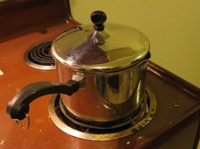 My life usually feels like this. I set out to do make something nice, and I end up with a scorched side dish, charred burgers, and crunchy peas. The output barely resembles that delicious-looking picture in Cooking Light, but hey, the toy trains are running on time!
 This is the time of the year for everybody to make lame, half-hearted resolutions about how they’re going to lead a better life in the new year: lose weight, stop smoking, eat less fried cheese, take a ceramics class, etc. My gym is already full of flabby, confused-looking people who spend more time adjusting their iPod cases and checking out their new track suits in the mirror than actually doing reps. I usually treat January as my month to be lazy; I stay away from the gym for a few weeks until the interlopers poop out.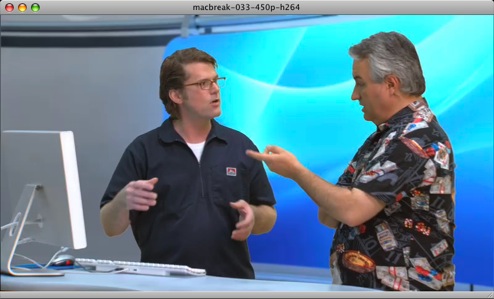


| EXPLORE 43Folders | THE GOOD STUFF |


