Drowning in email? Try Inbox Zero to learn sane tips for dealing with high-volume email. And don’t miss the free Inbox Zero video. »
Register for free on 43 Folders to comment on articles, post to our forum, customize your visits, and much more. Current users can login now.
iGTD: Strong OS X app with powerful Quicksilver integration
Merlin Mann | Apr 8 2007
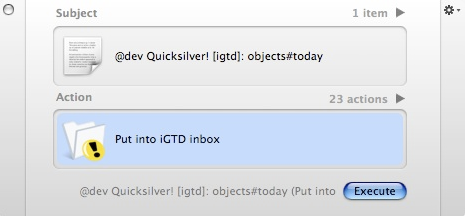
As I mentioned on MacBreak Weekly the other day, I’m very impressed with what I’ve seen so far in iGTD, a new “Getting Things Done” application for OS X. It feels like a solid, powerful, and practical tool for managing action, and I’m pleased to say it’s steered clear of a lot of the GTD-ish visual theatricality that, in my opinion, has made some of the apps out there more pretty and fun to use than they are useful in the context of a mature, streamlined system. I mention iGTD here because, in playing with it yesterday, I turned up this excellent page about iGTD’s Quicksilver integration. Pretty mind-blowing (albeit geeky) stuff, since the detailed syntax allows you to enter tasks via QS from anyplace, while still identifying project name, context, priority, date due — and even allowing you to add a note.
(BTW, that image will make more sense after you read the whole page) I encourage you to have a look at iGTD if you get a chance and take it for a spin. It’s evolving very quickly, with new updates available seemingly every time I open the app. Like any GTD tool, it won’t be perfect for everyone, but in my own testing over a couple days, I’ve found it to be one of the clear leaders in what’s quickly becoming a very crowded field. POSTED IN:
|
|
| EXPLORE 43Folders | THE GOOD STUFF |
I was using kGTD for...
I was using kGTD for a few months then tried a few other apps like GhostAction, Actiontastic and iGTD, but they all suffer from the same problem: NO PRINTING options. I kind of think this should be a no-brainer for a serious GTD app. I only use a Mac at home so portable context lists are a must for me and I haven’t seen a GTD solution that beats a hacked Moleskine yet.
btw, for quicksilver newbies, in...
btw, for quicksilver newbies, in order to get quicksilver to work with iGTD (and maybe other apps as well?), you have to tab in order to ‘enter’ the text in quicksilver. if text box is still in text entry mode, nothing will happen when you press ‘execute’, other than QS disappearing as if it’s done it’s job.
Considering that I was using...
Considering that I was using iCal up until now, I love it! I was going to try to build something like this but, sadly, I’m new to Cocoa and the learning curve is a killer. However, I don’t think that I would’ve come close to the relative simplicity accomplished by this UI. It does a lot with a little.
barring paper, iGTD is the...
barring paper, iGTD is the best GTD app out there for mac. as mentioned above, the developer is on fire. today he added a pref which allows the user to specify path to the data file. experimentally, i put the data on .Mac. things seem to be working smoothly, and now my desktop and laptop can now read/write to the same datafile. (same thing can now easily being done if you use a USB-drive.)
downsides (for the moment)
Upsides
wow! I'm staying up...
wow!
I’m staying up late to move kGTD stuff over to iGTD. I loved kGTD, but had syncing errors, and lost confidence. I love how iGTD lets you look deep into your Contexts, Projects with just a glance. If the beer and cereal can hold out, I’ll be done by breakfast - and it will be worth it.
I've got to admit that...
I’ve got to admit that this ongoing Newton user has finally shifted the task management out of the Newton back to a laptop. iGTD is fabulous, integrates with Mail via MailTags, allows me to see my academic duties in several different slices, and really works great. I have used it for a few weeks now, and this weekend finally did the big last transition. Of course, since the Newton can subscribe to published calendars, I can still keep my tasks with me as I move about (I know, you don’t care), so it’s not a full shift.
iGTD has some really great features. The part that most appeals to me is the keyboard use. Perhaps equal to that is how I can link any file to a task and launch it from within iGTD. Deadline on reading? It’s in iGTD. Mail to answer today? There, too. A keystroke or click later, I’m opening the file, and happy not to have used the Finder. Very, very nice.
If you like iGTD, you...
If you like iGTD, you might want to check out Actiontastic, I tested both apps a few weeks ago (shameless but relevant plug to my blog article about it: http://minimaldesign.net/blog/GTD/actiontastic-vs-igtd ) and decided to go with Actiontastic. I was using kGTD before that and I believe they’re the two apps that stick the closest to the GTD system.
iGTD seems to evolve faster than Actiontastic in terms of feature, and I might have to try it out again sometime, but I think Actiontastic’s interpretation of GTD is spotless and that’s its big strength… btw, I’m not affiliated with Actiontastic in any way, shape, or form… Just an enthusiastic user :)
The Icons and embossed toolbar...
The Icons and embossed toolbar buttons have got to go. He needs some UI polish as well. I wish he’d open this thing up to open source, because I’d gladly contribute.
It's very impressive. ...
It’s very impressive. If I wasn’t a Kinkless guy through and through…
It’s very hard to shift your workflow, especially after it’s been about 18 months or so and it’s finally feeling like you’re getting it…
I just wish it imported a Kinkless file…sigh….
it’s hard to face moving my Kinkless file over to it with the thought of Omnifocus coming down the pipeline and given that Kinkless already works so well.
Extremely impressive and features just...
Extremely impressive and features just keep rolling out - quite amazing!! I retired Kinkless for iGTD and no regrets as for Omnifocus what’s that?
Tommy: The other Mac GTD...
Tommy: The other Mac GTD developers must be hating Omni these days - every time I read about a Mac user they’re waiting to see what Omnifocus is going to be like!
How does this program compare...
How does this program compare with what you’ve seen of Omnifocus so far?
[...] Merlin Mann over at...
[…] Merlin Mann over at 43folders.com also has good things to say about iGTD. […]
"it’s hard to face moving...
“it’s hard to face moving my Kinkless file over to it with the thought of Omnifocus coming down the pipeline”
This is the power of vaporware. FUD is a marketing strategy.
Hands down, the best m'f'ing...
Hands down, the best m’f’ing GTD app I’ve seen, used, explored. I heard about it on MacBreak weekly, downloaded, and am now converted.
1) Powerful 2) Simple/Uncluttered (and doesn’t try to overdo things for you 3) Keyboard VERY-friendly 4) better syncing to iCal & palm than kGTD EVER was/is 5) Developer is VERY active, and responsive to suggestions/etc.
I immediately donated $ to him, and without reservation URGE you to check it out. This is really something. IMHO- the PERFECT balance of functionality with GUI goodness.
I just spent an hour...
I just spent an hour converting from kGTD to iGTD. This is exactly the type of app I’ve been waiting for. Forget about OmniFocus. iGTD is slick, very usable and FREE!
I’ve only been using kGTD for 3 months or so, and overall it has been great as well. But I hate clicking that sync button :)
OmniFocus would have to really come up with something fantastic to make me want to switch from iGTD.
The thing about Kinkless is...
The thing about Kinkless is that it works really well right now. - QS for input - iCal for getting through my week - Palm syncing
I don’t have to think about it, it flows really well.
I’ve bought most every piece of Omni software they’ve put out and OF will import Kinkless so it might be vaporware but it’s vaporware from people I trust and… the interim is working just fine.
iGTD looks really great though… and it’s interesting how crowded this market got as we’ve waited for Omni to deliver.
[...] The iGTD app has...
[…] The iGTD app has now grown to be a clear leader allowing a very flexible GTD workflow and great development support… Grab it and use it, you will be gladread more | digg story […]
I don't think the developer...
I don’t think the developer sleeps. This program keeps getting better and better. I’ve looked at a lot of the options and this one shows the most promise as well as being the most useful as it stands right now.
As a FORMER kGTD user...
As a FORMER kGTD user (who registered Omnioutliner (just for kGTD) - this new app is a GODSEND.
Really, Hat’s off to Ethan at Kinkless, but the learning curve, documentation, and (buggy kGTD files- had 3 go corrupt), and syncing issues make (IMHO, YMMV, insert standard disclaimer here) iGTD a CLEAR winner.
It’s just plain simple and solid, and for ME, allows me to get things done. If kGTD is better for YOU, by all means, keep on going - it’s a great fix/etc. until “OmniFocus/Fu/VaporWare” appears.
If you’re struggling with kTD or are looking for a solution. I HIGHLY urge you to check out iGTD.
I haven't used any of...
I haven’t used any of these other GTD apps (learning curve; didn’t look like exactly what I needed; I don’t use a Mac at work, only at home) but iGTD looked so promising, and was so easy to start using (I downloaded it 2 days ago), and fits so well with the way I work — I think this might be the killer app (apologies to all the other wonderful Mac-only software out there) that gets me to finally cut myself loose from the dark side (must … have … Macs … everywhere) ;-) This guy is wonderful!! … I’m thinking of learning Polish :-)
[...] I’ve never been a...
[…] I’ve never been a big organizer, but there are definitely some very useful functions from something that just popped up heavily in the blogosphere–iGTD. Merlin Mann, blogger of 43folders, recently wrote a review that helped me head on over. Basically, the app allows you to create several different projects or categories in which you can place various things that need to ‘get done.’ The name, iGTD, stands for (getting things done.) Merlin Mann helped start the ‘revolution’ of getting things done–or better, coined the term. […]
Close. Syncing between two...
Close. Syncing between two Macs doesn’t work quite right, as part of a .Mac workflow. You can save your data to an iDisk or a USB stick, but the two different iGTDs don’t mesh up when it comes to syncing with iCal (which syncs through .Mac already). It doesn’t see that an item on iCal that got there through iCal syncing is the same item in iGTD if that particual instance of iGTD didn’t put it there. You end up with duplicate calendars, etc. Maybe there’s a way to go about it, but frankly for now I am going to stick to an iCal-only solution.
I feel kind of guilty...
I feel kind of guilty because I had just about settled on Actiontastic when I downloaded iGTD and started playing with it a few days ago. Prior to that, I strongly favored Actiontastic because of its simplicity and nearly-vertical learning curve, and was just getting into its QS integration. iGTD has a lot of the same stuff going for it, and it is kind of pretty. The no-reordering business is something I hadn’t noticed yet, but I can imagine that I’d find that problematic. So maybe I’ll be back to Actiontastic in the end (what I need to do, is stop fiddling and pick one and just use it…)
It’s interesting to see how many people have a problem with no printing; this hadn’t even occurred to me. Syncing would be great, but syncing in general is so fraught with problems that I hadn’t even tried it with an organization app. I’m still finding my way into a trusted system, but I’m curious if anyone else has settled into regularly using more than one thing - I find that I use GTDmail and Actiontastic both, and in nonoverlapping ways. A mail-based system is great because it’s always in my face, being on e-mail so much anyway, and it’s everywhere I go. The organization app is great for breaking projects or schedules into NA pieces. Anyone else find this?
I tried iGTD a few...
I tried iGTD a few weeks ago but haven’t taken the time to switch things over from kGTD. Omnigroup is really missing the boat here as people move from Kinkless to iGTD and others as they keep promising betas.
BZ
AGH! i checked out iGTD, thought...
AGH!
i checked out iGTD, thought it looked snazzy, synced some new.old conctexts to iCal and LOST EVERY SINGLE ENTRY IN ICAL.
Careful, i dunno if this is a bug or what, but backup before running this app!!!
I've been using this program...
I’ve been using this program for a little bit now, after hearing about it on MacBreak Weekly. I have to say while I haven’t fully explored the integration with QS, it seems to be a good, solid program and I think it’ll help me out immensely.
[...] iGTD is a fantastic...
[…] iGTD is a fantastic GTD app - and i’ve tried em all (kinkless, actiontastic, etc, etc…). it’s made by a 26yo polish developer, and it’s the first Mac app he’s ever written. very impressive. there’s been a rash of GTD apps coming out (mostly for Mac), and this is the first really usable one that i’ve found. Merlin Mann, the GTD evangelist, also likes it. […]
[...] iGTD looks attractive, but...
[…] iGTD looks attractive, but as I said before: a moving target. Merlin has picked up on iGTD now, so it’ll be interesting to see if the extra attention affects development. […]
This looks great, would love...
This looks great, would love to use it. Does it sync with Entourage?