Drowning in email? Try Inbox Zero to learn sane tips for dealing with high-volume email. And don’t miss the free Inbox Zero video. »
”What’s 43 Folders?”
43Folders.com is Merlin Mann’s website about finding the time and attention to do your best creative work.
iGTD: Strong OS X app with powerful Quicksilver integration
Merlin Mann | Apr 8 2007
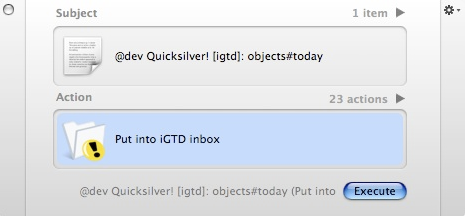
As I mentioned on MacBreak Weekly the other day, I’m very impressed with what I’ve seen so far in iGTD, a new “Getting Things Done” application for OS X. It feels like a solid, powerful, and practical tool for managing action, and I’m pleased to say it’s steered clear of a lot of the GTD-ish visual theatricality that, in my opinion, has made some of the apps out there more pretty and fun to use than they are useful in the context of a mature, streamlined system. I mention iGTD here because, in playing with it yesterday, I turned up this excellent page about iGTD’s Quicksilver integration. Pretty mind-blowing (albeit geeky) stuff, since the detailed syntax allows you to enter tasks via QS from anyplace, while still identifying project name, context, priority, date due — and even allowing you to add a note.
(BTW, that image will make more sense after you read the whole page) I encourage you to have a look at iGTD if you get a chance and take it for a spin. It’s evolving very quickly, with new updates available seemingly every time I open the app. Like any GTD tool, it won’t be perfect for everyone, but in my own testing over a couple days, I’ve found it to be one of the clear leaders in what’s quickly becoming a very crowded field. 48 Comments
POSTED IN:
![]() I was using kGTD for...Submitted by Ron (not verified) on April 8, 2007 - 9:47pm.
I was using kGTD for a few months then tried a few other apps like GhostAction, Actiontastic and iGTD, but they all suffer from the same problem: NO PRINTING options. I kind of think this should be a no-brainer for a serious GTD app. I only use a Mac at home so portable context lists are a must for me and I haven’t seen a GTD solution that beats a hacked Moleskine yet. »
![]() btw, for quicksilver newbies, in...Submitted by slb (not verified) on April 8, 2007 - 8:37pm.
btw, for quicksilver newbies, in order to get quicksilver to work with iGTD (and maybe other apps as well?), you have to tab in order to ‘enter’ the text in quicksilver. if text box is still in text entry mode, nothing will happen when you press ‘execute’, other than QS disappearing as if it’s done it’s job. »
![]() Considering that I was using...Submitted by Evan Light (not verified) on April 8, 2007 - 6:10pm.
Considering that I was using iCal up until now, I love it! I was going to try to build something like this but, sadly, I’m new to Cocoa and the learning curve is a killer. However, I don’t think that I would’ve come close to the relative simplicity accomplished by this UI. It does a lot with a little. »
![]() barring paper, iGTD is the...Submitted by slb (not verified) on April 8, 2007 - 8:10pm.
barring paper, iGTD is the best GTD app out there for mac. as mentioned above, the developer is on fire. today he added a pref which allows the user to specify path to the data file. experimentally, i put the data on .Mac. things seem to be working smoothly, and now my desktop and laptop can now read/write to the same datafile. (same thing can now easily being done if you use a USB-drive.) downsides (for the moment)
Upsides
»
![]() wow! I'm staying up...Submitted by Kelly (not verified) on April 8, 2007 - 5:43pm.
wow! I’m staying up late to move kGTD stuff over to iGTD. I loved kGTD, but had syncing errors, and lost confidence. I love how iGTD lets you look deep into your Contexts, Projects with just a glance. If the beer and cereal can hold out, I’ll be done by breakfast - and it will be worth it. »
![]() I've got to admit that...Submitted by Michael (not verified) on April 8, 2007 - 4:52pm.
I’ve got to admit that this ongoing Newton user has finally shifted the task management out of the Newton back to a laptop. iGTD is fabulous, integrates with Mail via MailTags, allows me to see my academic duties in several different slices, and really works great. I have used it for a few weeks now, and this weekend finally did the big last transition. Of course, since the Newton can subscribe to published calendars, I can still keep my tasks with me as I move about (I know, you don’t care), so it’s not a full shift. iGTD has some really great features. The part that most appeals to me is the keyboard use. Perhaps equal to that is how I can link any file to a task and launch it from within iGTD. Deadline on reading? It’s in iGTD. Mail to answer today? There, too. A keystroke or click later, I’m opening the file, and happy not to have used the Finder. Very, very nice. »
![]() If you like iGTD, you...Submitted by Yann (not verified) on April 8, 2007 - 4:04pm.
If you like iGTD, you might want to check out Actiontastic, I tested both apps a few weeks ago (shameless but relevant plug to my blog article about it: http://minimaldesign.net/blog/GTD/actiontastic-vs-igtd ) and decided to go with Actiontastic. I was using kGTD before that and I believe they’re the two apps that stick the closest to the GTD system. iGTD seems to evolve faster than Actiontastic in terms of feature, and I might have to try it out again sometime, but I think Actiontastic’s interpretation of GTD is spotless and that’s its big strength… btw, I’m not affiliated with Actiontastic in any way, shape, or form… Just an enthusiastic user :) »
![]() The Icons and embossed toolbar...Submitted by Justin Williams (not verified) on April 8, 2007 - 3:11pm.
The Icons and embossed toolbar buttons have got to go. He needs some UI polish as well. I wish he’d open this thing up to open source, because I’d gladly contribute. »
![]() It's very impressive. ...Submitted by TommyW (not verified) on April 8, 2007 - 8:45am.
It’s very impressive. If I wasn’t a Kinkless guy through and through… It’s very hard to shift your workflow, especially after it’s been about 18 months or so and it’s finally feeling like you’re getting it… I just wish it imported a Kinkless file…sigh…. it’s hard to face moving my Kinkless file over to it with the thought of Omnifocus coming down the pipeline and given that Kinkless already works so well. »
![]() Extremely impressive and features just...Submitted by ScottM (not verified) on April 8, 2007 - 8:53am.
Extremely impressive and features just keep rolling out - quite amazing!! I retired Kinkless for iGTD and no regrets as for Omnifocus what’s that? »
About Merlin MannBio Merlin Mann is an independent writer, speaker, and broadcaster. He’s best known for being the guy who started the website you’re reading right now. He lives in San Francisco, does lots of public speaking, and helps make cool things like You Look Nice Today. Also? He looks like this, answers questions, and has something like a life. The best thing Merlin’s ever written is a short essay called, “Better.” |
|
| EXPLORE 43Folders | THE GOOD STUFF |