Merlin’s weekly podcast with Dan Benjamin. We talk about creativity, independence, and making things you love.
ApplicationsCeltx: Powerful Free App for Script Writing, Pre-Production, and CollaborationMerlin Mann | Feb 1 2009
celtx - Integrated Media Pre-Production QPR - CryingStore - "Cold Tulips" by merlinmann (Celtx - Project Central) I've recently returned to using the Open Source (MPL-based CePL license) Celtx app for all the script-ish stuff I write. But it does a lot more than just collect and format drafts (which, unlike a text file or MS Word, Celtx does in a way that lets you focus solely on writing, rather than fiddly formatting). It's also an amazingly flexible and robust app for managing all the pre-production materials for screenplays, comics, audio plays, or what have you. And, again: it's totally free. read more »POSTED IN:
Ubiquity: Firefox Gets its Quicksilver OnMerlin Mann | Aug 27 2008Aza’s Thoughts » Ubiquity In Depth Take a few minutes this week to look at the Ubiquity plugin for Firefox. So far, I've spent just enough time with it to have my mind blown by the Quicksilver-like interface it wants to bring to web browsing. read more »POSTED IN:
Delicious.com Relaunches with 1,000-Character Notes FieldsMerlin Mann | Jul 31 2008
Oh happy day — the new Delicious is here In the years since del.icio.us was acquired by Yahoo! it’s been hard to get why it remained such a red-headed stepchild. Despite an unbelievable lead in both mindshare, functionality, and ease-of-use (yeah, it’s been my preferred bookmarker for years), del.icio.us seemed to sit there while a dozen social bookmarking sites lapped it with fancier designs and (mostly superfluous) new features. Yay, Yahoo. Today Y! revealed a beautiful new version of the site, redubbed Delicious.com. You’ve probably read way too much about this, but I want to highlight exactly one new feature: big, 1000-character notes fields.
POSTED IN:
iPhone Apps I'd Totally BuyMerlin Mann | Jul 17 2008
But it got me thinking about the stuff I want -- the itches I want to scratch. So, iPhone developer friends. Please make these three apps. read more »52 Comments
POSTED IN:
3 iPhone Media Apps (that Feel a Little Like Magic)Merlin Mann | Jul 16 2008
POSTED IN:
Quicksilver's Back; Nerd Hope Cautiously RestoredMerlin Mann | Jul 8 2008New Quicksilver builds | Hawk Wings
Since going open source late last year, things have seemed pretty quiet in the world of our favorite app launcher, Quicksilver. Today, our pal, Tim Gaden of Hawk Wings, posts on the availability of a bug fix release of Quicksilver that's come out in the last few weeks. He also points to a thread on the QS Google Group that suggests Quicksilver's auteur and flippered mystery bot, A1c0r, is currently hard at work on a substantial rewrite.
The post by user Patrick also refers to a separate, similarly numbered "Ankur's cleaned-up QS version," which refers to the work Ankur Kothari has been doing primarily to reduce the weight of Quicksilver's code. These have been white knuckle months for me (and a lot of other Quicksilver nerds), dreading the inevitable OS X update that might break the aging Quicksilver build we've been using. This all seems like encouraging news -- although you have to hope at some point the different folks working on improvements will be able to consolidate their efforts into one big, happy, branch. read more »POSTED IN:
Beeswax: Free Productivity App in the Spirit of Lotus AgendaMerlin Mann | Jun 28 2008
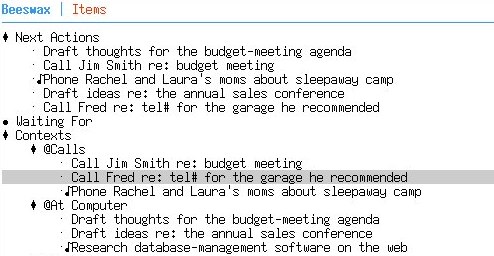
Beeswax - Mind Your Own Beeswax Wow, this looks like a really interesting project to watch — a GNU-licensed, command line productivity app that finds inspiration in a bona fide classic:
You still hear a lot of people saying Agenda is the closest they ever got to their dream productivity app. And, depending on who you ask, Agenda's endless flexibility was either incredibly powerful or infinitely fiddly. Beeswax is a very young application, but I’ll definitely be giving it a spin. There's certainly a long-standing itch for Agenda that lot of folks would love to have scratched. The Question to YouAny of the old hardcore Agenda folks tried out Beeswax yet? [via Anarchaia] read more »POSTED IN:
OmniFocus for iPhone: Location-Aware Contexts and MoreMerlin Mann | Jun 10 2008The Omni Group - OmniFocus for iPhone and iPod touch [Disclosure: I'm a consultant on the OmniFocus project. You can blame me for having requested any of the features you don't like.] Oh, man. It's so nice to lift the veil on this one. It's been like I knew you guys were getting the big Lego Millennium Falcon for Christmas, but I couldn't tell you until Santa had gone back up the chimney (in his black mock turtleneck and jeans). Anyway. Merry Christmas, Mac productivity nerds: iPhone synching for OmniFocus is coming. And it is gorgeous, usable, and location-aware. More here on OmniGroup's blog. From the OmniGroup site:
Yum. Screengrabs and more -- including a reminder that you should totally visit me at the WWDC OmniFocus meetup tonight -- after the iJump. read more »POSTED IN:
James Fallows on GTD appsMerlin Mann | May 2 2008Bright side #5: interesting GTD software, including for Mac The Atlantic writer (and recent Mac convert) James Fallows covers three apps that have caught his attention, including OmniFocus, ThinkingRock, and MonkeyWiki. Fallows says:
And, if you're in a real "grab the shovel" mood, don't miss his link to a metric buttload of GTD apps. As ever, though, friends, just remember: GTD's power is in what it does to your approach and to your thinking; it's not about magic beans and doo-dahs. Never allow yourself to obsess over tools to the exclusion of actually completing tasks. This is about action. POSTED IN:
Slate Magazine on the market for "Zenware"Matt Wood | Jan 24 2008Sort of an add-on to the New York Times piece Merlin linked the other day about Scrivener and its cohort of new writing applications, Jeffrey MacIntyre at Slate coins a new term for programs that eschew the familiar, bloated twiddliness of Microsoft Office for simplicity: read more » POSTED IN:
|
|






| EXPLORE 43Folders | THE GOOD STUFF |


