Drowning in email? Try Inbox Zero to learn sane tips for dealing with high-volume email. And don’t miss the free Inbox Zero video. »
Register for free on 43 Folders to comment on articles, post to our forum, customize your visits, and much more. Current users can login now.
Stikkit: Magic words, functional emails, and a handy cheat sheet
Merlin Mann | Feb 7 2007
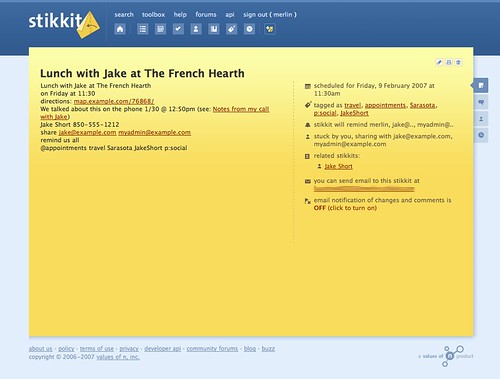
(Disclosure: I’m a proud member of Stikkit’s advisory board) As promised, I wanted to start sharing some of the reasons I’ve been digging Stikkit, so I thought I’d begin at the beginning: Stikkit’s use of “magic words” to do stuff based on your typing natural (albeit geeky) language into a blank note. There’s a lot more to Stikkit than magic words, but this is a great place to start. (And, yeah, future posts will be more about how to implement stuff with Stikkit, but it’s worthwhile to start with the mechanics.) [Note: this is one of those posts that you might want to print out] So let’s say I want to schedule lunch with my old roommate, Jake, during a notional trip to Sarasota later this week. I might create a new blank stikkit then add the following contents:
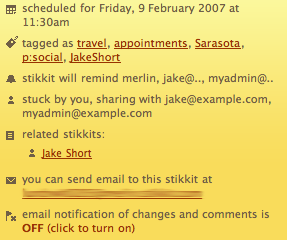
Ok, first — and as usual with my infamously over-the-top demos — there’s a lot more going on here than is strictly necessary (e.g., I could have just typed “ After the cut are a couple more detailed pics, followed by an explanation of what’s happening in my example, as well as an Unofficial Stikkit Cheat Sheet. So where ’s the magic here? Well, roughly in order of appearance…
So Stikkit seems pretty smart in its own way. Once you and Stikkit get good at talking with each other, it’s generally smooth sailing. Now let’s go back and have a look at the email that my pal, Jake, will get out of this:
A few things to note.
I realize this is a lot to digest, and you may want to just jump in and play with this for yourself. If so, it helps a lot to have a copy of the basic "magic words" in Stikkit (provided below). I also highly recommend visiting the Stikkit forums, where Michael Buffington maintains a terrific collection of tutorials and screencasts, and where many like-minded Stikkiteers participate actively in discussions, sharing hacks, and so on. # Stikkit Cheat SheetBoosted directly from the Stikkit Help window.
As you can see, there’s a lot going on in Stikkit, so this will most likely evolve into a regular feature here. I’m planning posts that’ll show you how to use Stikkit as your calendar and appointment maker, as a meeting notes app + light project management tool, as well as how you can set Stikkit up as a basic GTD-like personal producivity system. N.B.: Comments for the post are open, but I have to warn you in advance that I’m not exactly a Level 3 support stud (and, believe me, you will have a lot of questions about how Stikkit works). The forums are much better staffed for troubleshooting, getting help, and hosting clever remarks on server uptime. Still, I’m happy to talk about the example above and field any questions that I’m qualified to answer. (Disclosure reminder: I’m a proud member of Stikkit’s advisory board) 40 Comments
POSTED IN:
![]() Neat. Now give me...Submitted by GB (not verified) on February 11, 2007 - 3:38pm.
Neat. Now give me a standalone application that fits on a USB key and lets me use it at Starbucks without paying for WiFi access. » POSTED IN:
![]() [...] Merlin Mann, aka the...Submitted by ./innovate » Introduction to Stikkit (not verified) on February 14, 2007 - 11:25pm.
[…] Merlin Mann, aka the god of productivity at 43folders (which I read religiously) created a cheat sheet for Stikkit as well as some tips on using this neat little application. With my schedule right now, I don’t have the time to make changes to my GTD work-flow at the moment (using iCal and running Tracks locally). One thing I may not like about Stikkit will definitely be the inability to run it locally. The beauty of Tracks is I can run it locally on my portable and all the information is with me everywhere I go. Stikkit does look promising and I very well may try it out after I’m done with my midterms. However, the requirement of being “connected’ probably just wont cut it. Nevertheless, this introduction to Stikkit will definitely come in handy when I give Stikkit a serious look in the near future. Share and Enjoy: These icons link to social bookmarking sites where readers can share and discover new web pages. […] » POSTED IN:
![]() [...] read more | digg...Submitted by Multiplayer.ro » Blog Archive » Stikkit: Magic w (not verified) on February 8, 2007 - 6:11am.
[…] read more | digg story […] » POSTED IN:
![]() This article just made me...Submitted by George Penston (not verified) on February 8, 2007 - 9:08pm.
This article just made me take a good second look at stikkit. I often find myself signing up for the next big thing that comes out but soon lose interest after tinkering around with it for a few minutes. Thus was the fate of stikkit. But after reading through Merlin’s quick rundown of stikkit, I “got” it. Yes, it is very akin to Netwon’s natural intelligence: “Fax this to Bob”. I just copied everything that I was using Basecamp for over to stikkits and imported my entire Mac Address Book in a matter of minutes. Is stikkit for everybody? Probably not. Is it for those that get where user interface is going or should be going? Most definitely. This smart/thinking functionality that starts to understand context is where we should be going. Why we’re not all speaking to our mirrors and walls in house asking for today’s agenda before we get into our flying cars still gets me. As usual, thanks Merlin for pointing out the good stuff. » POSTED IN:
![]() [...] February 8, 2007 at...Submitted by Stikkit: Magic words, functional emails, and a handy cheat s (not verified) on February 8, 2007 - 7:48pm.
[…] February 8, 2007 at 8:00 pm · Filed under Uncategorized Stikkit: Magic words, functional emails, and a handy cheat sheet “As promised, I wanted to start sharing some of the reasons I ’ve been digging Stikkit, so I thought I’d begin at the beginning: Stikkit’s use of “magic words” to do stuff based on your typing natural (albeit geeky) language into a blank note.” 43Folders[news][entertainment][technology][software] […] » POSTED IN:
![]() [...] Starting from hyped application...Submitted by eDragonu - the choice of a personal path » List of GTD (not verified) on February 8, 2007 - 11:46am.
[…] Starting from hyped application that doesn’t yet exists, like OmniFocus, to recently strategically planned online apps, like Stikkit, which succesfully embarked Merlin Mann from the famous 43folders.com in their advisor’s staff. I think that was, from a PR viewpoint, an extremely good move, and I know for sure that the guys from Omni had the opportunity to do the same. Merlin politely stated that his support for OmniFocus is pro-bono, but the real thing is that his consulting services are a real gem. I mean, not only by their objective value, which I really doubt that can be challenged, but by the visibility and endorsment they could get by offically having Merlin in their team. That would gave them a huge advantage. From what I saw, Merlin took his advisor work very seriously (which I always knew he would) and gave us some insights, the stikkit thing looks pretty promising. […] » POSTED IN:
![]() [...] Now, however, I’ve just...Submitted by bojo » Intelligence and language, via Stikkit (not verified) on February 8, 2007 - 10:24am.
[…] Now, however, I’ve just found a great post by Merlin Mann in which he reveals exactly what Stikkit can do. It goes into some detail about how you can really get a lot out of using the magic words and the quite incredible (well, I think so) editing of shared files by email. […] » POSTED IN:
![]() Awesome Link Reads: 02.08... 6 Reasons...Submitted by Management, leadership & personal development of a young (not verified) on February 8, 2007 - 6:16am.
Awesome Link Reads: 02.08…
It Might Be Time to Take a Risk if… (Christine Kane) Stikkit: Magic words, functional emails, and a handy cheat sheet (43 Folders) Create New Habits: Self-Regulation (Senia) Why you need to wo… » POSTED IN:
![]() I guess I fall into...Submitted by Alessandro (not verified) on February 8, 2007 - 8:19am.
I guess I fall into the geeky category of people who would use the special features of stikkit. With one GIGANTIC caveat: There is no way in hades that I would ever use a Web app for this purpose. I currently use Natara’s Daynotes which syncs up to my Palm to keep track of everything that happens that’s worth keeping track of. Since the solution is local to my desktop and my PDA, both of which are secured against intrusion, I can use Daynotes for the most mundane and the most critical of purposes…. including jotting down important bank account information etc. etc. Stikkit would only serve me in the superficial life, and that would mean having to split my entry into two places. No go. the technology is cool, but I won’t bite. » POSTED IN:
![]() I think Stikkit is a...Submitted by Raymond (not verified) on February 7, 2007 - 9:37am.
I think Stikkit is a neat idea, but largely because of the example above, I fear it will only appeal to hardcore techies who would otherwise be using a plain text editor. For them, it’s a great idea. But for me, it’s just a fluorescent text editor on the web with strange and finicky features, that doesn’t work well with Safari, and may or may not at some point decide to charge me for it. I just can’t see it passing a “tipping point.” » POSTED IN:
![]() [...] Over at 43 Folders,...Submitted by Dubroy.com/blog » Back to the Future Part II (not verified) on February 7, 2007 - 10:55am.
[…] Over at 43 Folders, Merlin gives a demonstration of Stikkit. Merlin gives an example of Stikkit’s “magic words” — commands that Stikkit parses from each note. After my post on Humanized’s Enso, I’m starting to notice a trend here — it looks like the command line is making a comeback. A post at Lifehacker earlier this month noted that search boxes are also command line interfaces. […] » POSTED IN:
![]() Unfortunately, my company has now...Submitted by Darryl (not verified) on February 7, 2007 - 11:00am.
Unfortunately, my company has now filtered out Flickr as a “website-non-grata” at work, so I can’t see the photos. » POSTED IN:
![]() Thank you Merlin. I am really...Submitted by Nik Steffen (not verified) on February 7, 2007 - 9:06am.
Thank you Merlin. I am really getting into Stikkit, and these Guides are helping me more and more. » POSTED IN:
![]() This reminds me of Lotus...Submitted by Abram Cove (not verified) on February 9, 2007 - 6:45pm.
This reminds me of Lotus Agenda. A program I sorely miss. » POSTED IN:
![]() I used to sell CRM...Submitted by Eric (not verified) on February 9, 2007 - 5:50pm.
I used to sell CRM software back in the “salad days”. With that said the advent of a web application such a Stikkit with such a very smart AI to interpret layman parlance is a quantum leap. I’ve been using it via IMified, Quicksilver (mac), BB email, and the droplet in Safari. Stikkit in tandem with Gcal and Spanning Sync blows the shit out of any IBM, Siebel, Oracle, blah, blah, blah enterprise app that is out there. These are the days I’ve been dreaming of. » POSTED IN:
![]() [...] Stikkit tutorial: Mastering “magic...Submitted by Kolz Blog » Blog Archive » Stikkit tutorial: Mas (not verified) on February 9, 2007 - 5:56pm.
[…] Stikkit tutorial: Mastering “magic words” February 8th, 2007 by Lifehacker Previously-mentioned webapp Stikkit was included on my best apps of 2006 because of its flexibility and smarts. Now, fellow lifehacker and Stikkit advisor Merlin Mann breaks down Stikkit’s “magic words” for denoting the types of data inside your freehand notes. Like a wiki, Stikkit’s entry format looks strange to a newcomer, but those unintuitive-but-not-hard-to-learn “magic words” unlock a whole lot of smarts on Stikkit’s end. If you’re looking for a flexible, web-based personal organizer for contacts, notes, events, todo’s and collaborating, Stikkit’s it. Check out Merlin’s demo for a primer. — Gina Trapani Stikkit: Magic words, functional emails, and a handy cheat sheet [43 Folders] […] » POSTED IN:
![]() [...] For the past few...Submitted by public MattBerther : ISerializable » Blog Archive &raq (not verified) on February 9, 2007 - 10:05am.
[…] For the past few days, I’ve been using this sexy new web application called Stikkit. I first heard about Stikkit from Merlin’s 43 Folders, and was really intrigued by the ability to do stuff based on natural language. I’d suggest reading Merlin’s post on how the magic words work. It’s pretty fantastic once you wrap your head around it. […] » POSTED IN:
![]() I decided to dive into...Submitted by Daniel (not verified) on February 9, 2007 - 9:39am.
I decided to dive into Stikkit completely yesterday, after this. Actually, this was really my first bigand full-hearted foray into relying on web apps altogether, and so far I think it’s working out! I’ve got iNik’s scripty goodness all going, and now with the Quicksilver action, Stikkit has become so insanely easy to make a part of my everyday workflow that it’s seriously standing a good chance of replacing a lot of my “other stuff”. In essence, I really see Stikkit as becoming my daily Scratch Pad. I have a text file that I use Quicksilver’s append-text action with, but Stikkit really adds to that and clarifies tasks, calendar items, and everything – plus, pipes them imediately into iCal for me. Not bad for jotting down a few scribbles and “magic words”. I don’t think Stikkit is going to replace kGTD for me, or OmniFocus when it comes out. But for relatively mindless reminders and as a “scratch pad” for things I’m not invested enough in or are just quick thoughts that need jotted down, Stikkit is really, REALLY fantastic. Plus: It’s iPhone-ready, come June! » POSTED IN:
![]() As I noted in my...Submitted by Patrick D (not verified) on February 7, 2007 - 11:00am.
As I noted in my post (trackbacked above), I find it kinda funny to think about using what is basically a command-line interface. But, I have to say, that email editing feature is super cool, and wouldn’t be possible without Stikkit’s “magic words” » POSTED IN:
![]() While the English-like aspect of...Submitted by Stephen (not verified) on February 7, 2007 - 11:10am.
While the English-like aspect of Stikkit is nice, it is more verbose than I would like. Requiring “with” after “share” seems gratuitous when “share:” would do nicely. Synonyms like “get”, “buy”, and “make” seem like a recipe for ambiguity. Unless they have different interpretations, it would be easier to use “do”. An adjective might be added to distinguish getting the dog from the vet (“do:pickup”) and getting a dog from a pet shop (“do:buy”). Perhaps I’ve missed the boat because I haven’t explored Stikkit enough, but I think the aim of being intuitive is overrated. Instead, I would aim for simplicity with a well defined set of reserved words and flexible ways of combining them. » POSTED IN:
![]() I guess what goes around...Submitted by Frank (not verified) on February 7, 2007 - 11:28am.
I guess what goes around comes around — this reminds me of the Newton’s Intelligent Assistance keywords, that allowed you to set up an appointment by scrawling “Lunch with Jake next Tuesday at The French Hearth”, highlight it, choose assist, and get an appointment in the right place with the right fields filled out. I presume we won’t have long to wait for a Stikkit/QuickSilver interface…Oops. Already done. » POSTED IN:
![]() It looks like you are...Submitted by Paulo Neves (not verified) on February 7, 2007 - 12:22pm.
It looks like you are in the correct interface path: http://www.jnd.org/dn.mss/ui_breakthroughcomma.html » POSTED IN:
![]() [...] I just came across...Submitted by Uncover The Internet » Stikkit (not verified) on February 7, 2007 - 2:02pm.
[…] I just came across the Stikkit site after reading an article by Merlin Mann on his 43 Folders site. Merlin is on the advisory board of Stikkit, but has decided to share a little bit about this new application that allows for making quick notes and sharing those notes and details much simpler. Stikkit makes organizing your daily details as simple as jotting down a note or firing off email. Stikkit’s “little yellow notes that think” talk to the productivity applications you already use, as well as to friends, coworkers and family, giving you a universal remote for your life. […] » POSTED IN:
![]() [...] I recently highlighted an...Submitted by Emerging Earth - Stikkit - Great, but let’s take it a (not verified) on February 7, 2007 - 2:03pm.
[…] I recently highlighted an interesting little application called Stikkit on my Uncover the Internet site. I found the original application from Merlin Mann’s 43 Folders site for general life productivity and hacking tips. […] » POSTED IN:
![]() I agree that this will...Submitted by ted russ (not verified) on February 7, 2007 - 3:11pm.
I agree that this will appeal to us techie types much more. And I appreciate that most people will only do the “(e.g., I could have just typed “Lunch with Jake on Friday at 11:30” and been done with it)” kind of entry. But then those people are wasting the power of stikkit, and might as well stick to outlook. If stikkit picked up contexts or nocontexts without the ! and @ then it would be better, but montechie muggles would still get confused. Is that “remind” I use, or “reminder”? And did I accidentally type !1:30 and actually mean 11:30? And is that going to remind Jake or not? You see the problem? Stikkit is technically excellent but muggles aren’t… If the editor window could toggle between GUI mode and text editor then a lot more people would find it easier to use. With fields for each item, then the muggles are happy, and power users can go to the text field. Here are two more features you may want to think about: Allow Google Calendar/Outlook/Yahoo Calendar etc to be sent an event from Stikkit. I know, it can be done with iCal but who knows and who has time to add each note to their calendar(s)? This would ensure that the notes get used. Secondly - and if I’m reinventing the wheel here please forgive me I had trouble getting on the site due to a lousy ADSL connection here - but if I could email “myusername@stikkit.com” with a new appointment that would be pretty much deluxe. So - I like what I’ve seen so far, will get on the site and have a look. One suggestion - sell the idea to Google to add to their Notepad. Nope I’m nothing to do with G but I recognise a good fit when I see it. » POSTED IN:
![]() Like you said in your...Submitted by Suzanne (not verified) on February 7, 2007 - 4:15pm.
Like you said in your post, Merlin, “there is a lot to digest” with Stikkit. I just started using Gubb.net, which I heard about on LIfehacker. It is simple, clear and easy to use. The best place for me to stay productive and keep track of my lists. Not as complicated as the this site here, it is straightforward and useful. » POSTED IN:
![]() Since this is coming from...Submitted by CyberZombie (not verified) on February 7, 2007 - 4:23pm.
Since this is coming from Merlin/43folders, can we assume that there will be GTD functionality soon? » POSTED IN:
![]() Sorry Merlin, I think you...Submitted by mcogilvie (not verified) on February 7, 2007 - 6:21pm.
Sorry Merlin, I think you drank the koolaid on this one. Stikkit seems slow and doesn’t work 100% as advertised. Plus, it’s just yet another web 2.0 application (yaw2a). The intelligent parsing idea was in Lotus Agenda (BW- before Windows) and failed, as have other attempts. » POSTED IN:
![]() Hi guys - I thought...Submitted by Michael Buffington (not verified) on February 7, 2007 - 6:45pm.
Hi guys - I thought I’d jump in and answer a few questions and comments (thanks for all the tips and ideas as well - totally great to see): Raymond - I think to some degree you’re right - perhaps a lot of the power of Stikkit will at first be lost on normal, non-techie types, but we know that non-techie types are beginning to get the concept and really begin to run with it. If you’re a hardcore tech, then yeah, you might think of clever ways to do similar things in emacs. Stikkit allows you to get has hardcore as you want, or it allows you to be effective only using a tiny bit of what it’s capable of. Ted - I’m not quite sure it’s a problem if people are, as you say, “wasting the power of Stikkit”. If you only use it to book your lunch appointments, and for you, it’s the best tool out there to book your lunch appointments, I consider that success. If 100% of what you know about the application handles 100% of what you would use it for anyway, it’s probably a perfect fit. It’d be neat if everyone used all the features, because I think it makes for a great organization pocket knife, but it’s certainly not a waste if they don’t. Regarding “context” and “non-contexts”, we have a feature we call salutations that you might be interested in. If you precede a paragraph with a salutation (like so: “stikkit, today is my birthday”), stikkit only pays attention to that paragraph, or any other paragraphs that also have salutations. This is particularly useful when using email with Stikkit. And yes, every Stikkit account has it’s own special email address that you can send email to to create Stikkits. Stikkits themselves also get their own email address. CyberZombie: We are very interested in making it friendly to the GTD crowd. We have a dedicated GTD forum (just created today), and I’m certain we’ll let some of the best suggestions made there trickle into the application at some point. » POSTED IN:
![]() (")Lotus Agenda failed(")? Yes, and...Submitted by Chris Lord (not verified) on February 7, 2007 - 7:10pm.
(“)Lotus Agenda failed(“)? Yes, and what a shame. I am still waiting for the innovations of Agenda and Improv to resurface. What software! What a shame! » POSTED IN:
|
|
| EXPLORE 43Folders | THE GOOD STUFF |