Drowning in email? Try Inbox Zero to learn sane tips for dealing with high-volume email. And don’t miss the free Inbox Zero video. »
Register for free on 43 Folders to comment on articles, post to our forum, customize your visits, and much more. Current users can login now.
John Norris: More HPDA templates and 'the Meta Line Organizer'
Merlin Mann | Jun 16 2005
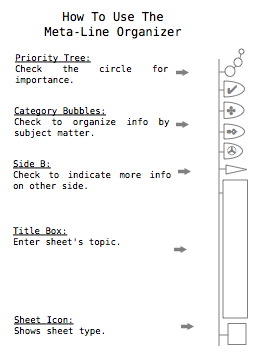
John Norris [John Norris’ Hipster PDA Templates] On the heels of Douglas’s wonderful DIY templates for the Hipster PDA, I’m now directed to these amazing templates from John Norris. John’s got some very creative ideas at play here, including miniature versions of games like chess; a small world map with time zones; music staffs; semaphore code (semaphore code!); and a variety of other lightly-structured templates. The most fascinating addition to the standard card is what he calls the “Meta Line Organizer” (how-to image)—a series of icons, fields, and fill-bubbles that run the vertical length of the card. They afford a fast, lightweight method for organizing and prioritizing your cards and then quickly identifying their purpose on the run. Really terrific stuff. It’s funny—I was telling a reporter yesterday how the whole Hipster PDA phenomenon has been such an unlikely instance of “Stone Soup“—what started as this jokey reaction to excessive personal technology keeps evolving into something smarter and more creative that I ever imagined. People are making thoughtful, deliberate decisions about how they capture data on the go, and having a framework—even one as admittedly dopey as the HPDA— apparently has enabled some very creative, clever ideas. Nice work, everybody, and especially: nice work, John! [Link: Matt Peck] POSTED IN:
|
|
| EXPLORE 43Folders | THE GOOD STUFF |
Does anyone know what those...
Does anyone know what those Category bubble icons stand for? I’m guessing the checkmark is for a to do list but the rest?
At a stab i'd guess...
At a stab i’d guess that you decide that for yourself. The symbology can represent whatever you want since it’s easier to draw a symbol than it is to draw a wee house in there or whatever to represent @home or its equivalent.
_Does anyone know what those...
Does anyone know what those Category bubble icons stand for?
I took them to be arbitrary generic icons, but I could see them being:
I'd like to think folks...
I’d like to think folks can make up whatever they want those bubble categories to be.
I used the dingbat font and chose things that seemed to fit my own needs. Further, they are different enough from each other making distinct visual clues for different categories. Hopefully that makes them useful for other folks.
For myself, the check mark is a to-do, the clover is for family stuff, the pen is for art, and the tape disk is for business.
Thanks to 43 Folders and Matt Peck for helping me share.
The time zone map is...
The time zone map is a bit too all-encompassing for my needs. This morning I put together a PDF of just the contiguous U.S. with several prominent cities and the time zone boundaries. If I understand how comments to this blog work, you can get it by clicking on my name.
Construction notes: I downloaded the outline map from http://fga.freac.fsu.edu/pdf/namerica/us_outline.pdf. The Florida Geographic Alliance provides geographic resources to teachers, so the PDF is intended to be downloaded and used. I imported it into AppleWorks, added the cities and timezones (with my trusty Rand McNally Road Atlas at my side), squeezed it down to HPDA size and “printed” it out as a PDF.
I drew the time zone boundaries reasonably accurately, but I didn’t do the fine detail because: first, the detail would get lost when reduced to 3x5; and second, my experience is that people who live near those boundaries figure out which time works best for them and don’t get too concerned with which side of the line they’re on.
The font size for the city names is on the edge of what I can see comfortably (I’m 45 yrs old and use “progressive lenses,” i.e., bifocals). After living with this version for a while, I may go back and increase the font size.
The paper ruler is a great idea; something I would use often if it weren’t a somewhat fuzzy bitmap. I may redo it as a crisp PDF this weekend.
One last thing, apropos of nothing: the list of commonly misspelled words in John Norris’s templates includes “Pokémon.” I find it amazing that the word Pokémon is used enough to be commonly mispelled.
When looking at Douglas Johnston's...
When looking at Douglas Johnston’s DIY hipster templates, I was having a really hard time with the concept of printing out and having on hand/in pocket all of these different card versions. What if I ran out of one particular card that I needed? Even if I am sitting at my desk I have to print out another of that specific even though I have plenty of the other types sitting right there already printed. Then yesterday, when I saw the new Meta-line organizer from John Norris, I realized that you could use his system in combination with Douglas Johnston’s version to create just one card that you could print out many copies of and fill in the bubble when you decide what type of “blank” you need. I print these on the backs of graph paper index cards so that I don’t waste valuable ink. This way there is always a blank sitting on top of your pile that has a header bar, a notes section, a checklist for next actions, shopping, projects, someday maybe etc… And on the other side there is always handy graph paper. Just fill in the “someday maybe” bubble and it becomes a “someday maybe” card. For the @home and @work labeling style, I added a top box and a very similar side labeling box.
I don't know if it...
I don’t know if it works, but i will give it a try! just for playing.
It looks interesting, maybe some one can come up with others versions.
Excellent post!
Very nice generic card, Jim....
Very nice generic card, Jim. I’d probably throw in a small number of weekly overviews, but other than that I can see myself using it as a standard version.
Did you consider making it available at a higher resolution or as a postscript / pdf file?
Merlin, et al: I join...
Merlin, et al: I join you in your amazement at the growth and interest in the Hipster PDA. Many of the ideas that I’ve seen are truly incredible in their creativity.
At the same time, I wonder if the spirit and goals of your original creation aren’t actually thwarted by so much of this. After all, you clearly do not eschew technology per se, but simply inefficiency and overuse of technology, right? And, while many PDAs (and their suggested usage) take things way too far in this way, do you think that some of the efforts to do “HPDA” templates and ready-mades also go too far? It seems like jumping through hoop after hoop just to tweak some document into index-card size is, in fact, re-inventing the wheel; if you really need to regularly refer to a time-zone map, for instance, wouldn’t it simply be better (more efficient, easier to maintain, etc.) to carry an electronic PDA? (Of course, if you don’t really need that time-zone map, then there is little question about efficiency and the time it takes to shoehorn it onto a card…)
I completely agree with the spirit of the HPDA concept; I just wonder if things haven’t gone way too far in some cases. As the mastermind behind this whole scheme, do you have any objective comments to make about this sort of contradiction?
Ed: Part of the beauty...
Ed: Part of the beauty of this approach addresses your concern elegantly, I think; if you don’t need the time zone card, don’t use it. Right? That’s why you roll your own. You wouldn’t stop using Palm OS because someone had invented a shareware game you thought was dumb; you just wouldn’t choose to make it part of your system.
In my opinion, the only repeating HPDA pattern that’s truly counter to the basic idea is “branded cards”—the idea that you would spend a very large amount extra for a card that’s got someone’s name or company printed on it. I’ve been approached by several companies wanting to make “43 Folders” cards, and I just kind of laughed. Cheap and easy to find are part of the idea, and not getting that is oddly funny to me. (This is just my own opinion and preference, of course—if “Acme Industries” cards turn people on—more power to them)
In general, your point is well taken, but I think there’s plenty of room for different personalities and interests in this particular overexposed meme; and given that the cost of entry is at least 1/100th of that required for a “real” PDA, I’m fine—nay, thrilled—with seeing people get creative, do whacky stuff, and test the edges of what will work best for them.
Ping me offline if you want to talk more.
Click on my name to...
Click on my name to download a crisp PDF ruler that fits on an index card. Metric along one edge, US customary along the other. It was generated through a simple PostScript program, which you can download through the same URL, but with a “ps” extension instead of a “pdf.”
Time for lunch. Reinventing wheels while jumping through hoops makes a man hungry.
Sounds great. But I can't...
Sounds great. But I can’t find any mention of it at the link!
disappointeddora: Assuming your comment was for...
disappointeddora:
Assuming your comment was for me, the PDF is at
http://www.leancrew.com/pdf/index-card-ruler.pdf
and the PostScript is at
http://www.leancrew.com/pdf/index-card-ruler.ps
Both these work for me. Sorry if my post wasn’t clear.
Ed's concerns are quite right....
Ed’s concerns are quite right. These ‘extra’ templates can be a distraction. However, as Merlin points out, they don’t cost much money to try and they may help some folks get things done.
For myself, some of mine were done tongue-in-cheek…poking a bit of fun at the Hipster, GTD, Planner idea. However, they do help expand the Hipster concept and may lead to new ideas that may help you as well.
I also really like the DIY aspect of them, and will keep mine available with Creative Commons licenses.
While I don’t use them, knowing that I have a full deck of playing cards gives me a smug feeling that helps me get through the day. I do use some of the other cards almost constantly.
There are many more things to explore with these.
(PS. THX drdrang for the fresh rulers…I’ll need to update my stack.)
LinuxCovey Open-source day planners. Cool....
LinuxCovey
Open-source day planners. Cool.
Wow ...As I watch my site...
Wow
…As I watch my site stats go through the roof from the previous post…
links for 2005-07-11 43 Folders: John...
links for 2005-07-11
43 Folders: John Norris: More HPDA templates and the Meta Line Organizer (tags: hipsterPDA templates gtd) Language Is A Virus (tags: language games writing) Months (tags: aztec calendar)…