43 Folders

43 Folders feed subscription icon - Shiny! Drowning in email? Try Inbox Zero to learn sane tips for dealing with high-volume email. And don’t miss the free Inbox Zero video. »

”What’s 43 Folders?”
43Folders.com is Merlin Mann’s website about finding the time and attention you need to create your best work. »

Beginner's Mind, Metropolis, and all our unnecessary parts

a million monkeys typing » The Beginner’s Mind

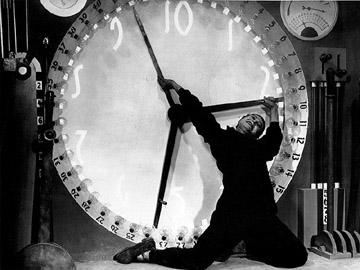
Metropolitan Clock

Douglas’s post reminds me of that unintentionally hilarious scene in Metropolis where the Beleaguered Iconic Worker is pushed to exhaustion in the clearly meaningless work of moving the clock hands around on the Big Futuristic Machine he’s charged to attend. (God, I wish I had a screengrab to share; it’s a stitch to watch. Found one. Thanks, Douglas.)

There have definitely been times in the past couple years when I’ve felt the same way about maintaining “my system”—driven as if by a motor from one list to another, dashing to connect all the pieces into some theoretically unified field theory of my life. It’s nutty.

The irony is that I, like many of you, tarry in this productivity sweat shop in order to achieve what David Allen has called “mind like water,” or the ability to adapt to change and disruption in a relaxed manner. So often, of course, the result is the virtual opposite. You get so stressed out about moving the meaningless clock hands on your Big Futuristic Machine that you forget what they’re supposed to be attached to.

I acknowledge that a certain amount of Byzantine organizational work is what keeps many of us interested in this stuff, but there is something very compelling about working to adopt Beginner’s Mind—in this case, the idea that you can achieve the higher goals of systems like GTD not by fretting endlessly over the minutiae of your personal ontology, but by exerting the absolute minimum amount of effort needed to get things off your mind and parked in the right place. That’s the sweet spot.

Or, to quote Strunk and White, in talking about writing:

A sentence should contain no unnecessary words, a paragraph no unnecessary sentences, for the same reason that a drawing should have no unnecessary lines and a machine no unnecessary parts.

Maybe one good goal this week would be to remove the largest, most unnecessary part from each of our machines. It may not be pure “Beginner’s Mind,” but it’s an easy place to start.


Comment viewing options

Select your preferred way to display the comments and click "Save settings" to activate your changes.
TJIC's picture

I was blown away by...

I was blown away by GTD when I read it, and I eagerly started reading 43folders and other related blogs and google groups…but then it dawned on me (I’d like to say “slowly dawned on me”, but it’s not true) that there isn’t a huge amount more to say on the topic…or at least, most of what was getting said NEAR the topic wasn’t all that bottom-line useful.

GTD appealed to me because it embraced a few notions I already had in protean form: always empty your email box, maintain a to-do list, keep the workbench clear so that you can do projects (metaphorically speaking), etc., but it systemized them and extended them to some areas that I still had problems with.

I was a bit het up on GTD and was tempted to go off and code up an linux app (maybe an emacs mode?) to help me implement the system…but I decided to just try - at least for a while - the “next item, by context” lists AND the tickler file AND my list of projects, all in one big text file. I carry a cheap moleskine and a space pen (like every other GTD geek on the planet…at least those who aren’t using Hipster PDAs). I note to-do items in the moleskine when I’m away from the computer. When I get back to the computer, I transfer everything into my Big Text File (tm).

…and you know what?

It works pretty darned well.

Having forced myself into a period of just-use-a-text-file, I’ve (a) stuck with it for 9 months; (b) watched with suprise (and a bit of alarm) as a lot of the folks who are in to GTD spiral down into their own navels (at least, that’s how it looks from the outside).

I think you’ve hit the nail on the head: a lot of GTD folks are trying to complicate what’s a pretty simple idea. Websites full of patterns to print on index cards? Special printers to dump the patterns onto hardcopy? Application this, scriptable tool that…it all has the feel of someone who used to obsess about her relationship with her parents, went into therapy to get over it…and now obsesses about her relationship with her therapist!

May I suggest that folks try not removing merely one part from their big machines (as you suggest), but instead try to fall all the way back to a few folders, one in basket, a notebook, and a pen? (Btw, the Metroplis scene you mention is a great analogy!)

Literally just-this-morning, bumbed that 43F had spiralled into it’s navel, I unsubscribed from the RSS feed…then changed my mind, hoping that something clarifying, as opposed to complexifying and obscuring would come down the pike.

I think your post above is a step back towards clarifying and simplifying…go for it!

DouglasJohnston's picture

TJIC wrote: "I think you've hit...

TJIC wrote:

“I think you’ve hit the nail on the head: a lot of GTD folks are trying to complicate what’s a pretty simple idea. Websites full of patterns to print on index cards?”

Wake up, Watson: there’s irony afoot! ;-)

yours truly, Doug “Beginner’s Mind” “DIY Planner” Johnston

Gwyn's picture

great points TJIC, one of...

great points TJIC, one of the most interesting things I’ve read about GTD is that David Allen implements the system using nothing but the out of the box software on a palm pilot.

Brian's picture

I get a sad pang...

I get a sad pang in my gut when I think of all the hours I’ve spent trying to achieve “mind-like-water.”

Merlin, earlier you said (to losely paraphrase): One hallmark of a geek is that they’re willing to spend 11-1/2 hours coding a script to do something that would take 12 hours to do by hand? But thru the pursuit of something like GTD methodology, I’m taking hours in the hundreds in the hope of saving a few dozen. he ratio has somehow gotten inverted: it takes 20 hours to accomplish thru a system what I could do in 11-1/2 if I just broke down and started stuffing the damned envelopes (metaphorically speaking).

I would rather be bored/boring and get my obligations out of the way so I have time to relax … I would rather be frustrated/anxious but be struggling with procrastination face-to-face, rather than by channeling that energy into creating a system that will supposedly help me in the long term … I would rather spend a HUNDRED hours learning to relax, let go, and be OK with making decisions that allow me to relax and enjoy my life NOW, rather than once all the “first things first” have been accomplished … than I would spend any more time trying to get my system up and running.

Of course, this isn’t to say I won’t be back on your blog tomorrow morning — you’ve got a zillion great “tricks,” many of which I keep around (like an assortment of rachets) to get me unstuck.

But I am going to have to say goodbye to all this GTD stuff.

eddy's picture

I remember spending HOURS at...

I remember spending HOURS at the kitchen table with my index cards trying to figure out what my NHA would be for this and that, how to keep my Someday/Maybes straight, how this fed into that and what to do when “xyz” could be listed on 2 different cards. It didn’t last long. Time to revisit this and start off SMALL… Thanks for the article and taking it back to where it belongs

Joe Ganley's picture

What Brian describes is common...

What Brian describes is common to geeks — that script doesn’t even need to save half an hour, it can even take longer than the original task, if writing the script is more fun than the task itself. But that’s not the point of all of this. I’ve commented before that, as a novice woodworker, I’ve noticed that a lot of woodworkers seem to use the hobby mostly as an excuse to fiddle with their workshop. If that’s what floats your boat, great, but again, that’s not the point of this stuff.

On a slightly different note, my current ‘system’ really fell into place when I abandoned the computer altogether. It’s all paper (most of it in my day-timer).

Chris's picture

As a OCD programmer, I...

As a OCD programmer, I too was enamored by the GTD system. The Hipster PDA was great, but it was hard to carry a lot of info. I tried so many different programs and books, but I’ve come back to a simpler place. Two things helped me see the light:

  1. That David Allen only uses out-of-the-box Palm software (as noted above).
  2. Merlin’s comment (somewhere) that “GTD is about action, not playing with lists”. That comment was so important to me that I noted it on my Treo, though I reworded it: “GTD is about getting things done, not playing with lists.”

Here are my simplifications:

  1. I just use the out-of-the-box Palm software: Calendar and Tasks.
  2. I reduced the number of my @contexts to just: @Work, @Home, @Weekend (a catch-all for random errands, weekend adventures, and free time, though it overlaps with @Home), @Laptop (which overlaps with @Home and @Weekend), and @Vacation. I would add @Phone, but I usually call people @Work, @Home, or @Weekend.
  3. I ensure ALL my tasks include an action verb. This is pedantic, but it helps me focus on ACTION!
  4. I don’t keep a separate Someday/Maybe list. Everything must be in a @Context. For Someday/Maybes, I create a task without a Due Date.
  5. I don’t keep a separate Waiting-For list. As Merlin has pointed out before, Waiting-For is just another action. I turn Waiting-Fors into actionable tasks such as “Ping Joe re trip report” (with or without Due Dates).
  6. I don’t keep a separate Projects List. Everything is an action in a @Context. If the Palm allowed tasks to have multiple categories, I would tag tasks with @Context and +Project. Fortunately, this is not a big problem because each project action must be done SOMEWHERE, so I just dump actions into the appropriate @Contexts.

With my new Less Is More system, I hope to finally stop gazing at my navel and start getting things done <;)

JayeRandom's picture

I just posted this on...

I just posted this on Bert Webb’s GTD blog and it seems germane here, too:

And now that I think about it, the way that I write down and annotate projects and next actions really doesn’t matter. (As long as I’m doing all that writing and annotating in one single system, rather than several systems scattered around.) What matters is that after I’ve written it down, I will come back to it the next week, reread it, reconsider it, and rewrite it if necessary. Clever methods of annotation and filing will not save me if I do not do a weekly review, every week. They are only useful if they make it easier to do the weekly review.

And now that I think about this, I think I’m really just paraphrasing something that I’ve seen Merlin write here previously. And I’m also probably paraphrasing a key point that from the GTD book or seminar recording. But it’s something I need to keep reminding myself of.

Zak's picture

I appreciate the sentiments found...

I appreciate the sentiments found here. I’ve settled on a few pages in Backpack to keep my list on, and a small note-book I carry with me when I go out.

I find 43 folders really good reading, and I come here nearly every day.

However, the very fact of having a blog about this kind of stuff means that Merlin has to keep introducing us to new methods and hacks. So, there is a contradiction of sorts: A system that works is stable and invisible, whereas a blog is all about the new and untried.

JayeRandom's picture

I think there is something...

I think there is something to be said for system experimentation. I know I did a lot of that before I settled on the system I’m using now, which itself is the product of several iterations around the core components. And I may update it yet.

The system that works best for Merlin will not necessarily be the best for someone else. So even if Merlin has a system that works for him, I appreciate his efforts to expose people to new ideas-for-system-parts, so that other people can try them out and find what works for them.

TubbyMike's picture

I read Douglas' original post...

I read Douglas’ original post and Merlin’s commentary and quickly realised that I’m never going to get “mind-like-water” the way that I am now. Basically, I have too many lists, on too many gadgets for the system to be coherent. I need to go back to Beginners Mind and work out what it is I NEED in the system. Already, I know that I must have one place for actions and one for hard landscape. The hard landscape device MUST squeak at me to remind me to be somewhere, since I have a very short attention span. This is the bare minimum I need to trust my system.

Interestingly, a lot of people who appear to be satisfied with their GTD system use paper for the majority of it. I wonder why this is?

However, I’ve already picked up good ideas for reducing @contexts from these comments and I am learning all the time. I too am a regular visitor to 43 Folders and thanks must go to Merlin for posting articles and links that make one think. This article is a classic example of that. The fact that the mere idea of starting again with Beginner’s Mind has lodged in my head has probably moved me up to the next GTD belt. I still feel way off black, but this has given me a way forward.

Somewhere, maybe on 43 Folders, I read a post about the concept of Shu-ha-ri (roughly, Hold-break-leave) and having once been a top-flight Fencer this found some resonance in my now aged brain. I’m beginning to assimilate this with the Beginner’s Mind concept posted here. It seems that to achieve GTD mastery, I need to break my existing system and leave to find my own, simpler way of working.

Thanks for reading.

Sammy's picture

Merlin, earlier you said (to...

Merlin, earlier you said (to losely paraphrase): One hallmark of a geek is that they’re willing to spend 11-1/2 hours coding a script to do something that would take 12 hours to do by hand? But thru the pursuit of something like GTD methodology, I’m taking hours in the hundreds in the hope of saving a few dozen. he ratio has somehow gotten inverted:

Brian, I couldn’t help but laugh when I read your post. I’ve often told people that one hallmark of a good system administrator is that he’ll take a day to automate a task that might have only taken an hour, if it means that in the future it will only take him a minute.

Anyway, I imagine this is the same sort of pathology that I imagine drives people to play the lottery. The initial investment seems so small, and there’s the perception that a huge payoff (in productivity) might be right around the corner.

Stephan's picture

I reduced my system to...

I reduced my system to a simple agenda an one of those little Moleskin with the five sections in it. I just have chossen different labels as the original ones: Work, Home, Network, Ideas, Notes.

Works pretty well, is small and very simple.

Stephan

Jeremy's picture

What a co-inky-dink I read...

What a co-inky-dink I read this post TODAY—the day I finally finished designing and implementing my very own GTD “inspired” (Tao based) system. The “spending time to save it” paradox discussed in this post is precisely what compelled me to revise GTD in a few ways…

I religiously followed GTD for over a year when the book was released using Outlook on the desktop, and Agenda Fusion for Outlook on a Pocket PC. It worked for awhile, but then I noticed how much time I was spending just to get things done with GTD.

So I tried a different path: TODO lists in a moleskin ONLY. Suffice to say, things got crazy in a hurry. So, I went about looking for a middle ground. First, I had to see—foundationally—where GTD went wrong the first go-round, and also why a simple written TODO list is not enough to actually boost productivity.

Here are some insights I came up with after many, many hours of journaling and thinking (time well spent IMHO):

1) “To BE is to DO”—anon. So focus on the doing, not the system behind it.

Implications:

a) Buy a stopwatch and religiously log exactly where your time is going, down to the smallest action. Better yet, get the Allnetic Working Time Tracker to automate this process with software (quite nicely and simply). This single tip alone has at least quadrupled my productivity.

b) Come up with some kind of “standard” for performance, at least for the most important actions you do regularly in the course of completing your most important projects. For example, I’m writing a novel write now. So using the stopwatch, and MS Word’s word-count feature, I can easily calculate a words-per-minute measure. Every time I sit down to write, I give myself a “timeboxed” duration of say, an hour (or whatever I have available in between appointments), and I try to beat my previous best words-per-minute. At the end of the timebox, I reward myself with 5-10 minutes of web surfing or whatever, but if I beat my previous best performance measure, I double the reward. It goes without saying that MS Excel will allow you to take all this data and do a fairly good job at projecting project deadlines based upon past performance instead of (un)educated guessing…which brings me to the next insight:

2) Know the differences between Planning, Organization, and Productivity, and don’t confuse them!

Implications:

a) Organization: “collect-tag-store.” But if the “tag” step can’t be automated in some hands-off way, then I simply put the “stuff” (emails, voicemail) into a “staging” area that I can come back to later in the day. In other words, I don’t spend a lot of time on the “Processing” step of GTD, because I don’t like the interruptions of asking myself if something is actionable or not, and then trying to decide whether it can be done in 2 minutes, needs to be delegated to my cat, or deferred. I basically like to get up in the morning knowing my most important actions for the day, and then doing them without interruption for as much time as possible. This also means I do much of the “Collecting” step in the evening along with my daily Planning (the “review” step in GTD—stuff like clearning my email inbox, reading a filing mail, and going through voicemail messages). Also, try and limit your storage to just 2 units: a harddrive(s), and 1 “PileSystem” (google pilesystem for more on this).

b) Productivity: “Do-Track-Improve.” Do actionable work related to your most important Projects as much as possible. Track your performance. Fight to constantly Improve it.

c) Planning: “Review-Allocate-Schedule.” Review your Values and associated Projects / Goals. Review how much time you’re actually spending toward each Project (this will tell you what’s really important to you better than what you tell yourself when you write down goals). Allocate Time based on what your Review tells you. Then, Schedule accordingly. And if you haven’t yet stored everything in its proper place and cleared your “staging” area, do that as well before you sign off for the night.

d) Do as little Project Planning as possible in advance. To do otherwise is to be a fortune teller. Instead, determine your performance measures (ala words-per-minute example above), and then plan out the fewest number of steps possible to realize a meaningful milestone on your project. Using your average performance measure, and the time you can realistically spend on the primary actions associated with a particular Project, calculate a “projected” deadline. If it’s after when you need the Project done, then you better improve your performance, or increase the amount of time you spend on this Project at the expense of others. Do NOT try and work longer hours—drop something. This is like taking Xtreme Programming and applying it to your life.

e) “DO 1st Things First”—Covey. But what I mean when I quote him, is that you should DO actionable, energy-intensive things early in the day, and slowly transition to Planning and Organizing type activities later in the day.

3) “3:1-80/20.” Focus on no more than 3 important Projects / Goals at any one time, and spend 80% of your time on only one of them, 20% on the other two combined. It’s the popular “rule of 3” and Pareto Principles combined.

4) Organize ideas, reference material, and anything that has “meaning” with liberal use of “tags” ala del.icio.us or flikr. Organize meaningless objects, like clothes, hardware, tools, and other boring nouns with “categories” or by location.

Implications:

a) Don’t use folders or other categories to organize information. You end up wasting too much time trying to remember the names of your categories, and too much time remembering which category you stored something under. Use tags + search. It’s what computers are good at after all.

b) If it can be automated, use a computer. If it requires creativity which can’t be automated (for example, painting or creative writing), use paper and the implements of your art, at least in the drafting / raw creativity stage. The work will be better for it.

…Wow. Just wrote a novel here. Sorry about that. But this whole conversation has me itching to start a new blog about all of this myself.

Love the site and these conversations. Kudos to all who participate!

The Minimalist's picture

Simplifying the organization stuff that...

Simplifying the organization stuff that was supposed to make things simpler

A Million Monkeys Typing has The Beginner’s Mind, a Zen riff on too much organization getting in the way of living an actual life: Why did I need to have several versions of a contact list, in three different forms? One is enough. Did I really …

About Merlin Mann

Merlin Mann's picture

Bio

Merlin Mann is an independent writer, speaker, and broadcaster. He’s best known for being the guy who started the website you’re reading right now. He lives in San Francisco, does lots of public speaking, and helps make cool things like You Look Nice Today. Also? He looks like this, answers questions, and has something like a life.

 
EXPLORE 43Folders THE GOOD STUFF

An Oblique Strategy:
Distorting time


STAY IN THE LOOP:

Subscribe with Google Reader

Subscribe on Netvibes

Add to Technorati Favorites

Subscribe on Pageflakes

Add RSS feed

The Podcast Feed

Inbox Zero

The original 43 Folders series looking at the skills, tools, and attitude needed to empty your email inbox — and then keep it that way. Don’t miss the free video of Merlin’s Inbox Zero presentation.

Making Time

3-part series on attention management for artists and makers. Read Bad Correspondence, The Job You Think You Have, and One Clear Line.