Merlin’s weekly podcast with Dan Benjamin. We talk about creativity, independence, and making things you love.
Kinkless GTD .83: Enhances Quicksilver and iCal integration, much more
Merlin Mann | Mar 27 2006
Kinkless GTD 0.83 [Relative Motion] | Kinkless The wait is over, kids. Ethan Schoonover has just released his .83 version of Kinkless GTD, and, brother, does it ever bring it. (For an intro to what kGTD is, start here, then go here and of course, here.) So, first great thing: the syncing problems people (including me) were having -- getting changes in Action views and iCal to get reflected correctly back in Projects view -- has been fixed most elegantly. So it's just a lot more usable and dependable right out of the box. But that ain't all E's been cooking up. Among the trove of new and updated features (cribbed from Ethan):
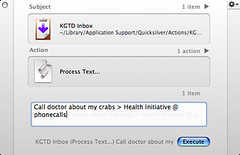
Visit the kGTD .83 release page for full details Ethan, as ever, has done a terrific screencast explaining how the app works -- DO NOT MISS the video if you aren't "getting" kGTD, because it's super useful in showing exactly how it works -- plus I'm sure there will be lots of lively discussion over on the kGTD forum, so for today I'll just focus on my favorite improved feature: what Ethan calls "fancy “task shorthand.'" PreviouslyIn the previous release (.7) there was some amazing stuff in kGTD that had helped realign the way I think about doing GTD on a Mac. Kinkless made it easy to add items to an inbox via Quicksilver, and the excellent iCal integration allowed me to organize my contexts in very efficient and functional ways. Which, by themselves, would have allowed me to die happy. But in this latest release, Ethan takes it further (yes! yet! again!) by introducing a simple syntax for taking tasks beyond the inbox -- allowing you to create actions via both Quicksilver and iCal that are then placed into the correct project and context back in kGTD. Total round-trip, no-look task management. So let's look at some examples of how it actually works in practice. Once everything is properly installed, we start to add an action via Quicksilver, and everything works pretty much as before. I bring up QS, type to select "KGTD Inbox," tab to the second pane and select "Process Text," then tab to the third pane, and enter my new task via the Text Mode field. (Note, as ever, that you can make a Trigger in QS that reduces all but the actual typing into a one-click operation). The new syntax
Well, if you already have a kGTD project called " It's smart, this syntaxYou could also have entered that same item as " Or, let's say you did not yet have a top-level project for this particular action and wanted to create one. You might then type " Now, let's say you wanted to, for example, do some research on these crabs and want to capture a web address for future reference. No problem. Consider...
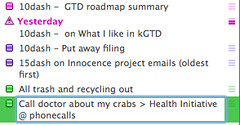
...where the line break in the QS text field is achieved via When you pop back over to kGTD, you'll be pleased to see that the address of your crab portal has been neatly placed in the "notes" field of your new task. Click on it, and you're taken right to the site. iCal wants to play, too
So imagine my joy that I can now create a new iCal task called " Plenty more under the hoodI really do encourage you to drop by Kinkless and catch up on all the many new features (and the shiny new site), because it's all pretty great. I know people have been clamoring for a new release, but Ethan has been a champ about making sure everything was working properly in this ground-up rewrite. This is a terrific, innovative, and geek-centric piece of work, and I'm truly grateful for the hours he's put into it. It's my system, I love it, and it really just works like a sonofabitch. 22 Comments
POSTED IN:
OK, so I'm officially a... by Ian (not verified)
I'm just glad you had... by emory (not verified)
OK, I can't believe after... by Craig (not verified)
[...] 43 Folders write up... by kGTD 0.83 is out! - MySprawl (not verified)
Kinkless GTD 0.83...
Eine neue Version... by Dobschats Weblog (not verified)
Love the .83 release of... by Rishabh R. Dassani (not verified)
what about Due dates in... by kjmcw (not verified)
Don't forget that there are... by danorama (not verified)
About Merlin Bio Merlin Mann is an independent writer, speaker, and broadcaster. He’s best known for being the guy who created the website you’re reading right now. He lives in San Francisco, does lots of public speaking, and helps make cool things like You Look Nice Today, Back to Work, and Kung Fu Grippe. Also? He’s writing this book, he lives with this face, he suffers from this hair, he answers these questions, and he’s had this life. So far. Merlin’s favorite thing he’s written in the past few years is an essay entitled, “Cranking.”
|
|


| EXPLORE 43Folders | THE GOOD STUFF |


