43 Folders

43 Folders feed subscription icon - Shiny! Drowning in email? Try Inbox Zero to learn sane tips for dealing with high-volume email. And don’t miss the free Inbox Zero video. »

Login or register

Register for free on 43 Folders to comment on articles, post to our forum, customize your visits, and much more. Current users can login now.

iCommit: PHP app for doing GTD

Getting Things Done [iCommit.eu]

iCommit Home View

Rainer Bernhardt has put together a nifty little PHP app for doing GTD via a web interface. It lets you wrangle projects, next actions, calendar items, ad hoc lists, and all the other tactical building blocks of GTD all via your (non-IE) browser. The interface is pretty good and typical workflow is quite easy to navigate through. It has nice touches like attachments, per-item effort estimates, printable views, plus Rainer says he may soon offer email integration which would “eliminate use of a separate e-mail app” for workflow-related planning. Wow.

Although I haven’t spent a great deal of time with it, I’m very intrigued by the baked-in “weekly review” functionality, which walks you through most of what you need to look over each week from one interface. Since review gets short shrift from the many folks (like me) who use GTD primarily for task management, I think an addition like this is a terrific idea.

iCommit is, like so many of my favorite apps these days, a non-commercial, one-man operation, so there are a few rough edges, no documentation (yet! coming soon, says Rainer), and it is very much “first come, first served” in terms of seats he can handle on his personal server setup (I hope we don’t cream Rainer’s productivity boxen with this). But iCommit is worth a look if you’ve been craving a cross-platform, low-paper implementation of Getting Things Done.

Screengrabs below the cut — I feel like Michael Arrington!

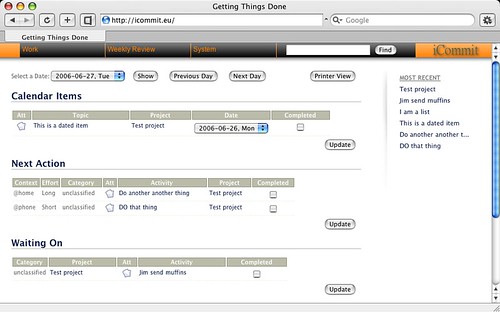
Home page

Logged-in with a few test items.

iCommit Home View

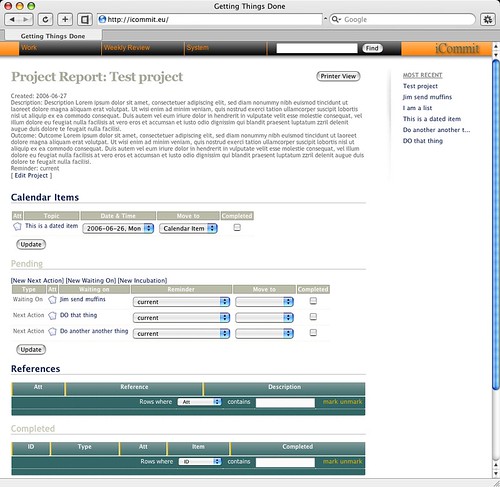
Project view

iCommit Project View

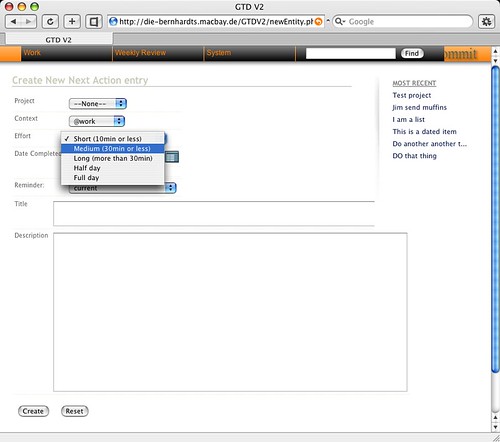
New next action

Note “Effort” estimate.

iCommit New Next Action View


23 Comments

Comment viewing options

Select your preferred way to display the comments and click "Save settings" to activate your changes.
??????????? ?????? » iCommit ????? ?????? ??? GTD-????'s picture

[...] 43Folders ?????: …?????? ?????????...

[…] 43Folders ?????: …?????? ????????? ??? ??????????? ???????, ????????? ????????, ??????????? ??????? ? ??? ?????? ??????????? ???????????? GTD. ?????? ? IE ?? ?? ????????. ????????? ?????????? ?????, ??????? ? ????? ? ?????????. ? ??? ???? ?????????? ?????? ???? ???????????? ??????, ?????? ?????? ?? ??????? ?????????? ?????, ???????? ??????? “??? ??????”, ????? ???? Rainer [?????] ??????? ?????? ????????????? ? ?????? e-mail, ??????? ????? ????????????? ????????? e-mail ?????????? ??? ???????????? ???????? ????????. ???… […]

Martin's picture

Hmm. Nextaction is nice, but...

Hmm. Nextaction is nice, but in the end I dumped it in favor of Tasktoy. It just got too heavy and slow. Saving would take up to 30 seconds and I always had to remember to take the files with me when moving around. With TT, this is not an issue.

But none of the apps I have tried lets me have nested projects. Big drawback. I assume things like kGTD provide this kind of functionality, but (a) I don’t have a Mac, and (b) I want something web-based. Does something like this exist? (I did not try iCommit yet, so I don’t know if it has this functionality.)

Paul's picture

All of us with Macs...

All of us with Macs have our own apache servers, as well as PHP, MySQL, Ruby on Rails and all sorts of other fun stuff that make installing these web apps a breeze. I agree that nextaction is a nice app. I really appreciate it’s simplicity. I’ll look into PimliPoche, because I’m really impressed with TiddlyWiki. Mostly I agree that the best solution is the simplest thing that works for you.

Daniel Burstyn's picture

Tracks and the excellent sourceforge...

Tracks and the excellent sourceforge project and such are fine for you webmasters with your own Apache servers, a new computer every three months and I don’t know what else. For the rest of us, iCommit seems nice, as Merlin points out that pesky WEEKLY REVIEW is built in, but for those of us who want something similar that keeps the material on the local drive - I like trimpath’s nextaction which runs on some sort of javascript best. I have tried to make heads or tails of Jacques Tourbe’s PimliPoche which runs on tiddlywiki, as well as GTDTW and Clint Checketts’ version of GTDTW, and I’ll stick with nextaction - I get bogged down by all the eye candy.

But in the end, since I’m using a Palm handheld, and I needed that synchronizability, I left all this stuff behind.

As DA says, use as few buckets as possible, and empty them often.

brian's picture

You said it, Will! Send...

You said it, Will! Send it to the masses!

bonaldi's picture

Crap. I as hoping this...

Crap. I as hoping this was open source, as I’m looking for something to replace TaskToy.com. TT has a better UI, even if it is less pretty, and it remembers where you are on each computer you log in from, so your action list is always relevant. But it’s on somebody else’s server too.

Robb Irrgang's picture

webbased gtd tools are remote?...

webbased gtd tools are remote? doesn’t everyone just run a local apache and webRICK combination? ;-)

(…I guess it’s just me)

Chris's picture

The problem with using tools...

The problem with using tools like iCommit or Backpack for GTD is the fact that they are remote. If I am, say, sitting on a plane or in a coffee shop with no WiFi, I cannot access by to-do lists. This is a big problem, which caused me to abandon Backpack as a productivity solution. For someone who spends as much time online as I do, I did not think it would be an issue, but it was. I really like tracks because it lets you have the whole browser-based experience, but on a local webserver.

Merlin Mann's picture

I actually agree with you,...

I actually agree with you, Chris (in terms of my own usage), But you wouldn’t believe how many cross-platformers — esp. Mac lovers with Windows dayjobs — are clamoring for something like this.

I just puts ‘em out there — even the ones what I won’t use. :)

nick's picture

Having read the book once...

Having read the book once through but not yet implemented, I find myself at one of those situations I call analysis paralysis…I want to implement my GTD, but at the same time I don’t want to choose a tool that will make executing GTD more cumbersome than it has to. And I’m a “home Mac/Win work” user who is in front of a computer more often than not.

So, to tool like this may be what I’m looking for, but in the end I’ll want to be able to run it on my web host’s server. Unfortunately, I’ll probably add this to my del.icio.us and over-analyze its usefulness.

jes's picture

Merl, thanks. one less thing...

Merl, thanks. one less thing to carry in my back. keep it remote and print on 3x5 what you need away from the mac.

Have you been on the Chandler system beta for testing? let us know. when to run for the gate.

Joe's picture

Here's a similarly-based PHP solution...

Here’s a similarly-based PHP solution for GTD.

http://gtd-php.sourceforge.net/

Haven’t had much time to play with it.

Morgan's picture

Nick I've been there (and will...

Nick

I’ve been there (and will be there again and again, I am sure on different decisions). What I find I need to do is time box my waffling and put down on paper (and usually tell someone who’ll double check with me) that I will make a decision by X date or after X hours of review and then I give myself an outer limit to the timebox to make the decision seem less permanent.

e.g. - I’m going to review GTD tools over the next two weeks in my spare time after that (July 14th at 5pm), I’ll pick the most promising and then use it for 4 weeks and assess again on August 14th.

I’ve been using Life Balance for a while for task management. I decided to do a review of my tool set (for data capture, brainstorming, task management, note taking and reference management) as I have just done a major move (different city, different work, etc) in the past month.

My deadline was this week and I’ve decided on a couple of tools including kinklessGTD for task management (I’m on a mac most of the time).

I am going to use this, without looking at other tools, for the next 6 weeks and then decide if it has been an improvement over Life Balance.

It is important to note that time in one system is not “lost” if you make a change — most of my GTD work has been in the content in the system. Cutting and pasting, even retyping, is some “work” but it can be part of a weekly review. As I am just doing it now, it is not as daunting as I thought it would be 3 months ago. :) It also gives me a chance to update my contexts, projects, etc more than I have in my semi-regular “weekly” reviews.

My suggestion is pick a date for change, and jump on a solution and learn how you can work it! But keep yourself time limited to the test. You will learn a lot about how you work (probably more than about the tools).

HTH

Morgan

Will Macdonald's picture

It would be great if...

It would be great if he open sourced this so it could be run locally.

Will

Paul's picture

I'd be nervous about trusting...

I’d be nervous about trusting such critical data to anyone else to mainatin. I’ll stick with GTD-PHP for now.

http://gtd-php.sourceforge.net/

Brian's picture

@Will The fact that he hasn't...

@Will

The fact that he hasn’t open sourced it yet, and that the UI is quite polished even at this stage, suggests to me that he plans to charge for it.

Rainer Bernhardt's picture

Just a few thoughts. in the...

Just a few thoughts.

in the past I was using a filofax to implement GTD and simply ran into capacity problems. The number of projects and lists were to many - too many pages to carry, to much notes to browse when I was receiving a call and needed a specific information. So I needed to have my Project/WaitingOn/NextAction Lists, my Reference information, and my 43folders in just one place - preferrably integrated.

Then I thought of an online system, and found the sourceforge.net-project which actually has been the blueprint for iCommit - if you wanna have a system on your own webserver, their newest update really is the best you can get. I originally wanted the same - a system on my own server, with a few changes to the sourceforge.net verison (and the database design…). But then friends and colleagues asked me to provide a version for them - and they didn’t have the skills to load php or didn’t have a webserver at all. Here we are…

Nowadays, using the online/remote system I only carrying a small notebook and a pen with me to store my ideas (I even have a second one in my car). Obviously - and latest during review - I would then transfer them into iCommit.

Now, going for a business trip, I typically print the days with “Print & Take a day” to carry my Calendar Items and the Reminders with me (yes - a layout suiting fitting in my filofax would be optimal). Meeting specific people, I would probably print the “waiting ons” for that person (->Find function, select type “waiting on”, press print button) to be prepared. Projects I wanna discuss I also would take a print of with me.

I even store contact data in iCommit (as list). From time to time I would print that list to have my contacts with me (yet again, the printing could be improved here).

I experienced that people understand that you cannot always carry all your information with you - but, today they can rely on me that I would respond quick and/or predictable once I am back to the system. As to myself, having all data at least “written down” (empty head) I feel great relexation and I use flights more for the creativity part than for meeting preparation. Due to my empty head now I do remember most information anyway - and trust my gut.

And compared to the filofax implementation my office days grew in terms of efficiency , since an electronic system allows me to find information quicker (iCommit does search the descriptions, lists, notes, … only attachment content is excluded today).

Besides: I do believe that within 12 months we will have devices with internet access-to-go everywhere (eg satellite??).

As outlined to Merl iCommit will very soon have - a help function including Tips - an email integration - my biggest pain is the gap between two systems… - a feedback mechanism (forum?) in order to respond to upcoming ideas

Have fun.

Paul's picture

If you suffer from analysis...

If you suffer from analysis paralysis (user above) I suggest you buy a nice pen or two, a few stacks of index cards, and 43 folders. Being in Poland I can’t get the kind of hanging folders you use in the States, but I really like my version of 43 folders that uses a binder and a hole punch with 43 dividers. It’s more portable than a filing cabinet and I can stick anything in it. But basically, my advice is to master low-tech before you try a new system on the computer.

iCommit is Web-Based GTD at Stylishly Dangerous's picture

[...] Download Commit (via 43...

[…] Download Commit (via 43 Folders) […]

Jeff's picture

@Merlin: Yeah, I'm one of those...

@Merlin:

Yeah, I’m one of those Mac-at-home, Windows-at-work GTD-ers you mention. I’ve fiddled with systems like iCommit, tasktoy, Backpack, and others which I can access from either work or home. It would have worked great, but for two problems:

1) I like to keep my GTD information secure on my own computer. (Not that I’m paranoid… I just like making backups. Call me crazy.) 2) I like to plan projects and next actions quickly, which means I’ve got no time to click on buttons and select things from drop-downs. Plain text or nothin’!

Obviously, if I’m doing most of my planning in plain text, a Backpack or an iCommit account is just another bucket to sync with my text files. No good.

So I’ve settled on the uber-simple: editing my text files from work using an ssh connection. At work, I use puTTY to ssh into my Mac at home, fire up emacs, and away we go. If I need to check my tasks at the office, it’s a simple “grep @office projects.txt” away. And any @home tasks I come up with at work can go straight into the text files on my Mac.

Daniel Burstyn's picture

Hey Merlin - have you...

Hey Merlin - have you seen Foldera? Could you give your $0.02 on what they offer?

T. Harris's picture

Does anybody have any first-hand...

Does anybody have any first-hand comparisons between Tracks and GTD-PHP?

GTD-PHP seems to be a little more feature rich and the reports are quite nice, but Tracks looks super simple and has all the ajax goodness.

T. Harris's picture

Okay, I just did an...

Okay, I just did an exceptionally cursory dash around gtd-php and Tracks and thought I’d post my observations.

gtd-php * php-based (you never know) * (apparently) single user * great reporting capabilities * more extensive deadline formatting than Tracks * space-time contexts. Kewl. * tickler file for things way out in the future

tracks * ruby-based * multi-user, a great feature IMHO * API, with plugins for doing things like adding items by SMS (a bit wonky) * possibility for email notification * partial iCal integration

 
EXPLORE 43Folders THE GOOD STUFF

An Oblique Strategy:
Discard an axiom


STAY IN THE LOOP:

Subscribe with Google Reader

Subscribe on Netvibes

Add to Technorati Favorites

Subscribe on Pageflakes

Add RSS feed

The Podcast Feed

Inbox Zero

The original 43 Folders series looking at the skills, tools, and attitude needed to empty your email inbox — and then keep it that way. Don’t miss the free video of Merlin’s Inbox Zero presentation.

Get Started with ‘GTD’

David Allen’s popular productivity book and the system on which it’s based help turn ‘stuff’ into actions that support valuable outcomes.