Time, Attention, and Creative Work. After 4 years and a lot of productivity pr0n, we’re shifting gears. Re-learn how to use 43 Folders. Then back to work. [»]
”What’s 43 Folders?”
43Folders.com is Merlin Mann’s website about finding the time and attention to do your best creative work.
GTD with a Mac label maker?
Merlin Mann | Sep 4 2006
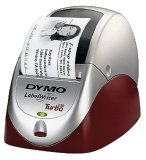
multipart/mixed: Turbo-Charging the Dymo LabelWriter I love my Brother PT-65, which is regarded by many as the unofficial official label maker of GTD nerds (and which, quizzically, appears to have been discontinued :-(). The PT-65 has easily paid back its modest sticker price with three years of faithful service. Trouble is, I like using it so much that it’s gotten to be kind of a pain to pull it out and Blackberry-thumb-type my bajillion labels via its teeny keys. Now, I want something that hooks up to my Mac. Josh Carter’s gotten me interested in the Dymo LabelWriter 330 Turbo via this handy tutorial from late last year, which covers basic setup info, plus a tip on speeding up the creation of a new label with Quicksilver. Josh has good stuff to say about the 330:
Anybody using one of these units or similar? Care to recommend a label maker of any brand that hooks up via USB and works well with Tiger/OS X? I ♥ my little Brother, but I’m ready for Label Maker 2.0! 30 Comments
POSTED IN:
![]() I own the Brother QL500...Submitted by Gordon Meyer (not verified) on September 4, 2006 - 5:35am.
I own the Brother QL500 label printer, which is similar to the Dymo. I picked it up super-cheap after an instant-rebate at the office store. One thing I like about it is that it takes labels up to 3” wide, which lets me use it for things other than file folders. The Brother software it comes with is a horrible WIndows port, and I don’t use it at all. The Mac OS X printer driver is just fine, and for met that’s all that really matters. One more tip, I use Ambrosia’s Easy Envelopes with the Brother labeler, making the tedious job of addressing envelopes (or generating any kind of label, really) just a Dashboard invocation away. »
![]() I use Seiko SII 450....Submitted by Marcos Detry (not verified) on September 4, 2006 - 5:50am.
I use Seiko SII 450. Very nice. It works very well with Mac-OsX. Has universal drives and software. connect via USB. The Labeling software is excellent and it´s a Mac soft not a windows port. »
![]() I use a Dymo LabelWriter...Submitted by Guy Ferraiolo (not verified) on September 4, 2006 - 6:24am.
I use a Dymo LabelWriter Duo via USB. It does both the mailing labels, up to 2 5/16” by 4” and the permanent labels, up to 1”. I use those big shipping labels for everything from envelopes to packages. I use 1/2” permanent labels for file folders. I particularly like that the Dymo permanent labels have a pre-split back which makes applying them very much easier than the Brother labels. I use a Brother labeller at work and it takes forever to get the backing off those labels. The software is fine, it seems Macish to me. I got it at a considerable discount when an office superstore closed some locations near me. http://global.dymo.com/enUS/Products/LabelWriter_DUO.html?WT.srch=1 »
![]() I use the Dymo LabelWriter...Submitted by Andrew Foster (not verified) on September 4, 2006 - 6:56am.
I use the Dymo LabelWriter with my Mac and love it. The labels are big and clear and the Dymo software adjusts the Font size automatically so the text always fits. I also love the way that the labels are easy to get off. I have to admit to becoming quite irrational with my previous stand alone label maker because it would take me two minutes to extract the label from its backing. »
![]() This is a little OT,...Submitted by Oyvind (not verified) on September 4, 2006 - 10:21am.
This is a little OT, but I also need a label writer able to write bigger labels. Like the back of video tapes (Digital Betacam specifically). Anyone? »
![]() I bought aDymo LabelWriter 400...Submitted by Sigurdur Armannsson (not verified) on September 4, 2006 - 11:11am.
I bought aDymo LabelWriter 400 few weeks ago. It works very nicely and allows me to print from what ever application I want, plus the Dymo printer app. The salesperson tried NOT to sell it to me because he said it was for Windows only, but I showed him the opposite on the box. Dymo supports the mac fine and they have Tiger compatable drivers on their site. Great tool. »
![]() You got me thinking now....Submitted by Lynette (not verified) on September 4, 2006 - 11:51am.
You got me thinking now. I have one of those older CoStars (now under Dymo) LabelWriter. Despite it’s age it works beautifully. Have not ever hooked it up to the Mac - its always on the PC but I distinctly remember seeing downloads for Mac. The only problem I find with using the label writers is having to swap the rolls - I use it to print postage 99% of the time. I saw a new one that can accommodate two types of labels. That’s nice. »
![]() I picked this up at...Submitted by Susan (not verified) on September 4, 2006 - 1:12pm.
I picked this up at work, and thankfully I have a really decent laser printer at home. For making labels, I simply take one sheet of labels, which may or may not have been snuck out of my workplace cough, and put it into my printer. I pull up the Word template sitting on my desktop for those labels, put in whatever I please… into the one box on the label template that I intend to use. Then I hit ‘print’. Price: Free! Er, that is, the cost of a sheet of labels. Also compatible with anything, and doesn’t require extra equipment cluttering up my desk. The key for making this usable is to be careful not to wrinkle up the page corners—if they don’t get folded over by accident at some point, you can easily run a single sheet through a laser printer for each label individually if you want to. Or do a bunch at once, if you like. »
![]() I bought a newer version...Submitted by Liam (not verified) on September 4, 2006 - 3:13pm.
I bought a newer version (the Labelwriter 400) of these when they first came out in Australia a few months ago, and I ended up taking it back for a refund. I wanted it for file folders and CD/DVD labels. The idea is good — but the execution is lacking. When I loaded a roll of labels and launched the software, the first label would print fine, but subsequent labels would drift from centre — the feeder didn’t do a good job of keeping things aligned. For larger mailing labels it probably would be a problem (or not often), but for smaller labels like those I was using, it just didn’t do a very neat job. The print quality was adequate, though nowhere near laser quality — the labels themselves are very thin (one of the boxes I bought with the machine was actually water-damaged). I think a cheap inkjet dedicated to the job, a pack of Avery labels, and something like a copy of BeLight Software’s Mail Factory (which lets you choose the position of the label that you’re printing to, so you can re-use partially used label sheets) would do a better job. »
![]() I just went to Staples...Submitted by Chanpory Rith (not verified) on September 4, 2006 - 5:41pm.
I just went to Staples the other week to get another labeler, and noticed the PT-65 was gone also. Looks like they replaced it with the PT-80, which actually fixed a lot of things I didn’t like about the PT-65. The PT-80 is slightly smaller, lighter, and has a better color scheme. It also has some improvements to the interface, solving my biggest complaint with the PT-65: the lack of a “Shift” button. If it has bluetooth printing, it’d be almost perfect. »
About Merlin MannBio Merlin Mann is an independent writer, speaker, and broadcaster. He’s best known for being the guy who started the website you’re reading right now. He lives in San Francisco, does lots of public speaking, and helps make cool things like You Look Nice Today. Also? He looks like this, answers questions, and has something like a life. Merlin’s favorite thing he’s written recently in the past few years is a short essay entitled, “Better.” |
|
| EXPLORE 43Folders | THE GOOD STUFF |