Merlin’s weekly podcast with Dan Benjamin. We talk about creativity, independence, and making things you love.
GTD with a Mac label maker?
Merlin Mann | Sep 4 2006
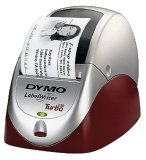
multipart/mixed: Turbo-Charging the Dymo LabelWriter
I love my Brother PT-65, which is regarded by many as the unofficial official label maker of GTD nerds (and which, quizzically, appears to have been discontinued :-(). The PT-65 has easily paid back its modest sticker price with three years of faithful service. Trouble is, I like using it so much that it's gotten to be kind of a pain to pull it out and Blackberry-thumb-type my bajillion labels via its teeny keys. Now, I want something that hooks up to my Mac. Josh Carter's gotten me interested in the Dymo LabelWriter 330 Turbo via this handy tutorial from late last year, which covers basic setup info, plus a tip on speeding up the creation of a new label with Quicksilver. Josh has good stuff to say about the 330:
Anybody using one of these units or similar? Care to recommend a label maker of any brand that hooks up via USB and works well with Tiger/OS X? I ♥ my little Brother, but I'm ready for Label Maker 2.0! 30 Comments
POSTED IN:
 Recent Brother TZ labels have...Submitted by Willis Wasabi (not verified) on September 8, 2006 - 12:22pm.
Recent Brother TZ labels have pre-split backs now. I haven't had to take out that little splitter tool in months. » POSTED IN:
|
|

| EXPLORE 43Folders | THE GOOD STUFF |


