New to 43 folders? Here are our All-time Most Popular Posts. Want the best stuff? Here are our Classics.
Register for free on 43 Folders to comment on articles, post to our forum, customize your visits, and much more. Current users can login now.
Sink or Swim: Managing RSS Feeds with Better Groups
Matt Wood | Nov 27 2007
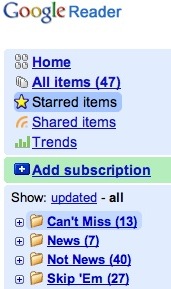
Besides baseball, coffee, and my music collection, I probably obsess over how I read RSS feeds more than anything. Sometimes it feels like I tinker with the setup more than I actually read the news, but I’m making progress. I won’t claim to be completely satisfied with how or why I try to consume so much information from the internet, but lately I’ve been as content with the process as I can hope. Bailing Out Trying to stay on top of dozens of feeds can feel like trying to squeeze a river through a kitchen strainer. I used to be a NetNewsWire guy, but I switched to Google Reader this summer to simplify switching between multiple computers. At first it exacerbated the feeling that for what little info I could process through that strainer, I might as well just give up and let it flood the place. Unlike more powerful desktop readers like NNW, Google Reader doesn’t give you any options to control the refresh rate of feeds, how long they stay in your queue before disappearing, etc. So if I missed a day, or even a few hours without checking in, hundreds of unread items would keep piling up, with no chance of my ever finishing them. So I started marking hundreds of items at a time as read, and sure enough I felt better. It was like dipping a bucket in the river instead of trying to drink the whole thing, and after a few days I realized it was okay to let a few things pass me by. Group Them the Way You Read Them The magic trick for me though, has to do with how I group the feeds in Google Reader. This can be accomplished with any modern news reader, but the Google’s does things in a particular way that really hits a sweet spot. When given the option to group things, we tend to do it topically, with labels like “Sports,” “Technology,” “Blogs,” etc. For years, I lumped my feeds into folders like this, thinking it would help me manage them, but all it did was help me ignore just how many I’d subscribed to by tucking them away in folders. I still looked at the growing numbers of unread items and felt that endless sense of dread that I would never finish. Knowing how to cut my losses when I got behind was nice, but it was also making me miss a lot of stuff that I wished I hadn’t. I didn’t mind skipping through some feeds, like standard news or high-frequency group blogs, but I felt bad missing my friend’s weekly update, or that new column from one of my favorite writers. So it dawned on me to group my feeds by the way in which I want to read them, not by topic. If there were some feeds that I didn’t mind missing, and some of which I wanted to read every single word, I should organize them that way, not by their putative subject areas. Here’s what I came up with:
![]() Again, nothing revolutionary, but it’s made my daily information gathering process more manageable, namely because it gives me an easy way out when I’ve fallen behind. Process Your Pleasure The obvious alternative to all this would be to simply cut the number of feeds I try to follow, and I wholeheartedly agree. Like I said, I have a pretty high threshold for what gets into the club, and keeping things in that Skip ‘Em folder makes it easy to identify which ones might be on the chopping block. But this approach gives me the latitude to read broadly in a number of subject areas and still focus on the most important stuff. The fact that I felt compelled to write about this is quite ridiculous, really. I’ve taken what should be a leisurely activity and turned it into a dull process. But I also realized that I derive a lot of pleasure from reading all these news sites and blogs, and there was no sense in depriving myself. The dull process has kept it enjoyable. POSTED IN:
|
|
| EXPLORE 43Folders | THE GOOD STUFF |
Grouping RSS feeds
Finally somebody wrote the post I’ve been waiting for. Like you I obsess over how i organize my RSS feeds and like you I feel stupid discussing the topic with people. Its just reading it shouldn’t be that complicated. Nevertheless I do it and Im gonna add your “Feed Preference” folder groupings which should be a time saver. I use Google Reader now (formerly used Blogbridge and Bloglines) and I mainly organize topically. I’ve spend an inordanant amount of time trying to find the best categories. So far I’ve reduced it to 9: 1. news/government 2. Science and technology 3. Health and Education 4. Economics 5. Media Dump (for stuff like updates to Digg del.icio.us and Youtube - not specific topic feeds) 6. Film, Television and Lit 7. Sports and Gaming 8. Music and design 9. Opinion. It’s tough to see my relationship to the blogs in my groupings and your system seems to help out in that. Like I’ll definately put my friends blogs ina seperate folder. Using your “Feed Preference” grouping and maybe a “media grouping” (Video, Photo etc). I should be well situated. thanks
I've gone in a similar direction...
I made a similar shift a couple of years ago, too -- though my response to my own taxonomic compulsions has been to go even further in the other direction. I have just four folders:
Daily: Self-explanatory. The feeds that I want to read individually every day.
New Subs: The folder where I drop any new subscriptions. I generally keep things in there for a few weeks to see whether I maintain an interest, and then move them into one of the other folders or unsubscribe.
Bulk: This is where most feeds go if I keep them after the "new subs" trial period. I tend to read the contents of the bulk folder in a "river of news" reverse-chronological style. I'll only occasionally go through and look at individual feeds.
Volume: Similar to bulk, but a place for the feeds that update really frequently (and would thus dominate the bulk folder if I put them in there).
The gotcha in my system, though, is that the two latter folders are really used as input for the "watches" that I have set up in FeedDemon (best feed reader ever): I have an ever-changing list of word/phrase searches set up (based on my interests at any given time), watching all the feeds I'm subscribed to. This pulls any items that may be of particular interest to me without my going through 500+ feeds individually.
I've basically shifted to a low-friction approach where I'm consuming the aggregate product rather than the individual feeds.
Re: Sink or Swim: Managing RSS Feeds with Better Groups
I just number them, 1-5. 1 is stuff from my friends all the way down to 5 which is downright frivolity. It’s worked much better than categories/labels/tags. It seems counter-intuitive - using a number system… but what can I say, it works. (43folders is a 2 - I used to miss it all the time until I started rating feeds).
Re: Re: Sink or Swim: Managing RSS Feeds with Better Groups
Another mindset I keep when adding feeds ala my numeric rating system: 1 should have less than 2, 2 should have less than 3, 3 should have less than 4, 4 should have less than 5. That way I am evaluating what I feel is important ad hoc.
tagging
Make use of any tagging capability in your feed reader and use that for grouping, whether it is a numbering system, actual categories, or secret codes for your weird fetishes. I tag with my own feed reader MonkeyChow. Sometimes you only have time for certain feeds, and this lets you keep up with what you really want to know.
managing rss feeds
I took your advice and moved my all of my 106 feeds into two categories: must read and non-essential. I already feel better about not reading all of the posts every day. Thank you thank you!
confessions of a 30-something reader
I just turned 30, and with that took the decision of what I wanted to be in life. Miraculously my rss-feeds followed suit. I subdivided as follows:
And then there’s another step. A la GTD, I try to make what I read actionable. Either I see something cool and blog about it, or I see something cool and I either bookmark it for my blog-readers to read (in the form of weekly links (which I also evaluate before posting)), or I print it out, read it, process it, and perhaps blog it. If I notice that after a few weeks I don’t ever read a specific feed, I either delete it or move it down the page and promote other more interesting ones.
To summarise, I took 3 steps: 1. formed a goal - what do I want to achieve? 2. subdivided my time into modules supporting that goal; and 3. evaluate by making items actionable.
Though I don’t want to jinx it for myself, this system has worked really well for a few months now. However, step 1 really is the hardest, and step 3 is no piece of cake either.
RSS Filtering...
I subscribe to a couple of hundred feeds, and I often don't get to half of them. That's until I discovered Aide RSS (http://www.aiderss.com/). You can give them an OPML file, and they use some algorithm magic to filter your feeds in real time and serve you a new feed with the best, most popular stuff.
So, instead of not reading 30 marketing and PR blogs, I can read one feed that's a decent distillation of those blogs. It's not perfect, but it's probably a 75% solution.
Right on
I wrote basically the same post in May 2006:
http://www.ihol.org/blog/index.php/2006/05/31/surviving-aggregation-overload/
So I can tell you after two years of experience that this is an incredibly liberating way to organize your feeds! (Screenshot is bloglines but I've moved to Google Reader, too)
word.
i agree whole heartedly about the google reader pile up causing agitation.
the thing that helped the most was when google switched to actual counts over a hundred. for a while everything over a hundred just said “hundreds” and working to get that number down with no real measure of how far i had to go caused me a lot of stress. now i can handle keeping things about a hundred - knowing at least how many there are. but i think i might try this system for a while.
How about a nice serving of perspective?
You’re feeling stress about your RSS feeds? Talk about self-created problems. The real solution to managing RSS feeds is to stop reading RSS feeds. It’s simple.
Email difficulties I can understand. Email is the main source of information between myself and my students, my department chair, etc. If I stop reading my email, I’m not doing my job. But my RSS feeds? Not even close.
At best, RSS feeds provide “news”, most of which is the pap that media conglomerates use to sell advertising. I look back at my news-divorce earlier this year as one of the best productive moves I’ve made. I don’t read the newspaper, nor watch television, nor visit any dedicated news websites. I don’t even listen to the news in the car anymore (thanks to NPR podcasts that allow me to listen without hourly interruptions of “top stories”). No news = happier me. It’s like quitting smoking, but the benefits are all mental rather than physical.
All those feeds makes you happy? They give you pleasure? I hear the same is true of heroin. Heroin will kill you, and the other will cause you to erupt with glee when someone helps you “deal” with your problem more efficiently.
I do read a few RSS feeds. I have a couple of blogs I follow, or sites devoted to subjects I find interesting. I’m not opposed to the technology, which is good. But when a purely optional “convenience” technology is causing stress, it’s time to re-evaluate at a pretty fundamental level. Re-ordering might work for some folks, but the right answer might be rather to kill the feeds and start over. Start with fewer than ten and give it two weeks: I’ll bet you’ve lost no money, lost no opportunities, lost no life experiences and instead found a healthy heapful of real life.
Bingo
You probably think you were being mean or giving tough love by saying that, but you really hit home. When I say I obsess over this stuff, I don’t mean searching for the perfect way to build a haystack. I mean that I wonder what it’s all for and why I even try to read all that news in the first place.
For me, it’s a matter of the identity I try to cultivate for myself. I like to think of myself as an informed person, and in order to be that person, I feel like I need to consume vast quantities of information. But I also recognize that this isn’t very healthy behavior, namely because I know I could be an informed, smart person without half of this stuff. But it’s where I am right now. This is how I’m controlling it.
I wouldn’t compare it to the intense mental and physical anguish of substance abuse, but to play with that metaphor for the sake of discussion, I’ve tried going cold turkey before, dropping RSS and most of the web completely, and I literally had cravings for it, an emotional need to look at that screen. And I’ve gone the other way too, long benders of reading where I just exhaust myself and swore it off completely.
I want to and have cut it down my passive internet use, i.e. browsing, to the bare minimum I need to fuel ideas for my work. I’ve restricted it so that it doesn’t interfere with my “real” life, which believe it or not, still occupies the vast majority of my day. But I don’t see the use in arbitrarily cutting myself off when I genuinely enjoy it as a hobby. This post explains my attempts to find a happy medium between gross indulgence and deprivation, to use in moderation, if you will.
whew.
I was afraid of coming across as an ass; I’m glad that you appear to be using your ass-filter glasses and see my post as kind-hearted. I did mean to be helpful, so, thanks.
Re: whew.
Oh no, not at all. I think you helped me decide what I should write about next.
And, if you don’t mind, I’m stealing the term “ass-filter.”
Quick question re: your plan + GReader
Are you still labeling things Sports, etc. in addition to the uber categories you list?
I’ve used a somewhat similar system with iTunes Smart Playlists that I’ve been meaning to post about.
Thanks for the post,
a
Re: Quick question re: your plan + GReader
No, just the time/priority tags, although I have a small enough number of subscriptions that I pretty much know which topics are where, if I really want to get a certain topic.
80-20, Bit Literacy, & *big* opportunity for tools
Thanks for the ideas - it’s a tough problem, and one that’s near and dear. A few comments:
The big problem (and this means big opportunity) is for the tool makers (Bloglines, Reader, etc.) to support quantitative measures of value, i.e., to help answer definitively the question “Which sources are most worth reading?” It’s really the only question that matters when there’s so much to read. There are two parts: Trusted recommendations (finding pre-filtered candidates - those worth trying out) and concrete evaluation (just mentioned). The former is a research problem, but collaborative filtering should provide a good start now. (If Gmail can use collaborative SPAM filtering, why can’t…)
The latter should be possible now - the tool would track percentage of a feed’s posts I “investigate,” down to one or two levels (expand body, click URL, etc.) As envisioned, I think this does go beyond Reader’s Trends feature. More at Information provenance - the missing link between attention, RSS feeds, and value-based filtering.
Just my 2c (OK, maybe 3c :-)
Filter the fire hose by attention
Personally, I should reduce my feeds to the “vital few” but I can’t stand not being connected thinking that I might miss a piece of information that I find to be extremely relevant. Simply turning down the fire hose of information doesn’t solve this problem. I work for Attensa, and we develop RSS readers for the enterprise. The value proposition here is that knowledge workers like myself, need a better way to sift through information overload. Organizing feeds into groups only spreads the problem into multiple folders. The Attensa RSS Readers are cool because they use predictive ranking to continuously observe and analyze user behavior as one processes the feeds. So now as I read my feeds the articles are displayed in a prioritized list based on the likelihood that they will be of interest to me. My personal reader is configured to show my “favorites” which are the feeds that I read most often and consistently. While I am still plugged into all of the feeds, I know that the most relevant ones will be brought to my attention.
This goes beyond the “trend features” and includes the time and frequency that feeds are accessed and articles read, deleted and ignored.
Best, from the Attensa Team.
Re: Sink or Swim: Managing RSS Feeds with Better Groups
I love how the comments here often are as valuable and interesting as the posts themsevles, a lot of good advice here!
Re: Sink or Swim: Managing RSS Feeds with Better Groups
My groups are similar to wood.tang’s above, but they’re filtered more by author/publisher than by personal importance (a subtle distinction, to be sure, but important nonetheless).
Private: Twitter, blog comment feeds, and other things in which I participate directly.
Wife: My wife is a writer, and she has 3 blogs and writes for 2 websites. Her feeds are all in here.
Friends: Feeds of people I know in real life (and who aren’t my wife).
People: People I don’t know in real life, but who publish great single-author blogs. John Gruber, Andy Ihnatko (I have a scraper feeding me his CST column as well), and Stephen Fry are among those in here.
Content: Online material I read for the content, not the author. Indexed and Ars Technica can be found in this one.
News: High-volume feeds that I’ll only read a few articles from, but I like to see all the headlines. Yahoo! Top Stories and Slashdot.
Then I sometimes have a couple of feeds that aren’t in folders. These are things I’ve just recently started following, and I’m deciding whether to move them into a more permanent location or scrap them entirely. Currently (including 11 that are either Private or on probation) I’m only following 35 feeds, and I still feel like I’ve got my finger on the pulse of everything I want to know.
Folder
One other category I have in my Bloglines feed reader is “testing” or “trial.” I find that I’m “testing” a lot of feeds and I don’t want the “trial” feeds grouped in with my “active” feeds. Because once a feed makes it into my active folders and my “process.” It’s much harder to get rid of the feed.
Also, since the launch of Bloglines Beta (http://beta.bloglines.com) over the summer, I find myself very systematically rearranging my feed library to limit the feeds I have in my “active” folder. I’ve become more ruthless in allowing feeds to remain in my top 10.
Netvibes
I was surprised no one mentioned Netvibes. I have an account, with tabs of like minded feeds. I have netvibes set up to only load the feeds that I go t - this prevents a constant thrash. I also like the box view to scan the headlines. I am not sure how I would use RSS without netvibes