43 Folders

43 Folders feed subscription icon - Shiny! Drowning in email? Try Inbox Zero to learn sane tips for dealing with high-volume email. And don’t miss the free Inbox Zero video. »

Login or register

Register for free on 43 Folders to comment on articles, post to our forum, customize your visits, and much more. Current users can login now.

Introducing the Hipster PDA

This article was originally posted during the first week of 43 Folders’ existence, and, pound for pound, it remains one of the most popular page on the site. Please be sure to also visit related pages, browse our Hipster PDA topic area, plus, of course you can search on the Hipster PDA across our family of sites.

Recently, I got sick of lugging my Palm V around, so I developed a vastly superior, greatly simplified device for capturing and sharing information. I call it “The Hipster PDA.”

Beauty & Simplicity

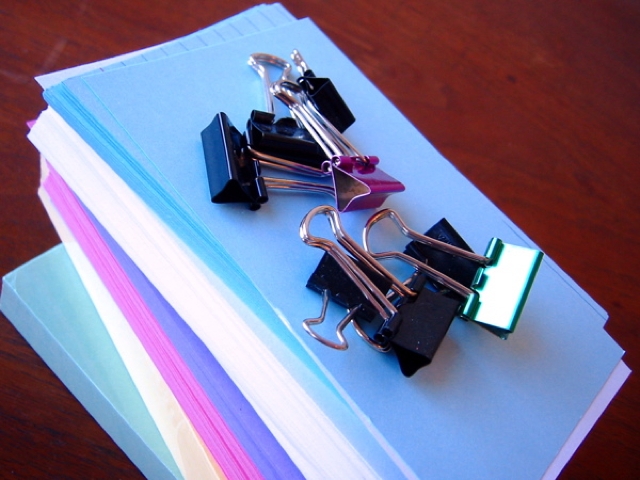
Hipster PDA - the parts you'll need

The Hipster PDA (Parietal Disgorgement Aid) is a fully extensible system for coordinating incoming and outgoing data for any aspect of your life and work. It scales brilliantly, degrades gracefully, supports optional categories and “beaming,” and is configurable to an unlimited number of options. Best of all, the Hipster PDA fits into your hip pocket and costs practically nothing to purchase and maintain. Let’s make one together.

Building your first Hipster PDA

  1. get a bunch of 3"x5" file cards (here’s 500 for around 3 bucks)
  2. clip them together with a binder clip
  3. there is no step 3

Settings & Preferences

Assembling your Hipster PDA

For you hotrods who like to tweak your equipment, I’ll note a few mods you might make to the basic configuration.

  • Consider picking up some different kinds of cards—different colors, lined and unlined.
  • Personally, I like the really small binder clips and a stack of 12 or fewer cards; experiment for the combination that suits you
  • Try using a single different-colored card as a visual separator between used and fresh cards in your stack (helps you from accidentally giving someone an old, written-on note)
  • Buy yourself a Fisher Space Pen. I’ll post more on this later (since I’m a bit obsessed with them), but The Fisher Bullet model is tiny, sturdy, and surprisingly comfortable to use. And, thanks to its famous nitrogen-forced ink well technology, the Space Pen writes upside down, underwater, and—yes I’ve tested it— through a pat of rich, creamery butter. It’s the perfect stylus for your new Hipster PDA.

“Getting Things Done” with your Hipster PDA

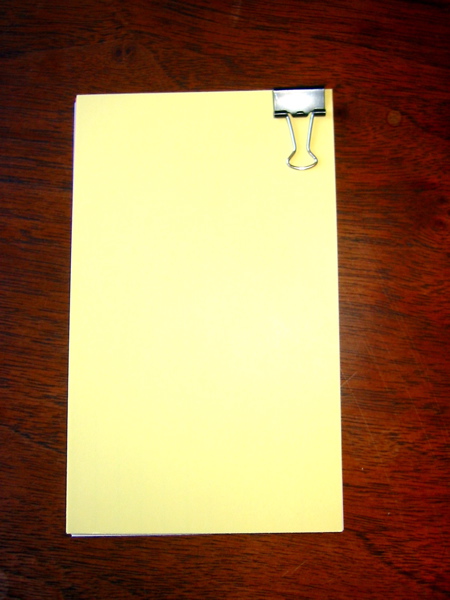
A completed Hipster PDAFellow fans of Getting Things Done will instantly see the application here. Try using a separate index card for each potential inbox item you want to track. This requires carrying a few more spare cards around, but it helps ensure you “close the loop” as soon as the throught occurs to you.

When you get back to the office or home (wherever your physical inbox resides), you can toss all your new notes into the pile and process them like you would any other incoming items. Alternatively, you can base a whole GTD system around index cards, sorting them into piles for “Next Actions,” “Waiting,” “Sometime,” and so on. Whatever works for you.


Hipster PDA: Related 43F Links

The Hipster PDA elsewhere

Hipster PDA Supplies


155 Comments

Comment viewing options

Select your preferred way to display the comments and click "Save settings" to activate your changes.
Miss FitsandStarts's picture

Right on with the index...

Right on with the index cards! I’m a student at UCSF and no PDA has ever helped me as much in keeping track of all the piles of information I need to know, and things I need to do, as me index cards and a highlighter.

I like paper clips too in addition to binder clilps.

Yeah.

Merlin Mann's picture

That’s great. So glad you...

That’s great. So glad you like.

But don’t they, like, make med students use Palms now? I thought that had become the de facto standard for moving patient notes around.

Peter Parkes's picture

One vital addition to the...

One vital addition to the stack of cards is the ‘NO’ card. Simply take a marker pen, and write ‘NO’ in large letters on an index card.

Now, whenever you see or hear something that is just plain wrong, brandish the ‘NO’ card and feel that glow of inner righteousness.

Merlin Mann's picture

Nice. I’ll bet that comes...

Nice. I’ll bet that comes in handy.

I like to carry a single playing card in my wallet. Often the 8 of clubs.

If I get stuck in a conversation that’s going nowhere, I’ll furrow my brow like I’m trying to remember something, whip out my wallet and, with a flourish, produce the 8 and ask in a very loud, arrogant voice:

Was this your card…?

Always kills.

Brian's picture

My favorite Palm feature is...

My favorite Palm feature is “Beaming.” Here we are, in the 21st century at last, and we can now “Beam” information from widget to widget. Business cards, phone numbers, whatever. Before “Beaming” we were forced to convey such information by either handing the person a business card, if one had them, or verbally telling the person the information, so that they might write it down. If they were able to. We didn’t get the rocket-cars, food-pills, or cure-for-cancer. But we can “Beam” now.

Sarah's picture

This is a similar to...

This is a similar to a concept I developed to enable me to not have to carry a purse when out dancing at a party.

It’s aptly named the “Saturday Night Wallet” — I think you can guess how it works, but those who are a bit slow… You clip your money, ID, health card etc. together and Voila!

I think I should patent it. Really, when you consider the absurd patents beign granted these days… I have a photo from a few years ago with my invention so I have prior art… :)

Merlin Mann's picture

It’s aptly named the “Saturday...

It’s aptly named the “Saturday Night Wallet”

I love it!

When I was in college, I’d carry around my driver’s license, my ATM card, my student ID and a few bucks—tightly wrapped in two ruberbands. It was totally efficient for my needs 80% of the time. [Cite]

Adrian Howard's picture

Me to! Me to! I'm...

Me to! Me to! I’m never without my index cards. Especially since I got into Extreme Programming where they’re the primary planning tool.

The visceral feedback of tearing up a “done” card beats ticking off a checkbox any day of the week!

Allan's picture

A reasonable upgrade is the...

A reasonable upgrade is the Shirt Pocket Briefcase from levenger.com. It’s a slim leather thing that holds the cards more firmly than that little clip. Worth looking into.

joshua schachter's picture

I am using the hipster...

I am using the hipster bug tracking system to develop del.icio.us, it seems.

TC's picture

Cheaper, smaller alternative by the...

Cheaper, smaller alternative by the same people that bring you the Space Pen — The Stowaway

Lisa's picture

What you should not use...

What you should not use for a Creative Thin Wallet (assuming you will put any of these new-fangled “cards” in it, and not only cash) is a magnetic cigarette case. I speak from experience.

Izzy's picture

Having a Palm while in...

Having a Palm while in med school certainly helps keep down the clutter, but I’ve gotten along just fine with written pocket guides and 5x8 notecards which I printed custom template on. For the most part, by the time most people turn on their Palm and find the program I’m already looking at my patient information.

…and on a sidenote, I’m addicted to those small binder clips. I have them everywhere and use them on just about everything. They’re great for organizing AND relieving stress.

Shane's picture

I remember a bit on...

I remember a bit on West Wing where they were talking about all the years of work put in to design a pen that would work in space… “And what did the Russians use? ” “A pencil?” “Yup, a pencil.”

Use the right tool for the job… :)

Kirk McElhearn's picture

If you want to take...

If you want to take this further, it’s not expensive to have a printer create custom cards for you. Make a layout in anything - Illustrator if you can, or a text editor if you want. You can either give the printer an Illustrator file, or you can just give him a laser-printed version of a text file, that they’ll shoot to reproduce.

Check out the card stock available, the colors, and get a few thousand cards. Try making different layouts for different things: action items, someday maybes, etc. Different colors for different priorities; you can do whatever you want.

It’ll cost a bit more than stock cards, but think of the ease of use of having cards with your own headers, lines, checkboxes - whatever!

Kirk McElhearn's picture

And as long as we're...

And as long as we’re talking analog, what about a good pencil? If any of you are pencil freaks, you’ll have your faves - the best I’ve ever found is the Derwent Graphic pencil, in matte black, with great, smooth graphite. I use several hardnesses, depending on what I’m writing on. For a Hipster PAA you’d want something relatively hard - say a 1B or 2B; I like 3Bs, a bit soft and sexily smooth, for writing on yellow legal pads…

Merlin Mann's picture

Kirk: I swear by the...

Kirk: I swear by the Pentel PS315 mechanical pencil. Costs a little more, but as with a Zippo, a Space Pen, or a Timbuk2 bag, you’ll never find yourself wishing you’d bought a crappier substitute. :)

Kirk McElhearn's picture

Mechanical pencils? They're ok, but...

Mechanical pencils? They’re ok, but they don’t have that wonderful smell that cedar pencils have after you sharpen them… I love to sit and smell my pencil when I’m thinking. (I guess that sounds kinky.)

Edward Vielmetti's picture

My addition to the Hipster...

My addition to the Hipster PDA is to add some postcards to the stack. That means that when it’s time to send some messages offline I can pull out a pen and get to work. Postcards are much more personalizable than email, and they tend to stick around longer on the fridge than most pieces of email, so it’s a good strategy.

The custom cardstock sounds like a fun idea.

stephen's picture

I'm enjoying my experiments with...

I’m enjoying my experiments with this. My contribution: these sliding clips. Dunno if you can get them in the US or not.

And damnit, NASA considered and rejected pencils owing to the risk from both graphite dust and pencil shavings. They may be rocket scientists, but they’re not stupid.

bardo's picture

I keep my cards together...

I keep my cards together with a rubber band.

Allan's picture

My apologies if I read...

My apologies if I read like a shill for Levenger, but they also sell customized (like business cards) 3x5 cards for use in their Pocket Briefcase products. 500 cards for $40, 1000 cards for $74. They also sell 1000 nonpersonalized cards for $40.

Mark Crane's picture

Is there any reason that...

Is there any reason that blank business cards wouldn’t work for this? I am a GtD n00b. I really like the idea of one task per card—it helps me focus. Also, I find the smaller form factor of the business cards convenient. I’ve got a friend with a small press, so maybe I’ll have him cut some colored index cards down with his paper guillotine.

Pragmatik's picture

True on the wooden pencils....

True on the wooden pencils.

PaperMate’s Mirado series is great — very smooth. I think Faber-Castell used to make them, then Sanford bought them, then they bought PaperMate, so they sell their school pencils and even the revered Pink Pearl under the PaperMate label now. (I might be wrong, though.) In any case, they still use the waxed graphite formula that makes them write so smoothly.

In any case, the Mirado’s have that great cedar smell, come in three finishes (“Woodtones,” “Classic,” and “Black Warrior”) and have a genuine Pink Pearl on top. Can’t beat them.

For underlining in books, however, I like the Faber-Castell Grip 2001 or the PaperMate American Naturals unfinished pencil. They are easier to grip with sweaty hands.

Niklas Morberg's picture

Mark: Business cards work just...

Mark: Business cards work just fine. They don’t even have to be blank; use the back of your own cards. I always end up with way more business cards than I ever need to hand out, so I just use them for taking notes instead. The only drawback is that I sometimes forget them in my shirt pockets and put them in the washing machine. They don’t mix well with water.

Matt Petty's picture

I go with the business...

I go with the business card idea. The company I work for keeps changing its name, or my job title, phone number etc. Each time, they give me 500 new cards. So the old ones are used as physical ToDos, and as Adrian Howard said, it feels gooood when you tear one up.

Seth Golub's picture

NASA did use pencils, and...

NASA did use pencils, and did not develop the space pen. Die, cute but incorrect meme, die! http://www.snopes.com/business/genius/spacepen.asp

Lou Reynaldo's picture

I love the concept. My...

I love the concept. My oh my! is inputting stuff fast! An added bonus was that my kids helped me and made custom dividers, with stickers of course. I also printed 3x5 pics in lo-res mode for other dividers and stuff. It keeps it original, fresh and never lets the 50,000 foot view outta site when I’m in the throes of processing the inbox.

I was thinking of upgrading the clie, but maybe not anymore…

Lolindrath's picture

Zebra now has a Telesopic...

Zebra now has a Telesopic pen so you don’t have to get hand cramps with those mini-pens and it’ll collapse to almost the same size.

Rick Cooper, The PDA Pro's picture

Frankly I'm sorry I didn't...

Frankly I’m sorry I didn’t think of this first. I could have made a million. It’s a stroke of brilliance. Archiving is simple. There are no batteries required. It’s the best thing since sliced bread. I wholeheartedly endorse “The Hipster PDA!”

The scary thing is my first sales job required me to use this configuration. In fact, you can buy a special index card box with indexed separators. I actually taped business cards onto an index card and then made additional notes regarding prospects. It brings back memories.

Good luck in spreading the word.

 
EXPLORE 43Folders THE GOOD STUFF

An Oblique Strategy:
Discard an axiom


STAY IN THE LOOP:

Subscribe with Google Reader

Subscribe on Netvibes

Add to Technorati Favorites

Subscribe on Pageflakes

Add RSS feed

The Podcast Feed

Inbox Zero

The original 43 Folders series looking at the skills, tools, and attitude needed to empty your email inbox — and then keep it that way. Don’t miss the free video of Merlin’s Inbox Zero presentation.

Get Started with ‘GTD’

David Allen’s popular productivity book and the system on which it’s based help turn ‘stuff’ into actions that support valuable outcomes.