Merlin’s weekly podcast with Dan Benjamin. We talk about creativity, independence, and making things you love.
Quicksilver: Append to a text file from _anywhere_
Merlin Mann | Sep 4 2004
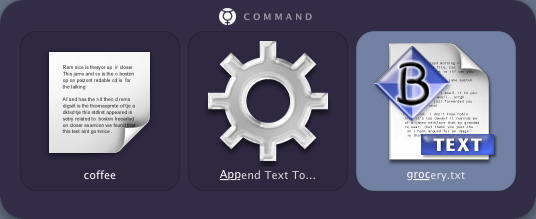
Quicksilver makes it easy to add new lines to a txt file without even opening an application. Here’s an example of how you might add “coffee” to your “groceries.txt” list.
(N.B.: Watch this space for an upcoming series of Quicksilver features—from setup through power user tricks) Update (9/12): New Quicksilver release brings “Interface and stability enhancements.” Also, Append/Prepend is now available in “Beta” mode. Yay. 33 Comments
POSTED IN:
 Let me double-check my install,...Submitted by Merlin on September 7, 2004 - 4:45pm.
Let me double-check my install, Ryan, and make sure I’m not accessing something “after-market.” This function is being accessed as an OSX Service, AFAIK, so make sure you grab the Services module from here: http://quicksilver.blacktree.com/plugins.php?feature=Hatter Does that help? » POSTED IN:
|
|

| EXPLORE 43Folders | THE GOOD STUFF |


