Merlin’s weekly podcast with Dan Benjamin. We talk about creativity, independence, and making things you love.
Quicksilver: Append to a text file from _anywhere_
Merlin Mann | Sep 4 2004
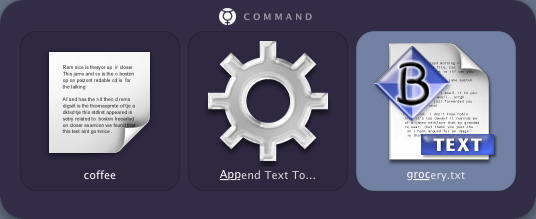
Quicksilver makes it easy to add new lines to a txt file without even opening an application. Here’s an example of how you might add “coffee” to your “groceries.txt” list.
(N.B.: Watch this space for an upcoming series of Quicksilver features—from setup through power user tricks) Update (9/12): New Quicksilver release brings “Interface and stability enhancements.” Also, Append/Prepend is now available in “Beta” mode. Yay. 33 Comments
POSTED IN:
 The “Append Text To…” functionality...Submitted by Merlin on September 8, 2004 - 5:43am.
The “Append Text To…” functionality is apparently an alpha-only feature at this moment (I begged my way onto the bleeding edge a few months ago). The great news is that (the very responsive developer says that) it will be rolled into the next release, Beta29. At that point you'll just need enable "Beta" functionality in the control panel (which most of you probably have already anyway). » POSTED IN:
|
|

| EXPLORE 43Folders | THE GOOD STUFF |


