43 Folders

43 Folders feed subscription icon - Shiny!Time, Attention, and Creative Work. After 4 years and a lot of productivity pr0n, we’re shifting gears. Re-learn how to use 43 Folders. Then back to work. [»]

”What’s 43 Folders?”
43Folders.com is Merlin Mann’s website about finding the time and attention to do your best creative work.

Quicksilver: Append to a text file from _anywhere_

Appending to a txt file in QS

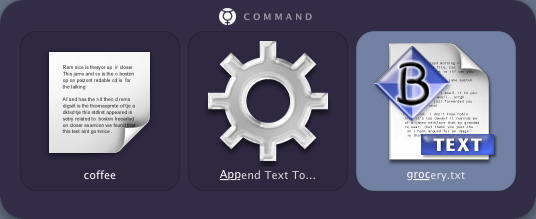
Quicksilver makes it easy to add new lines to a txt file without even opening an application. Here’s an example of how you might add “coffee” to your “groceries.txt” list.

  1. Invoke QS (usu. “CMD-space”)
  2. Hit “.” to start typing in the variable input field
  3. Type “coffee”
  4. Tab to the next pane
  5. Type “APP” (or whatever it takes to pull up “Append Text To…”)
  6. Tab to the next pane
  7. Type “GROC” or surf to your running “groceries.txt” file
  8. Hit enter
  9. You’re done
  10. Optionally, note that after you’ve appended this, the window autopops with the destination file (“groceries.txt”) ready to open for inspection.
  • Hint: You can add carriage returns in the input field by typing option-return.
  • Hint: To place your new text at the beginning of a txt document, rather than the end, type “PREP” (or whatever it takes to pull up “Prepend Text To…”) in step 5 above.

(N.B.: Watch this space for an upcoming series of Quicksilver features—from setup through power user tricks)

Update (9/12): New Quicksilver release brings “Interface and stability enhancements.” Also, Append/Prepend is now available in “Beta” mode. Yay.

Thomas Yager-Madden's picture

I'm also seeing the same...

I’m also seeing the same issue as Nick - running B29 with Beta mode set in prefs, the Append Text action appears in the drop down, but only succeeds in appending text to certain files. So far, I’ve noticed that files created in BBEdit, or simply with ‘touch’ at the command line work fine - but it won’t add text to files created in TextEdit or sync’d from my handheld using NoteTaker.

Its sort of fun when it works, but for now I’m sticking with CMD-Tab.

 
EXPLORE 43Folders THE GOOD STUFF

An Oblique Strategy:
Honor thy error as a hidden intention


STAY IN THE LOOP:

Subscribe with Google Reader

Subscribe on Netvibes

Add to Technorati Favorites

Subscribe on Pageflakes

Add RSS feed

The Podcast Feed

Inbox Zero

The original 43 Folders series looking at the skills, tools, and attitude needed to empty your email inbox — and then keep it that way. Don’t miss the free video of Merlin’s Inbox Zero presentation.

Making Time

3-part series on attention management for artists and makers. Read Bad Correspondence, The Job You Think You Have, and One Clear Line.