43 Folders

43 Folders feed subscription icon - Shiny! Drowning in email? Try Inbox Zero to learn sane tips for dealing with high-volume email. And don’t miss the free Inbox Zero video. »

”What’s 43 Folders?”
43Folders.com is Merlin Mann’s website about finding the time and attention to do your best creative work.

Custom feed refreshing in NetNewsWire

NetNewsWire is one my favorite Mac applications. It’s a beautiful RSS/Atom reader with so many wonderful features that it’s easy to lose one of it’s smartest ones in the lights.

I’ve talked recently about the value of setting your email program’s “autocheck” frequency to something more realistic than “every minute,” as so many folks currently do. It’s an easy way to minimize distraction, plus it encourages the smart habit of “ganging” email work into focused sprints of activity—rather than dashing away from whatever you’re doing every minute or two like Pavlov’s drooly puppy.

NetNewsWire has a setting that supports this same good habit in your site surfing habits. Under “Preferences > Downloading > Feeds”, you can set “Refresh all subscriptions” to any of [Manual only | Every 30 Minutes | Every Hour | Every 4 Hours]. While the last one is optimal for server load etiquette and reduced distraction fu, I think you could be forgiven for wanting updates every hour. But what if you want even more granularity—to further minimize distractions from time sink “fun” sites? Easy.

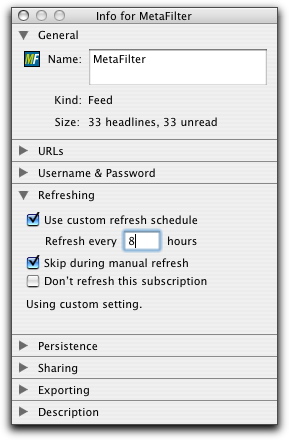
My MeFi prefs in NNW

  1. In NetNewsWire, select the feed whose checking frequency you want to edit, and go to “Window > Get Info” (or key CMD-i).
  2. Flip the little reveal triangle for “Refreshing”
  3. Click “Use custom refresh schedule”
  4. For “Refresh every X hours” choose something that works for you.
    • I’d suggest somewhere between 2 and 24 hours, depending on the site
  5. Click “Skip during manual refresh”

You can repeat this for any feed whose siren’s call is taking you away from the work at hand. Alternatively, I suppose you could use this trick in reverse; set the “Refresh all subscriptions” to “Every 4 Hours” and then tell a given individual feed to refresh every hour or 1/2-hour.

Also, if it’s not clear already, I do really recommend Mac users consider having a look at NetNewsWire or it’s freeware little brother, NetNewsWire Lite. Atom and RSS always seemed like a good idea, but it took Brent’s amazing work on NNW to make them as integrated into my working day as email and the web.


Comment viewing options

Select your preferred way to display the comments and click "Save settings" to activate your changes.
Practical Mac » Blog Archive » News Readers Revi's picture

[...] I’ve selected five news...

[…] I’ve selected five news readers to talk about today: NetNewsWire, Vienna, Shrook, Safari and Newsfire. There are of course many more like RSS Owl, Pulp Fiction, NewsMacPro and NewsFan but I’ve chosen these five for review based upon a combination of their simplicity, ease of use, prettiness and price. First: NetNewsWire NetNewsWire is the 800 pound gorilla of desktop news readers. At one point in 2005 FeedBurner reported it was the most popular reader on any platform, Mac or PC. It’s simple interface and abundant features make it a real workhorse and the reader of choice for such productivity-savvy individuals as Merlin Mann and Walt Mossberg. Some of the stand out features that I find useful in NetNewsWire are smart folders, integration with Del.icio.us, and compatibility with Automator and Applescript. I like being able to include NetNewsWire in my workflows, and it’s really nice to be able to throw together a smart folder that contains all the news items from local sources that contain information about crime in my neighborhood, or this time of year, to automatically collect all the news that makes reference to WWDC. […]

Kevin Ballard's picture

I'd like to point out...

I’d like to point out that anybody using NetNewsWire 1.x should really upgrade to the public beta of NetNewsWire 2. It’s fantastic.

Oh, and here’s another tip. You can set the custom refresh for folders, and any children of the folders inherit that custom refresh as their default refresh (you can obviously set a custom refresh for them that’s different). That’s quite useful. For instance, when I was testing out podcasting (I eventually stopped, since I rarely ever listened to them, since I don’t have a commute), I set the Podcasts folder to refresh every 24 hours, since no podcasts (that I know of) come out with more than one a day (and most are less often). This way whenever I added a new podcast, it would default to refreshing once a day rather than once every hour.

I’d also like to mention tuning refreshes with the bandwidth stats window. A while ago I set my default refresh to every hour, then waited a day, then opened up my bandwidth stats window and found all the feeds that either didn’t use gzip or didn’t use 304 responses and made them refresh less often. Then I found the ones that did do that and, depending on the feed, made them refresh more often. Of course, I took update schedule as a factor in this. MacUpdate gets refreshed every half hour, because it’s always adding new stuff. Same for Fark and BoingBoing. But, for example, ChiperBlog (the blog of one of my friends) gets updated every 6 hours, because he often goes for days or weeks between posts (and 6 hours is a reasonable compromise between once a day, which is more economical, and every hour, which lets me see the post sooner after it goes up).

Lasar Liepins's picture

I tried using NetNewsWire Lite...

I tried using NetNewsWire Lite for a while, but found it lacking in features (which the non-lite version may well have). Then I stumbled across NewsPipe[1], which is a Python script that mails you all new items in your feed list (which is an OPML file like NNW exports). You lose NNW’s feed management features, but you win all the benefits of having the news in your mail client. Plus it’s one application less in the Dock.

Merlin Mann's picture

Good comment, KB, and a...

Good comment, KB, and a great catch.

I’m using the 2 beta myself, so can folks on 1.X in full or lite version illuminate whether the feature I so cavalierly reference is available in those versions. :)

tia.

Mike's picture

I prefer Sage myself. Not...

I prefer Sage myself. Not a lot of options (manual refresh only), but I don’t have to leave the browser :)

Durbrow's picture

Netnewswire Lite does not seem...

Netnewswire Lite does not seem allow one to adjust the size of the type for subscription feeds (the names of the subscription on the left panel). The existing typesize is pretty small for aging eyes. Does anyone know of a way to adjust this?

Kevin Ballard's picture

Are you using 1.x or...

Are you using 1.x or 2.0 beta? NetNewsWire 2.0 beta (dunno about Lite) lets you change the font used there (and the size as well).

Greg Borenstein's picture

In both NNW 2b and...

In both NNW 2b and NNW Lite, you can change the font size from the preferences (in Lite it is under “HTML” and in 2b “appearance”). It would be nice, though, if the News Items display font would respond to cmd+ and cmd- the way web pages do.

One of the coolest things about NNW 2b is that if you quit when you’ve got a zillion tabs open (which is an easy thing to do accidentally when cmd+w is right next to cmd+q), they’ll all reappear and reload when you next launch. Wish Safari did that. Also, have you seen the del.icio.us script? It lets you post the current News Item from the Apple Script menu.

I’ve been using NNW 2b a ton and I really like it (I even paid for it), but my question is: Do you think you’ll still be using it after Safari RSS is on the scene? (If you think talking about this here would be hijacking the original topic too badly, we can move over to my place I recently posted on NNW 2b, too.)

Durbrow's picture

I am using NetNewsLite 2.0b23....

I am using NetNewsLite 2.0b23. As far as I can figure, changing the type preferences only changes the size of article titles (right panel) and article text. It does not change the size of Subscription Name (i.e. BBC News, New York Times, etc) which is the left panel. Thanks for any advice.

Michael's picture

So what are the feeds...

So what are the feeds y’all find essential for RSS? I use VersionTracker and MacUpdate, of course. I’m prolly going to add this just as soon as I figure out how. What else should I be checking out?

About Merlin Mann

Merlin Mann's picture

Bio

Merlin Mann is an independent writer, speaker, and broadcaster. He’s best known for being the guy who started the website you’re reading right now. He lives in San Francisco, does lots of public speaking, and helps make cool things like You Look Nice Today. Also? He looks like this, answers questions, and has something like a life.

The best thing Merlin’s ever written is a short essay called, “Better.”

 
EXPLORE 43Folders THE GOOD STUFF

An Oblique Strategy:
Distorting time


STAY IN THE LOOP:

Subscribe with Google Reader

Subscribe on Netvibes

Add to Technorati Favorites

Subscribe on Pageflakes

Add RSS feed

The Podcast Feed

Inbox Zero

The original 43 Folders series looking at the skills, tools, and attitude needed to empty your email inbox — and then keep it that way. Don’t miss the free video of Merlin’s Inbox Zero presentation.

Making Time

3-part series on attention management for artists and makers. Read Bad Correspondence, The Job You Think You Have, and One Clear Line.