Merlin’s weekly podcast with Dan Benjamin. We talk about creativity, independence, and making things you love.
kGTD Tip: Link to sites, files, and more
Merlin Mann | Jan 30 2006
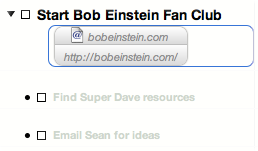
This is technically more of an OmniOutliner Pro tip than a strictly kGTD trick, but it's so useful that I wanted to make sure my fellow fans are aware of it. The beauty of kGTD lies in its single-minded focus on managing your tasks in the context of the projects with which they're associated. Add too much else (or get lazy with your level of commitment to what you've added) and the system starts to fall apart. And yet it's so useful to have easy access to the people, websites, and documents that you'd like associated with your tasks and projects. OS X to the rescue, because OmniOutliner makes it very easy to drag and drop virtually any kind of Mac data object into a given OO document -- and, consequently, to keep the non-task corners of your world never further than a click away. Add web linksFor example, let's say you've created a new kGTD project related to finally starting your Bob Einstein fan club. The very first thing you might want to do is associate Bob's current website address with the project at a high level. Easy. Just add a note to the project's line (keyboard:
You now have an automagic clickable button that takes you right to the site. But it doesn't stop there. Add peopleHow about adding a person to one of your tasks? Just find the entry in your Address Book, and drag it into a new note for that particular line.
Now you have one-click access to your team's contact info. All in context. Add documentsFar and away my favorite use of this -- and whose teaching unto me by none other than kGTD's peerless Ethan JA Schoonover got me started in this direction -- is adding aliases to documents within your kGTD doc. Personally, I live and breathe text files, so I'm forever referring to one document or another for reference or to work on a post, or create a bit of HTML. This is where we go to the next level. Create a note for a task or project, then locate the document you want to attach somewhere on your drive. Start dragging the document into the note you've created and before you release the mouse to put it in place, hit "
So, now, I can basically wire my whole world together inside kGTD in a way that's efficient, contextual, and very easy to maintain. To my knowledge you can add virtually anything as an attachment in OO, including images, movies, PDFs, etc., and (AFAIK) you're practically unlimited in how many of these links you can add in a document before it keels over, so you're bounded only by imagination in the ways kGTD (and OmniOutliner Pro, in general) can help to wrangle the disparate pieces of your world. I can tell you it's doing a bang-up job on mine. 1. For aliasing a file (as in the last tip), you can also choose to " 12 Comments
POSTED IN:
As Lou Reed says, I'm... by Joe Briefcase (not verified)
I just put the text... by Joe Briefcase (not verified)
Oh, this is all amazingly... by Mark Morgan (not verified)
If you're using Mail.app, you... by Gordon Meyer (not verified)
I was wondering - if... by Brett (not verified)
Thx.. I just got OO,... by Doug (not verified)
Can I do all this... by Rondolino (not verified)
If you put links in... by Ted Pavlic (not verified)
You can also do the... by Durbrow (not verified)
yeha is there anything like... by yehweh (not verified)
About Merlin Bio Merlin Mann is an independent writer, speaker, and broadcaster. He’s best known for being the guy who created the website you’re reading right now. He lives in San Francisco, does lots of public speaking, and helps make cool things like You Look Nice Today, Back to Work, and Kung Fu Grippe. Also? He’s writing this book, he lives with this face, he suffers from this hair, he answers these questions, and he’s had this life. So far. Merlin’s favorite thing he’s written in the past few years is an essay entitled, “Cranking.”
|
|




| EXPLORE 43Folders | THE GOOD STUFF |


