Merlin’s weekly podcast with Dan Benjamin. We talk about creativity, independence, and making things you love.
Vox Pop: Workflow for the Fujitsu ScanSnap?
Merlin Mann | Oct 23 2007
In comments about yesterday's "Making friends with paper" post, I was reminded by 43f member Adam Hooks...
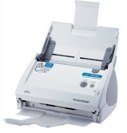
Adam remembers correctly that I purchased and preliminarily fiddled with the Fujitsu ScanSnap S500M for OS X (Info, Amazon). It's a small-footprint, high-speed document scanner that a lot of people have been talking about lately. I'd read so many reviews and blog posts about how easy it is to use that I was intoxicated by the dream of a life -- if not without paper storage -- where I could at least try to minimize my unnecessary paper clutter and start making document archiving easier and more searchable. Given the not inconsiderable cost of the unit, I'm embarrassed to say that I got busy with other stuff and haven't yet returned to using the ScanSnap in any automated way. Doesn't mean I'm not interested or haven't gotten started... ScanSnap S500M My initial experiences, while tentative in terms of time commitment and true workflow integration, have been very positive so far. It's easy and fast to set up the S500M and then start scanning one- or two-sided documents. The beauty part is that the included "ScanSnap Manager" app not only stores your document preferences, but directs the USB input from the ScanSnap right into the destination app of your choosing (which can, of course, be an OCR app -- that's where it gets powerful). Initial experiments scanning directly to image-only PDFs were very positive, while scanning into "Yep" and "DevonThink Pro Office" (which has on-board OCR) seems to point even closer to the direction I eventually hope to go. I know at least a few of you are ScanSnap studs who have come up with workflows that are really happening for you (hint: looking at you for a blog post here, Mr. Norbauer). In the absence of a more detailed report from me, I'm hoping a few of you can chime in here. The Question to YouHow are you integrating the ScanSnap (or another OS X-friendly document scanner) into your workflow? What are you using for OCR? Having particular success with ReadIris, Acrobat, DevonThink, or Yep? Any sexy Automator workflows to share? 22 Comments
POSTED IN:
 Document WalletSubmitted by jvoorhees on October 23, 2007 - 12:16pm.
I've been using my Canon MP500 printer/scanner which works well except for the fact that you can't scan when hooked up to an Airport Extreme - how dumb is that? I tried Yep for a while and it generally got the job done, but I really prefer the interface of Document Wallet. It has a more hierarchical structure than a strict tagging approach used by Yep. » POSTED IN:
|
|

| EXPLORE 43Folders | THE GOOD STUFF |


