43 Folders

43 Folders feed subscription icon - Shiny! New to 43 folders? Here are our All-time Most Popular Posts. Want the best stuff? Here are our Classics.

Login or register

Register for free on 43 Folders to comment on articles, post to our forum, customize your visits, and much more. Current users can login now.

The Great Keyboard Bath of 2007

A few months back I read Scott Machella’s story, via BoingBoing’s post, about cleaning a computer keyboard by putting it in the dishwasher. From the little bit I know about electronics, it rang true to me but I didn’t feel compelled to actually try it. At least, not at first.

The thing about a dirty keyboard is that it’s only dirty if you notice it. I’m a touch-typer, so I rarely look down. But once the aforementioned articles caused me to examine my own keyboards, I was sorry that I looked. Yuck. Clearly, I had to do something about it.

Scott wrote about how he let his keyboard dry out for 5 days, and given my own impatient nature, I thought it best to wait until I was going to be out of town before giving it a try. But I decided to go whole-hog and wash both my beloved Matias Tactile Pro Keyboard and my Apple Bluetooth Keyboard at the same time. (My Apple Bluetooth Keyboard is the original, white plastic model. Not the current slim metallic work of art.)

The Tactile Pro’s USB cable can’t be removed, so I wrapped it up tightly with a twist-tie. For the Apple keyboard, I removed the batteries and left the battery door cover off. I decided not to remove the keycaps on either of them, having done that in the distant past (while replacing the keyboard springs on my Atari ST) and found it to be too nerve wracking and tedious. But on the whole I followed Scott’s process. The hardest part was figuring out how to turn off the drying cycle and suppress the rinse-chemical additive on my dishwasher.

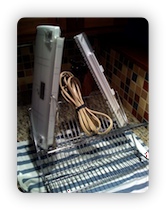
After the washing was over, I shook out as much water as I could, then propped-up the keyboards so they’d drain. (See the photo. The other item pictured is an extension cord that I also washed; it was impulse add-on.) Both keyboards dripped like crazy for a long time, but by the next morning there was only a slight fog of moisture visible inside the clear parts of the Apple keyboard. I resisted all temptation to plug them in, and then left town for 7 days.

Upon my return, both keyboards were completely dry, of course. They were also sparkling-clean and—the moment you’re waiting for—functioned perfectly. Hurray! A time-efficient and effective path to cleanliness. What a great feeling. Hey, this mouse looks a little dirty too…


16 Comments

Comment viewing options

Select your preferred way to display the comments and click "Save settings" to activate your changes.
Sean Coffee's picture

Wow.

You’re my hero! I am writing this on my own beloved (and, I just realized, much too dirty) Tactile Pro, and I’m leaving town over the holidays. Headed downstairs right now to figure out how to turn off auto-dry!

shawnpetriw's picture

Quick story about Matias...

A few months ago I managed to break one of the little feet on the keyboard. I went to the web site to see if replacement parts were available, but couldn’t find any. So I sent an e-mail using one of the contact forms.

They got in touch with me right away, and sent me 2 replacement feet at no charge.

Awesome. And now that I know I can clean this sucker in the dishwasher, all the better!

popastronaut's picture

Ha ha

At a previous job, we used to clean office keyboards in the old dishwasher. It worked like a charm but I’ve never had the guts to do it again. I’m still not sure I will since the price of failure is so high, but thanks for the validation anyway!

Merlin Mann's picture

Flavorful

The last time I cleaned my keyboard, I started by just flipping it over — causing about a teaspoon of what looked like human “Mrs. Dash” to sprinkle onto my desk. Chilling.

I really need to get a dishwasher.

Wild Rye's picture

Warp Speed

Yes the dishwasher trick works wonders. But I got a little too impatient and tried to use a hair dryer to speed the process. This also worked wonders. But only momentarily. At first I thought I was getting dizzy, then I realized that it wasn’t my vision getting wobbly…THE KEYS WERE MELTING.

jweiland's picture

Yes, but....

Interesting experiments. But consider the alternative: go ahead and buy a new keyboard after a few years of use. In addition to acquire all sorts of dirt over time the marking on the keycaps typically fades away on the most frequently used keys. A good keyboard should be no more than 20-30 bucks and you can get one for less than 5 bucks if the budget is tight. BTW, one of my USB sticks went trough a full heavy-duty cycle in the washing machine two years ago - and still works fine.

JokersTheory's picture

Re: The Great Keyboard Bath of 2007

I actually just threw my keyboard in the dishwasher a few days ago. But my keyboard is made to be taken apart and thrown into a dishwasher. I have a Saitek Eclipse. Instead of the keys individually, They are all part of a a plastic plate. I’ll get some picture of it’s insides sometime later when I become less lazy.

Craig's picture

I’m in the rinse cycle

I’m in the rinse cycle now, waiting for the results, and it just occurred to me to ask - this works with laptops, too, right?

jeffhot's picture

The Bluetooth one too!

I can’t believe you washed that Apple Bluetooth Keyboard successfully too. USB keyboards are one thing, but I can’t picture a little Bluetooth module being happy when wet. As I recall, the Apple Wireless Keyboard has little holes next to the battery springs that make it seem unlikely to be isolated enough from the water. Oh well, whatever works.

Of course this page can’t exist without a link to Coudal Partner’s “Shift Option Rinse” short: http://www.coudal.com/keywasher.php

Mikey's picture

cool!

Wow, what a great idea! Hey, this here Macbook is lookin’ a little grungy. The cat needs a bath too…

drhayes's picture

Slightly off topic...

I love this site! I read it all the time!

Now that THAT’S out of the way… does anyone else have problems posting links to this site using the del.icio.us bookmarklet? It just does nothing, nothing at all — I’m bummed.

Is there some sort of 43foldery wizardry in place to disable del.icio.us? Are you in cahoots with ma.gnolia? What gives? ( =

gordonmeyer's picture

ymmv

Not a lot of help, I know, but the bookmarklet works for me, from this site, using Safari 3.

mmrtnt's picture

Air Compressor

I've washed many keyboards. I've also washed numerous circuit boards. The trick to getting them dry right away if you're impatient is to use compressed air. You need a compressor for this, not a spray-can.

Blow high-pressure (50-100psi) air into the device continuously until water stops coming out.

(Don't blame me if you don't get all the water out, though)

axoplasm's picture

Might work for digital cameras, too...

Although I certainly wouldn’t recommend it. I dropped my Canon Elph in the sandy salty ocean a few months back. It worked OK for a day, but I could hear grit in the mechanics when I turned it on and off. After a couple more days it just stopped working. Desperate, I took out the battery and rinsed it in cold tap water, then let it dry for, I dunno, 2 weeks?

Then, whaddya know, it worked.

bigfatdummy's picture

Re: The Great Keyboard Bath of 2007

A while back I removed all the keys from my keyboard and put them into this sack my wife had for laundry. (I guess you put smaller, delicate items in the bag to wash them) I put all the keys in the bag and put them in the dishwasher. It worked perfectly! I cleaned the rest of the keyboard manually and reassembled it.

Merlin, I feel for you not having a dishwasher I went 4 years without a dishwasher in my house, until I remodeled my kitchen. I sure love having one. Maybe you could try the laundry bag idea and use it in your clothes washer?

flc's picture

Keyboard? Too easy :)

I thoroughly washed my PC in a shower once (motherboard, processor/cooler assembly, videocard/cooler assembly, power unit with cooler) and the case. Just get tired of all that dust, you know :) Takes a patience to wait till it’s dry (48 hours on radiator) 4 years passed, still working perfectly. Coolers are good too.

Don’t forget to take out BIOS battery!

I believe there is nothing wrong with water then stuff is unpowered.

 
EXPLORE 43Folders THE GOOD STUFF

An Oblique Strategy:
Only a part. Not the whole.


STAY IN THE LOOP:

Subscribe with Google Reader

Subscribe on Netvibes

Add to Technorati Favorites

Subscribe on Pageflakes

Add RSS feed

The Podcast Feed

Inbox Zero

The original 43 Folders series looking at the skills, tools, and attitude needed to empty your email inbox — and then keep it that way. Don’t miss the free video of Merlin’s Inbox Zero presentation.

Get Started with ‘GTD’

David Allen’s popular productivity book and the system on which it’s based help turn ‘stuff’ into actions that support valuable outcomes.