Merlin’s weekly podcast with Dan Benjamin. We talk about creativity, independence, and making things you love.
Custom feed refreshing in NetNewsWire
Merlin Mann | Feb 28 2005
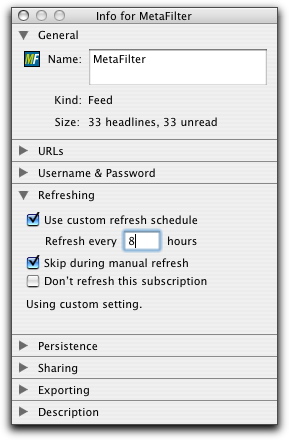
NetNewsWire is one my favorite Mac applications. It's a beautiful RSS/Atom reader with so many wonderful features that it's easy to lose one of it's smartest ones in the lights. I've talked recently about the value of setting your email program's "autocheck" frequency to something more realistic than "every minute," as so many folks currently do. It's an easy way to minimize distraction, plus it encourages the smart habit of "ganging" email work into focused sprints of activity—rather than dashing away from whatever you're doing every minute or two like Pavlov's drooly puppy. NetNewsWire has a setting that supports this same good habit in your site surfing habits. Under "
You can repeat this for any feed whose siren's call is taking you away from the work at hand. Alternatively, I suppose you could use this trick in reverse; set the "Refresh all subscriptions" to "Every 4 Hours" and then tell a given individual feed to refresh every hour or 1/2-hour. Also, if it's not clear already, I do really recommend Mac users consider having a look at NetNewsWire or it's freeware little brother, NetNewsWire Lite. Atom and RSS always seemed like a good idea, but it took Brent's amazing work on NNW to make them as integrated into my working day as email and the web. 21 Comments
POSTED IN:
I'd like to point out... by Kevin Ballard (not verified)
I tried using NetNewsWire Lite... by Lasar Liepins (not verified)
I prefer Sage myself. Not... by Mike (not verified)
Netnewswire Lite does not seem... by Durbrow (not verified)
Are you using 1.x or... by Kevin Ballard (not verified)
In both NNW 2b and... by Greg Borenstein (not verified)
I am using NetNewsLite 2.0b23.... by Durbrow (not verified)
So what are the feeds... by Michael (not verified)
I'm a big fan of... by newswrap (not verified)
About Merlin Bio Merlin Mann is an independent writer, speaker, and broadcaster. He’s best known for being the guy who created the website you’re reading right now. He lives in San Francisco, does lots of public speaking, and helps make cool things like You Look Nice Today, Back to Work, and Kung Fu Grippe. Also? He’s writing this book, he lives with this face, he suffers from this hair, he answers these questions, and he’s had this life. So far. Merlin’s favorite thing he’s written in the past few years is an essay entitled, “Cranking.”
|
|


| EXPLORE 43Folders | THE GOOD STUFF |


