43 Folders

43 Folders feed subscription icon - Shiny!Time, Attention, and Creative Work. After 4 years and a lot of productivity pr0n, we’re shifting gears. Re-learn how to use 43 Folders. Then back to work. [»]

”What’s 43 Folders?”
43Folders.com is Merlin Mann’s website about finding the time and attention to do your best creative work.

More on gluing stuff together in Entourage

The main reason I stick with Entourage for all my calendar, TODO list, and—to a certain extent—archival email needs, comes down to one word: glue.

As annoying as Entourage is in so many ways, I love that I can basically associate anything with anything via the “Link” functionality. This provides a handy little landing pad for any task, note, event, email, or contact onto which you can drop any other Entourage object as well as virtually any item from the Finder (for some reason it doesn’t easily handle URLs, which seems kind of dumb: use .weblocs as a workaround). Entourage then perpetually remembers that association in both the linking and linked items. Got it? Group like with like, and then get to anything from anything (Steal this idea, Apple; use Spotlight).

So, I can associate an email message with a TODO, attach a text file to a calendar event (see my article in June’s MacWorld), and even, apparently, attach Applications and folder paths to any Entourage object. Why is this last one so freaking handy? Lemme show you.

I love recurring tasks and use them all the time for repeating TODOs that I want to just forget about until they’re due again. One such task—ironically enough—is my monthly backup of Entourage’s glass-jawed database.

Now this isn’t terribly complicated, but here’s the steps I need in order to do this each month:

  1. Get a reminder about the need to backup
  2. Open the folder in which my Entourage identities (and databases) live
  3. Open up the Database Utility to run the "Compact Database" command needed to generate the backup
  4. Open the folder on my external drive where I keep my monthly backups
  5. Copy the backup to the external drive’s folder

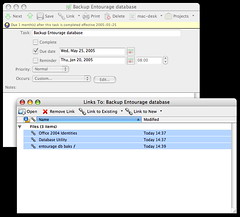
The beauty part is that I can embed links to the Database Utility app and both folder paths right in the reminder. When I get pinged each month, I can just open the calendar event, select all my stuff in the Links section, and click “Open.” Boom: the utility launches and the two folders open right on my desktop. No hunting, no searching, and no janky alias maintenance.

Entourage to Finder Links

Think about applying this same process of linking in similar scenarios:

  • Keep all the running notes and Excel spreadsheets for a standing weekly meeting in one repeating calendar event (I’m looking at you, B-May)
  • Create a “job jacket” that contains the folders for all your design assets linked inside one event (like, maybe, the deadline)
  • Prepare for a retreat or other off-site meeting by keeping all the relevant folders, contacts, notes, URLs, and related events in one calendar item

Now if you’re already a long-suffering Entourage user, your eyes should be lighting up right about now, because this trick emulates several of the best features of the Project Center without the functional death march. No need to walk through the stupid wizard and tell it all the things you don’t need: just spark up a new task or calendar event, pop open the Links area, and start throwing your stuff at it. Super easy.

Now, I know nobody ever wants to admit to their dark existence on the Entourage downlow, but I must ask: Anybody else doing cool tricks with linking? Got a neat way you keep your stuff tidy in Entourage? Share.


Comment viewing options

Select your preferred way to display the comments and click "Save settings" to activate your changes.
Andrew Currie's picture

I myself could never entrust...

I myself could never entrust my precious email to Entourage, precisely because of its proprietary database format. I had some bad RAM corrupt my database once, and that was that — poof! All my email, gone…

Never again!

Anyone interested in my quest for the perfect Mac email app might be interested in this post on my own site:

http://www.andrewcurrie.ca/index.php/weblog/comments/allaboutemailformacosx/

Merlin Mann's picture

That sucks, Andrew. Entourage is...

That sucks, Andrew. Entourage is notorious for crap like that.

Having said that, I’d personally never rely on POP mail for that very reason—regardless of apps. I currently pipe all my email (about 10 active accounts in various places + 30ish domain catchalls + Gmail) through a single IMAP account (Fastmail. Love them.). Takes a lot of the peril out of email. Can’t imagine going back at this point.

I just wish there were a sturdy analogue of IMAP for calendar events. That would be gold.

[n.b. - Fair warning. Let’s not make this a generic (Entourage|Microsoft|Whatever)-bashing thread. Please keep comments on the topic of how you’re using linking. Thanks.]

Gregg's picture

Google 'CalDAV' for at least...

Google ‘CalDAV’ for at least one up-and-coming “IMAP for calendars”. (for example, http://greenbytes.de/tech/webdav/draft-dusseault-caldav-01.html). Unlike the “put a file on a disk somewhere” model of iCal, it actually tries to use extensions to the WebDAV protocol to support various calendar object thingees (alarms, invites, etc).

Merlin Mann's picture

Nice, Gregg. I haven't touched...

Nice, Gregg.

I haven’t touched iCal (or its underlying protocol) for probably a year. At one point I was trying to manage half a dozen projects with it, and it became really frustrating that you were either THE owner or THE user with no privileges or communication in between.

Would be great to see something that’s an open protocol (and usable on virtually any hosted box—tough with WebDAV) that lets an administrator grant access to users at varying degrees.

Thanks.

Rich's picture

This sounds like a great...

This sounds like a great opportunity for some Applescript!

Write a script to do exactly that, save it as an application, then drop that in as a link in the recurring reminder.

Now when you get the reminder you just have to run it!

… or, even better, schedule the Applescript to run with cron or similar.

Yay automation!

Jud's picture

Andrew and Merlin, Straight up, I'm...

Andrew and Merlin,

Straight up, I’m the guy in charge of the databse for Entourage…

Andrew, I read your post, interesting stuff in there. In defense of the Entourage database, it has come a long way since E2001. 5 years of changes, most of which were centered around making sure that we never end up with a database that ate all of your mail. I have yet to see a 2004 database that couldn’t be repaired at least to a point where you could export all of the records in it.

Merlin, have you lost any data with the latest Entourage?

Merlin Mann's picture

Merlin, have you lost any...

Merlin, have you lost any data with the latest Entourage?

I’m happy to say I have not.

I do recall having had a number of unsavory experiences in a previous version, but not with this one. I do still backup neurotically. The reports I get from people—some anecdotal and probably just the same stuff you hear—has historically come down to three issues:

  1. Database gets HUGE pretty fast under certain circumstances (I have friends claiming theirs tops 2GB)
  2. Database crashes or gets corrupted easier than people would like, resulting in data loss
  3. The proprietary format makes people crazy (this very much includes me). “Why I can’t I touch my stuff? Why does ‘exporting’ mean ‘archiving? I just want to see my mail!…!”

These may seem inaccurate today, but I did learn my lesson a couple times on previous versions. If you have information you’d like to share, or suggestions for beating corruption problems, do it. Since I guess I’m resigned to this thread veering wildly off-topic, feel free to respond here or via email.

(And tell Mr. Ruff to bring me down there some day; I have a list of feature ideas longer than your arm. :-) )

Andy Ruff's picture

Merlin, give me a date...

Merlin, give me a date that you can make it to lunch in Mountain View and we’ll arrange something. I’ll also be up in the city a couple days during WWDC if you’d like to meet up in the second week of June (perhaps we can get Jud to join us as well).

Andrew Currie's picture

Hi all, Just checking back in... Yeah,...

Hi all,

Just checking back in…

Yeah, didn’t mean to Entourage-bash. Mailsmith’s database terrifies me just as much. Heck, even the few lines of XML that Mail.app 2.0 supposedly adds to each and every email for Spotlight indexing scares me!

Edwin's picture

I never saw that option...

I never saw that option before until you mention it now. Great! I immediately put the backup thing in a recurring Calendar event.

One “link” trick I often use is with the Applescripts that make it easy to “create task from message”. I have changed it a bit so not the whole message ends up in the task details, just the subject becomses the title. Automatically the email is linked to the task so when I need it (reference material) when going through the tasklist I do not have to click to the appropriate folder.

About Merlin Mann

Merlin Mann's picture

Bio

Merlin Mann is an independent writer, speaker, and broadcaster. He’s best known for being the guy who started the website you’re reading right now. He lives in San Francisco, does lots of public speaking, and helps make cool things like You Look Nice Today. Also? He looks like this, answers questions, and has something like a life.

Merlin’s favorite thing he’s written recently is a short essay called, “Better.”

 
EXPLORE 43Folders THE GOOD STUFF

An Oblique Strategy:
Discover the recipes you are using and abandon them


STAY IN THE LOOP:

Subscribe with Google Reader

Subscribe on Netvibes

Add to Technorati Favorites

Subscribe on Pageflakes

Add RSS feed

The Podcast Feed

Inbox Zero

The original 43 Folders series looking at the skills, tools, and attitude needed to empty your email inbox — and then keep it that way. Don’t miss the free video of Merlin’s Inbox Zero presentation.

Making Time

3-part series on attention management for artists and makers. Read Bad Correspondence, The Job You Think You Have, and One Clear Line.