43 Folders

43 Folders feed subscription icon - Shiny! Drowning in email? Try Inbox Zero to learn sane tips for dealing with high-volume email. And don’t miss the free Inbox Zero video. »

”What’s 43 Folders?”
43Folders.com is Merlin Mann’s website about finding the time and attention you need to create your best work. »

My kGTD setup

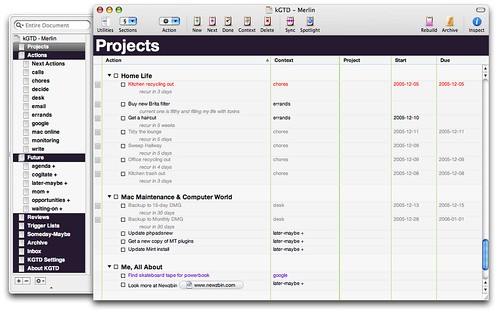
Related to today’s earlier post, a number of people have written over the past few weeks with curiosity about kGTD (“Is it worth buying OmniOutliner Pro?” “Is it worth buying a Mac?” “Will I be able to vanquish all foes?”). While I’m not prepared to do a major sales presentation, I am happy to oblige the folks who wanted to see how I’ve set mine up. Also gives you a little window into my current contexts (as well as my atrocious personal habits).

Screenshot here (best viewed full size): comments and questions will be entertained.

My kGTD Setup


Comment viewing options

Select your preferred way to display the comments and click "Save settings" to activate your changes.
Paul Farnell's picture

Ok basic question perhaps, but...

Ok basic question perhaps, but how did you make it black, with the larger title etc.?

Merlin Mann's picture

You can change the appearance...

You can change the appearance (type, colors, spacing, etc.) of any element in the Styles section. See the little draggy “nipple” at the bottom of the drawer? Drag that up to reveal the style guts. Also CMD-T to bring up your Fonts, and CMD-5 to show the current styling in toto.

One thing: as much as I adore Lucida Grande, it doesn’t do italics very well, so I went with Helvetica for everything.

Peter Parkes's picture

'Update Mint' is always on...

‘Update Mint’ is always on my ‘things to do sometime maybe’, too. If only it could be persuaded to do it by itself…

Merlin Mann's picture

Man, this Mint update looks...

Man, this Mint update looks like a bitch. Must read slowly and not drink beer while updating…

Ethan's picture

That mint update is indeed...

That mint update is indeed bitch-like. It fried my stats on the first try. Backups are nice. Wear gloves. Shut your eyes. Move into the light.

Helvetica, eh? I’ve had rather a number of complaints on the font. Sigh. Maybe time to offer up an alternative. Comic sans is out, I suppose?

Phil Ulrich's picture

Blast you, Merlin, now I'm...

Blast you, Merlin, now I’m going to have to shell out for OOPro. I’m still using the version from back before they split it in two, even!

Merlin Mann's picture

Phil, there's a lot to...

Phil, there’s a lot to like in that app. You can alias files and it handles drag and drop (or paste-in) URLs. Sweet stuff.

Mark Grimes's picture

You remind yourself to do...

You remind yourself to do system backups? What happened to cron, erm launchd? If it’s a laptop I recommend you check out Anacron+launchd. (http://members.cox.net/18james/anacron-tiger.html) Maybe rsync? I recently grabbed a 20g StrongSpace account for offsite rsyncs - highly recommended… now if Apple will just fix the -E bug :) (What I mean is if the data you backup uses resource forks, forget about 10.4.3’s rsync for right now). But I digress…

kGTD sure is nice for what it is (applescripts ontop of a larger scope pricey and hefty application) but is largely something I use to map the feature sets that are most important to me so I can give my GTD a diet and invest in CoreData. But until vaporware materializes that doesn’t require using such a beast to manage lists, I use kGTD for now. Much like Merlin I’ve probably tested all the GTD systems on OSX, except I probably use the systems less then he does because I suffer from the finding-the-one-true-system bug that turns me into an avid GTD evangelist and application tester more then just sitting down and usin GTD (I know, it’s a big no-no) — kGTD is an advanced version of what some of us remember from a third party kludge to HogBay Notebook… I don’t think there is anyway of pleasing everyone all the time short of writing your own.

For people that want to write their own, ADC has a ToDo CoreData sample application on their website. I invite the roll-your-own mac developers to make a custom shoe. Note I’m not advocating the world needs another GTD system — I am simply saying, once you’ve tried them all you’ll likely say wouldn’t it be nice if I had features from X, Y and Z — and there’s only one path to getting what you want (time-willing).

NathanB's picture

Sucks that I can't see...

Sucks that I can’t see the large version unless I have a flickr or yahoo account. Boo Yahoo.

kGTD looks great though.

Mark Grimes's picture

A couple more thoughts... Ajax seems...

A couple more thoughts…

Ajax seems to be where it is at for GTD systems though… I can’t help to feel excited about the Web 2.0 buzz… I don’t really feel that fat client GTD is going to last. Each application requires significant overhead (yours or riding on some other app), even to the point of making sure that kGTD stays with the latest beta of OOPro, which may not be what you want to do if you actually use OOPro for anything else… I still tend to call it bleeding edge GTD where your organization system can come crashing down if OmniGroup has too many beers. Granted it is changing in the future, but who likes to spend $150 on a single use case for OOPro, since you have to pretty much skin your outliner to solely chew on your GTD template.

I am just getting into RoR and setting up a textdrive+typo+apache/lighttpd+mint setup and the more I play with Rails the more I find it to be the ideal place for roll-your-owners to play.

I detract my insinuation of a standalone GTD client in the last comment… I think instead it’s all about xmlrpc clients that hook into webapps with content stored in CoreData… Mmmmm Rails Cocoafication… Ya that’s the ticket.

Roger Eberhart's picture

kGTD and VoodooPad are currently...

kGTD and VoodooPad are currently battling it out for my GTD application of choice. Next actions are currently scattered between both apps. What a mess. Hopefully I can make up my mind soon.

John's picture

Now if only there would...

Now if only there would be such an application running under windows too. I hate to bring it up again, but after having been a loyal reader of 43F since the beginning, and trying out a gazillion different applications to give me a good GTD setup, I’m still coping with a less-than-ideal setup:

ePIM on a USB-stick. Don’t get me wrong, ePIM is a great piece of software with a really good development cycle and ingrained beta-team, but it doesn’t do the job as easy as, say an application like Tracks. But in all fairness, any GTD application that takes me to setup an application framework, a webhost and a seperate database to run, isn’t going to easily work in most people’s setups.

Anyhow, I digress. Conclusion: kGTD looks spiffy, wish I could testdrive it too. Oh and Merlin, your contexts don’t look that shabby at all. It’s all about reviewing the contexts every now and then. I do that during my weekly review. I’m setting aside 15 minutes to write down some stuff I’ve found out regarding how I work/deal with the GTD system. From there I see if I can (with a quick hack/change that is) improve the systematics if needs be (like splicing or combining contexts, etc).

I digress again! Good stuff, keep it up.

Craig's picture

Important to note is that...

Important to note is that kGTD doesn’t run under Panther (10.3.x). Regardless, I still bought a copy of OOpro 3.5. I use it daily for various academic research tasks and probably couldn’t write a paper without it anymore. Also, I run a hacked-up version of GTD with OOpro for my planning needs. There are times I wish I had the applescript-magic that is kGTD, but things ‘get done’ so I doubt I need much more. See it at http://diddy.dartmouth.edu/myGTD.jpg. I can’t recommend Omni Group products enough - don’t even ask how many illustrations I have made with OmniGraffle! [PS - All you university folks, they have a great education discount.]

Señor Pantaloons's picture

Thanks for posting that, Merlin....

Thanks for posting that, Merlin. Just wondering why you’re using “+” as the suffix for “waiting on” instead of “-“?

Tim Kimrey's picture

Quick note for Craig. Do...

Quick note for Craig. Do you know if OmniGraffle will open documents created in Open Office 2.0 Draw?

Señor Pantaloons's picture

"Ajax seems to be where...

“Ajax seems to be where it is at for GTD systems though… I can’t help to feel excited about the Web 2.0 buzz”

the technology is irrelevant — it’s the concept, functionality and implementation that matters. don’t get sucked in to Marketing 2.0.

Chris's picture

Whats up with the "skateboard...

Whats up with the “skateboard grip tape” for your Powerbook? Ripping the 180 ollies on your laptop?

Mark Grimes's picture

I hear you about VoodooPad,...

I hear you about VoodooPad, but I gave up on GTD on that rather quickly. It’s now a place where I keep project notes, not where I manage my day.

Had we not lived in the age of Internet convergence and lightweight web application frameworks I would tend to agree that web apps are not the answer — but I assume I’m talking to geeks here — if I was addressing this to Grandma I’d give her a pen and paper… but it’s just not the case anymore, look around you. Typo, Flickr, Upcoming, Tada Lists / Basecamp — it’s all the rage… GTD systems are the exact fat client target that AJAX is targeted at replacing.

Now I use a single powerbook for just about everything so it’s not a huge ordeal, but hooking into Quicksilver and Markdown+SmartyPants markup is just too good to be true. Centralized storage is good, it solves the exact problem addressed above (my crap is in >1 GTD system whereas I’m probably better off not using GTD anyway). The question is how do you handle the storage side of the thin client… For example, look at how Safari and Vienna handle RSS feeds (sqlite backends), set the feeds to never expire articles and you have your recording source for all the external information you take in on the Web.

I spent a lot of time using DEVONtechnologies’ tools (and still beta testing)… waiting for the day that blackbox databases catch up with my filesystem. I am a Spotlight guy now, using TagBag for file-based GTD (but certainly looking for a better, non-Dashboard way) I think GTD spans so much further then ToDo lists and tickler files.

Finding ways to tie the to-dos, project notes and deliverables together has been the life quest that got me into GTD in the first place… Quicksilver and NExT (erm Mac OS X) Services have played a big piece here, but I stlll use a ton of different apps to keep it all together (Quicksilver, VoodooPad, sidenote, iCal).

I am getting an iPod nano soon for the calendar/todo list and the fact it also plays music. I could never get into moleskins and PDAs, too bulky. I have a usb voice recorder for verbal cued shorthand that I use as a GTD recording device when not in front of the laptop, and transcribe it into my powerbook once I get back to it. Olympus makes a nice one that is the size of a pack of trident gum. That’s another nano feature I’d like of course so I can consolidate the devices to carry a single very small instrument when away from the laptop. It’s already very slick that VoodooPad can kick off your entire project wikis to your ipod notes and you can wheel through the CamelCase words.

Pardon the braindump.

Mark Grimes's picture

“Ajax seems to be where...

“Ajax seems to be where it is at for GTD systems though… I can’t help to feel excited about the Web 2.0 buzz” the technology is irrelevant — it’s the concept, functionality and implementation that matters. don’t get sucked in to Marketing 2.0.

Point taken, I should have rephrased that to say I have seen so many useful implementations of AJAX, that I have no doubt that it will supplement much of the way we use a particular class of applications as fat clients.

No different then SSL not being able to solve end-to-end security in a world of convergence where people are connecting from many devices and points of presence in an organization… a task OASIS is solving with WS-Security (XMLenc/XMLDsig, SOAP, SAML, XACML, etc)… Organizations moving from disparate client/server mmgt to service-oriented architectures where Federation is possible.

My thoughts are certainly toward the use-case and not the tech as much recognizing the tech provides elegant development resources for the feature set that resembles GTD applications.

communicatrix's picture

I'm mainly interested in how...

I’m mainly interested in how you freed yourself from Entourage. I’m so deeply invested in it I can’t imagine breaking free. And yet I yearn, I yearn…

shtikl's picture

I have two files (or...

I have two files (or actually their aliases) on the Desktop: KGTD and a simple Word-Doc in Notepad-Mode. KGTD ist for GTD, the Doc is for quickly jotting down ideas and short texts and nurtering them into a states that makes them deserve to inhabit an own file.

I would like to get rid of the Word-Doc, but you can’t really write longer texts in OmniOutliner. I wish they would beef up the “Note”-function or add the possibilty of writing and editing texts with something resembling a text editor at least halfway.

Yes, I know, Merlin has written somewhere here, that KGTD “is no database”. Still I wish it were. At least a little. I tried Devonthink, but that just ain’t it. KGTD with “a little text-editing” would maybe be a good tool for idea-gathering, spontaneous braindumps etc.

Mark Grimes's picture

the Doc is for quickly...

the Doc is for quickly jotting down ideas and short texts and nurtering them into a states that makes them deserve to inhabit an own file. I would like to get rid of the Word-Doc, but you can’t really write longer texts in OmniOutliner.

I really recommend VoodooPad for this. Documents are spotlight-indexable and you can sketch right into the pad alongside your notes, drag images into the pad, files into the pad so they are invoked when clicked. Export a number of different ways. In fact Gus Mueller’s weblog is generated by VoodooPad.

DevonThink is a Data Mining organizer, I don’t look at it as a place to organize your thoughts. You could try Tinderbox, but the learning curve is very steep, the interface is antiquated, and I’m not sure how much help it is when contrasted against the tme spent massaging the agents.

Brainstorming to me is about taking snippets of thoughts and figuring out how they fit together — outliners don’t do that for me, they simply break down a bigger idea into smaller chunks (also necessary, but I look at this as more useful once an idea is already clearly defined). Data correlation is best visualized in a form that already naturally supports self-documentation. As you flesh it out, it grows together… a wiki is the best fit.

Braindumping in a kGTD document seems like a great way for information to get lost in the shuffle. Probably better to keep your notes in something else and drag them next to your action item. Spotlight doesn’t become as useful even though OO documents have a mdimporter plugin when ALL of your projects are maintained in a single OO document.

shtikl's picture

@Mark: Thanks for all the...

@Mark: Thanks for all the infos. I will have to work my way through them. :-)

Brainstorming to me is about taking snippets of thoughts and figuring out how they fit together — outliners don’t do that for me.

Same here.

Some time ago I wrote a book (in German) entirely in a Mindmapping-Tool. I simply hacked in ideas and connected them together in the way you do when doing simple Mindmapping. (Of course I was constantely revising and rearranging the nodes and texts.)

When I was finished, I exported everything into RTF and polished ist in Word, then sent it to the publisher.

The cool part with that tool was that it was possible to enter long and fully editable texts with every node. - And now that I think of it, I may look out for something like that on the Mac Platform too. (I’m not trying to conceal the fact that I am a) a newbie on Mac and b) still am looking for the “perfect” tool for me.)

Thanks again for all your tips, Mark. I’ll check every single one of them!

Sam's picture

What I really want to...

What I really want to see is GTD implemented into iCal. I searched this site and google as well, and I can’t find an outline for it.

After using a couple different programs, including the excellent LifeBalance, I’ve decided that its just too important for me to have my action list on me at all times, and instead of buying a bulky and expensive PDA or treo (which I almost did), I’m trying to perfect it in iCal so I can simply hotkey a script (www.swedler.uhduh.com/downloads/35/iSyncMe.scpt) to launch iSync and send the iCal info over to my phone, alarms and all.

Plus, printing in iCal is getting better and better. In case you haven’t looked recently, there’s a setting in the print dialog that lets you print everything or certain things directly to a 3x5 card, for all you hipster guys out there.

Also, iCal is integrated with everything on my system, and there are plenty of apps being developed around it, so if someone had a good outline for using GTD in iCal, I’d love to see it.

In the meantime, if I get mine perfected, I’ll send it in to Merlin.

Deborah's picture

Makes me wish I had...

Makes me wish I had a Mac. It’s purty!

Mark Grimes's picture

Sam, You're using the all mighty...

Sam,

You’re using the all mighty and powerful CalendarCreator.service right? Your quick trip to setting up iCal meetings through Quicksilver.

Thinking of ical reminds me of ticklers, so it is worth pointing this out if you use Mail.app — Mail.app GTD Tickler. That, MailTags, MailActOn and integrated Spotlight, there’s no problem with the email conduit in the GTD solution.

steve mcfarland's picture

Merlin, I echo Chris' question:...

Merlin, I echo Chris’ question: what exactly do you intend to do with your Powerbook’s skateboard tape? I don’t want to pry, but I get the feeling that whatever your answer is, it’s going to be a pretty awesome lifehack.

Mark Grimes's picture

Sounds to me like Merlin...

Sounds to me like Merlin has sweaty palms and is afraid he’s gonna drop his precious laptop ;) Grip tape works good if you carry your laptop sans case around a lot.

Merlin Mann's picture

Merlin, I echo Chris’ question:...

Merlin, I echo Chris’ question: what exactly do you intend to do with your Powerbook’s skateboard tape?

I think I read about it on Boing Boing—you use strips of griptape to make your laptop less slippery. Easier to grab with one hand, plus it won’t slip off your lap as easily.

Karen's picture

Merlin, Thanks for sharing your...

Merlin, Thanks for sharing your setup. I’ve been going back and forth on the Next Actions summary option and it looks like you are using it. Is it working for you?

About Merlin Mann

Merlin Mann's picture

Bio

Merlin Mann is an independent writer, speaker, and broadcaster. He’s best known for being the guy who started the website you’re reading right now. He lives in San Francisco, does lots of public speaking, and helps make cool things like You Look Nice Today. Also? He looks like this, answers questions, and has something like a life.

 
EXPLORE 43Folders THE GOOD STUFF

An Oblique Strategy:
Distorting time


STAY IN THE LOOP:

Subscribe with Google Reader

Subscribe on Netvibes

Add to Technorati Favorites

Subscribe on Pageflakes

Add RSS feed

The Podcast Feed

Inbox Zero

The original 43 Folders series looking at the skills, tools, and attitude needed to empty your email inbox — and then keep it that way. Don’t miss the free video of Merlin’s Inbox Zero presentation.

Making Time

3-part series on attention management for artists and makers. Read Bad Correspondence, The Job You Think You Have, and One Clear Line.