Merlin’s weekly podcast with Dan Benjamin. We talk about creativity, independence, and making things you love.
rooSwitch for easy, restorable application profiles
Merlin Mann | Jul 31 2007
rooSwitch - Shuffle Your Settings Around
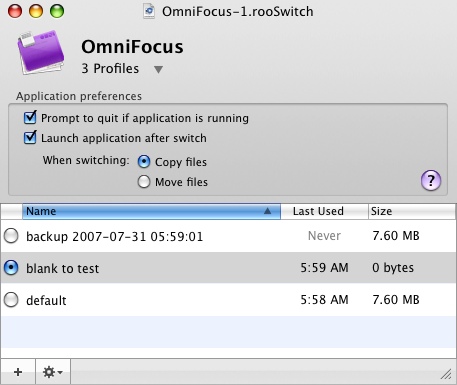
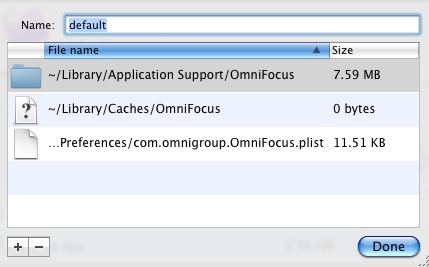
When you're testing a new version of an application (or just being a little paranoid), it can be a pain to deal with protecting your "real" data from being corrupted or overwritten. While something like SuperDuper is priceless for backing up a drive to a disk image, you want something that's not only lighter in weight, but that is smart enough to deal just with the settings associated with a single program. That's where roobaSoft's rooSwitch comes in. rooSwitch's smarts come in being able to recognize which Preferences, Application Support folders, and related files belong to an app's settings (but, not -- it should be noted -- its documents), so that you can then backup, switch, and restore a group of settings whenever you need to. This can be quite a lifesaver. So, for example, if I feel like a build of the OmniFocus sneaky peek is being balky (Heaven forfend!), I just drop the OF icon onto rooSwitch's drop-pad, and it saves the current prefs as "default," allowing me to create a new, empty set of preference for testing the app. I can also duplicate a previously switched profile, and, of course, restore any set at any time.
Another one of those fantastic apps that you may never need -- until the day you really need it. rooSwitch is shareware from roobaSoft, and it will set you back $14.95 (approximately 1/47 of an "Alex"). Props to roobaSoft for easy PayPal payment and an instant serial number. 4 Comments
POSTED IN:
wow, could be just the... by franz sittampalam (not verified)
I like RooSwitch for those... by Tommy Weir (not verified)
Omnifocus is not the best... by zxspectrum (not verified)
About Merlin Bio Merlin Mann is an independent writer, speaker, and broadcaster. He’s best known for being the guy who created the website you’re reading right now. He lives in San Francisco, does lots of public speaking, and helps make cool things like You Look Nice Today, Back to Work, and Kung Fu Grippe. Also? He’s writing this book, he lives with this face, he suffers from this hair, he answers these questions, and he’s had this life. So far. Merlin’s favorite thing he’s written in the past few years is an essay entitled, “Cranking.”
|
|



| EXPLORE 43Folders | THE GOOD STUFF |


