Drowning in email? Try Inbox Zero to learn sane tips for dealing with high-volume email. And don’t miss the free Inbox Zero video. »
Register for free on 43 Folders to comment on articles, post to our forum, customize your visits, and much more. Current users can login now.
Use Quicksilver to navigate around dialog boxes; Default Folder plug
Merlin Mann | Mar 3 2005
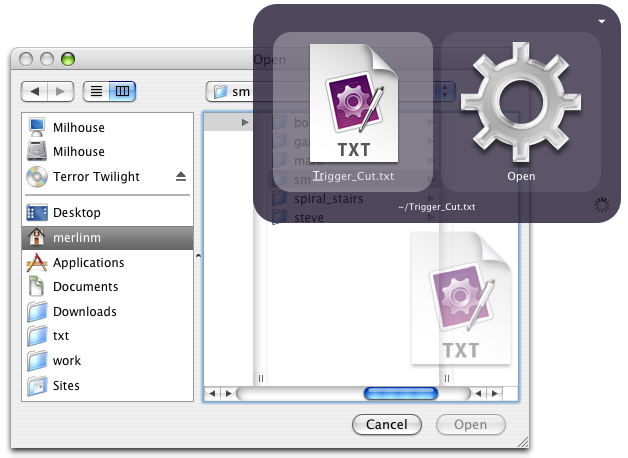
With the dialog box open, invoke Quicksilver, and pull up the file or folder you want to target as usual. When your match comes up, drag the icon for the item from Quicksilver into the dialog box, and you’re done (screenshot). Bit of a piffle until you really start using it and realize: you now have yet another way to pipe your life through Quicksilver and avoid repetitive clicks and drill-downs. Also, note that this “drag in or out of Quicksilver” function works pretty much everywhere (and possibly just completely changed the way you work if you didn’t know that already). On a related note, I should put in a plug here for a brilliant companion app that I’ve used since Christ was a corporal: Default Folder. In addition to totally tricking out your dialog boxes and adding tons of helpful functions, it lets you—from within a dialog box—click any open folder in the Finder to make that the target folder in the dialog box. The window doesn’t even have to be the frontmost window. This is a huh-uuuge timesaver. So worth the $, especially if you move around in lots of files each day or frequently “Save as…” multiple versions. Got a good trick for Quicksilver dragging? Leaned “the comma trick” yet? 37 Comments
POSTED IN:
![]() Wait, comma trick? I hit...Submitted by David Ham (not verified) on March 3, 2005 - 7:28am.
Wait, comma trick? I hit the comma key and it put a tiny NetNewsWire icon below the main one in the QS window. What does that do? And more importantly, how do I remove one of the tiny icons, in case I accidentally added two? » POSTED IN:
It's adding those selected documents...Submitted by Merlin Mann on March 3, 2005 - 7:34am.
It’s adding those selected documents or folders to your working stack; you can fly all over the place adding items to do “something” to. Just ESC to get out. Super handy stuff. » POSTED IN:
![]() This is sort of a...Submitted by Dan Phiffer (not verified) on March 3, 2005 - 7:52am.
This is sort of a silly thing to point out, but the term dialog box is a category of controls that includes things like alert messages, which don’t have any use for filesystem paths. Neat trick though. The best one I can offer is setting up a trigger for rescanning your Applications catalog. This saves me a little time right after I’ve installed a new app. » POSTED IN:
![]() Thanks for the praise for...Submitted by Jon Gotow (not verified) on March 3, 2005 - 7:58am.
Thanks for the praise for Default Folder! I’m the author :-) I just wanted to let you know that your link points to the Mac OS 9 version of Default Folder not the OS X version. You really want to point to http://www.stclairsoft.com/DefaultFolderX/. Thanks! » POSTED IN:
![]() Great to see Default Folder...Submitted by Doug (not verified) on March 3, 2005 - 8:24am.
Great to see Default Folder get a mention. It’s been around for so long that I think it sometimes gets overlooked, but it’s been on every Mac I’ve ever used! » POSTED IN:
So many corrections! I feel...Submitted by Merlin Mann on March 3, 2005 - 8:33am.
So many corrections! I feel like Dave Winer. ::ducks:: @Jon: Thanks for the correction and the wonderful product. Default Folder has saved me months of time over the years, and I want everyone to know it! (yes, you may use that) :-) @Dan: Thanks for that. So what should I call the widget that lets me decide where to open or save a document? » POSTED IN:
![]() File Dialog...Submitted by James Rifkin (not verified) on March 3, 2005 - 9:49am.
File Dialog » POSTED IN:
![]() Excellent work, Mr. Mann. This...Submitted by kathryn (not verified) on March 3, 2005 - 9:53am.
Excellent work, Mr. Mann. This works awesomely with uploading files via your web browser as well, I should note. Open File Dialog, do some Quicksilvering, and then drag-and-drop. And if anybody can come up with a keyboard shortcut for the drag-and-drop step, that would rule twofold. » POSTED IN:
![]() i can never remeber this:...Submitted by Mathew Hoy (not verified) on March 3, 2005 - 11:23am.
i can never remeber this: when i’m appending text to a file, how do i create a list? i.e.: i have a list of items i want to add to the file. how do i create an “end of line” marker? does that make sense? is the reason i can’t remember this because you can’t do it? » POSTED IN:
No sweat, Mathew: "OPTION-return"...Submitted by Merlin Mann on March 3, 2005 - 11:25am.
No sweat, Mathew: “OPTION-return” » POSTED IN:
![]() gaah. i was using shift+return...Submitted by Mathew Hoy (not verified) on March 3, 2005 - 11:28am.
gaah. i was using shift+return and nothing. :( thanks. » POSTED IN:
![]() hehe. i just realised i...Submitted by Mathew Hoy (not verified) on March 3, 2005 - 11:36am.
hehe. i just realised i can do this: i’ve a todo text file on my ipod. i can use quicksilver to prepend an item to the list on the ipod and not have to open the pod’s file to change it. hawt. » POSTED IN:
![]() actually, i just realised i...Submitted by Mathew Hoy (not verified) on March 3, 2005 - 11:46am.
actually, i just realised i cannot! :) whenever i type some text, tab to append or prepend, then tab to the file on my ipod and hit return, i get this PING sound and nothing happens. :( » POSTED IN:
![]() okay, 1 more post. i...Submitted by Mathew Hoy (not verified) on March 3, 2005 - 11:59am.
okay, 1 more post. i can. :) i had to rescan my catalogue after changing my file to a .txt extension. » POSTED IN:
![]() Comma trick: (lots of heavy...Submitted by Jeff (not verified) on March 3, 2005 - 12:03pm.
Comma trick: (lots of heavy breathing) I had no idea. It’s so cool I feel a buzz. Wonderful. And drag from the bezel? I’d never even tried it. All this time I’d been using QS to reveal the location and then drag that into the file dialog. Sheesh, this just cut the effort to less than half. Excellent! » POSTED IN:
![]() I recently learned that I...Submitted by Aaron Cass (not verified) on March 3, 2005 - 12:14pm.
I recently learned that I could drag from the QS bezel and I use it to add attachments to e-mail. So instead of bringing up the file dialog for attaching a document, I search in QS and drag to Mail. Makes a once frustrating task very easy. » POSTED IN:
![]() Drag it to mail? What...Submitted by Alcor (not verified) on March 3, 2005 - 12:42pm.
Drag it to mail? What about using the paste action on the file while the message is open or compose the message in QS directly. » POSTED IN:
@Aaron: So another flavor of Alcor’s...Submitted by Merlin Mann on March 3, 2005 - 12:51pm.
@Aaron: So another flavor of Alcor’s recipe might go like this (assuming we want to attach “foo.txt” from the Desktop):
Ta-da. Sounds long, but, in my test, the whole thing took me 7 seconds. It so pays to get fast at Quicksilver. » POSTED IN:
![]() To Merlin and Alcor: Yes, I...Submitted by Aaron Cass (not verified) on March 3, 2005 - 1:17pm.
To Merlin and Alcor: Yes, I could attach to a new e-mail from QS, but if I’m already in the middle of composing an e-mail, why start afresh? With the mail window already opened, I’m sure I spend less than 7 seconds attaching the file. » POSTED IN:
I see what you're saying...Submitted by Merlin Mann on March 3, 2005 - 1:22pm.
I see what you’re saying Aaron. I think it’s cool that QS has really brought the Perl mantra of “There’s More Than One Way to Do It” to the GUI. I do love it. » POSTED IN:
![]() You can do this without...Submitted by Brian Donovan (not verified) on March 3, 2005 - 2:55pm.
You can do this without the drag and drop part, but it requires you to have enabled access for assistive devices in System Preferences -> Universal Access. To do it, get the script and follow the directions on that page. » POSTED IN:
![]() So does that text file...Submitted by Andy (not verified) on March 3, 2005 - 4:56pm.
So does that text file contain the lyrics to “Trigger Cut”? Such a great song! » POSTED IN:
![]() The one thing I'd add...Submitted by Tarek (not verified) on March 4, 2005 - 3:44am.
The one thing I’d add to your workflow, Merlin, is to make sure that you don’t select “Email to… (Send)” as the action, as that will actually send (duh) the email without allowing you the opportunity to write any accompanying text. (Not that I’ve done this or anything… ) » POSTED IN:
I know, Tarek! That's a...Submitted by Merlin Mann on March 4, 2005 - 4:21am.
I know, Tarek! That’s a loaded gun. :) I totally did that within 5 minutes of loading Quicksilver for the first time. Very embarrassing. » POSTED IN:
![]() On a related note you...Submitted by Strict (not verified) on March 4, 2005 - 4:52am.
On a related note you can use QS to choose wich application to open a file with by:
I find it useful to open Photoshop-associated images with Preview or to open text files in BBEdit. » POSTED IN:
![]() qs ?: now that i...Submitted by Mathew Hoy (not verified) on March 4, 2005 - 12:12pm.
qs ?: now that i know how to add items to a file, is there a way to open text in the qs bevel from a .txt file and delete items? that would be hawt. » POSTED IN:
![]() What app made that TXT...Submitted by macfixer (not verified) on March 4, 2005 - 3:44pm.
What app made that TXT file? So sexy… //k » POSTED IN:
![]() macfixer: TextMate...Submitted by Brian Donovan (not verified) on March 6, 2005 - 10:58am.
macfixer: TextMate » POSTED IN:
![]() Just so you know, In...Submitted by Steve Bissonnette (not verified) on March 11, 2005 - 9:25am.
Just so you know, In any mac os 10.x open/save dialog box : You can drag an outside folder/disk/item onto the dialog box while it’s on screen to “bring up” that path and filename .. hard to explain - just try it and you’ll see what i mean … You don’t need default folder for this trick. » POSTED IN:
Steve: Can you "point" to...Submitted by Merlin Mann on March 11, 2005 - 9:55am.
Steve: Can you “point” to open windows in the Finder to call them up in the dialog box (without changing focus)? I thought that still required Default Folder, but I could be wrong (since I’ve had DF installed for years and wouldn’t know the diff. :-) ). » POSTED IN:
About Merlin MannBio Merlin Mann is an independent writer, speaker, and broadcaster. He’s best known for being the guy who started the website you’re reading right now. He lives in San Francisco, does lots of public speaking, and helps make cool things like You Look Nice Today. Also? He looks like this, answers questions, and has something like a life. |
|
| EXPLORE 43Folders | THE GOOD STUFF |