Drowning in email? Try Inbox Zero to learn sane tips for dealing with high-volume email. And don’t miss the free Inbox Zero video. »
Register for free on 43 Folders to comment on articles, post to our forum, customize your visits, and much more. Current users can login now.
Quicksilver <3s Backpack
Merlin Mann | Jun 1 2005
Web services are going lowercase - Signal vs. Noise
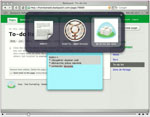
David’s post points to a terrific Quicktime movie illustrating the kind of interaction you can generate when your small pieces are loosely joined—in this example using Quicksilver and email to seamlessly add items to a Backpack page. Totally slick. It’s funny, but I still sometimes struggle to explain Quicksilver to people who haven’t seen it in real-world usage by someone who’s adapted their workflow to take best advantage of it—this movie is a great demonstration of how that looks for one person, so I recommend you check it out. The mind-blowing thing about Quicksilver is how it allows you to adapt or massage your workflow down to a series of minimal movements. Since it can glue together virtually any content with almost any actions that that content can understand, it become like an Erector set for your workflow. It observes how you work and then lets you bind your most common activities to key commands and mouse gestures. Yeah, yeah I know, most of you are already drinking the Kool-Aid, but I know there’s still a few of you out there shaking your heads. Check out the movie, and consider the small pieces you might want to loosely join. [Link: Lifehacker] POSTED IN:
|
|
| EXPLORE 43Folders | THE GOOD STUFF |
Hmm i get a 404...
Hmm i get a 404 error on the movie :S.
Works for me, Dave. Try...
Works for me, Dave. Try the other link on the post: nouvellepatrouille.net.
I watched the video and...
I watched the video and have no idea what I’m looking at. A little naration would help. Is that all one program?
Cool video. It seems that...
Cool video. It seems that the next cool feature for Backpackit would be to detect and load changes in the background. A couple of scenarios would make good use of that: updating the data via the web services (as demo’d in the video) and collaborative update of shared pages.
when, though, will we get...
when, though, will we get a quicksilver action for “send to backpack”?
…or, better and more flexible, i suppose, a way to turn applescripts or automator scripts into quicksilver actions, so we could roll our own?
(yeah, i realize you didn’t write quicksilver, merlin … just venting.)
For future reference, Unicode has...
For future reference, Unicode has a heart glyph at U+2764 (❤) and you can include it in HTML with ❤ (or insert it directly).
Really needs an audio track...
Really needs an audio track to go with it - it’s really difficult to follow what is happening here?
Agreed - it looks really...
Agreed - it looks really cool, but I can’t tell what keystrokes are being hit. An audio track would be very beneficial.
In the video, it looked...
In the video, it looked like he was emailing notes/to-dos to backpack. Which works, but they’ve released an API. I imagine the LazyWeb will produce QS actions for Backpackany day now…
Well, I get what he's...
Well, I get what he’s doing, and can recreate it to an extent, but I’m not sure I understand how the “>>” works for the subject line for an email. When I try to do it, it doesn’t appear to make the subject line of the outgoing email either “todo” or “note”. Am I missing a Mail plug in for quicksilver or somethin’?
The ">>" lets you separate...
The “>>” lets you separate the ostensible subject (which governs whether it’s a todo, note, etc.) from the content.
Yeah, make sure you update all your plugins. You def. need the Mail plugin (although Mail.app it doesn’t apparently need to be open at the time) and you should update the Backpack plugin. It just got updated (yesterday?) and adds automatic addition of pages as email addresses (no need to expressly create them in Address Book). Very handy.
Ooooh, snap! He's using Tiger...
Ooooh, snap! He’s using Tiger ain’t he? I’ll have to test it out on my home machine tonight.
i am the author of...
i am the author of this video, you can see the second capture here : http://www.nouvellepatrouille.net/quick_back2.html ++ franck
I'm running QS Beta 42...
I’m running QS Beta 42 : it seems to forget my API number for Backpack. Or, more accurately, it never remembers it, so my catalog is always 0.
Plus, can anyone explain to me what’s the difference between e-mail directly and e-mail (send) in QS?
re: "Plus, can anyone explain...
re: “Plus, can anyone explain to me what’s the difference between e-mail directly and e-mail (send) in QS?”
E-mail send will launch Mail to send the e-mail while e-mail directly will send the e-mail without launching Mail.
BTW, QS b42 is forgetting my API number also.
Hmm, "send e-mail directly" just...
Hmm, “send e-mail directly” just goes “bing”, and nothing happens. No mail ever arrives anywhere, and a tcpdump shows no traffic :-( Odd.
Well, I can't seem to...
Well, I can’t seem to trigger the Send email directly action either. And I have installed AND updated any plug-in I could think of, and running latest beta (in Beta mode as well) Any clue (sorry if this is polluting the comment)
Merlin, any idea on doing a write-up on how backpackit could help for GTD? (I am a bit wary of relying on an online tool. I am just getting into GTD -at last- and I feel the hipster PDA is a sure way to go ;-) )
Speaking of Quicksilver, I'm trying...
Speaking of Quicksilver, I’m trying to get into it, using beta 42 (in beta mode) with Tiger, and it’s not letting me do the append text trick that everyone is so wild about. I can’t get the text manipulation actions to always be loaded—how is it that one loads and unloads installed plug-ins, anyway?—but when it is showing as loaded (the diamond filled in) I see the “append text” action in the preferences, but can’t call it up in the command window. Argh.
I posted a quick tutorial...
I posted a quick tutorial on getting Quicksilver working with Backpack over at my site - some of you may find it of interest.
Eclipse Rich Client Platform: the...
Eclipse Rich Client Platform: the next computing revolution
I have long argued that Eclipse was going to shake up the smart client space. In fact, i was arguing that before IBM even began its rich client work under the auspices of the Eclipse organization. The thing is, Eclipse…
Three OS X Apps: Tiger...
Three OS X Apps: Tiger Update
Back in January 2003 I talked about my three favorite OS X apps for their simplicity and functionality. A lot has changed since then. My primary computer is an iBook instead of an iMac, Panther and Tiger have replaced Jaguar and Safari appeared. So …
Link Dump, Part II Part II...
Link Dump, Part II
Part II of the Giant Link Dump. These links are all over the place. Tomorrow will be a little more focused on web stuff. Video Poker Strategy Master is a neat app. You tell it what variant of video poker…
Link Dump, Part II Part II...
Link Dump, Part II
Part II of the Giant Link Dump. These links are all over the place. Tomorrow will be a little more focused on web stuff. Video Poker Strategy Master is a neat app. You tell it what variant of video poker…