43 Folders

43 Folders feed subscription icon - Shiny! Drowning in email? Try Inbox Zero to learn sane tips for dealing with high-volume email. And don’t miss the free Inbox Zero video. »

”What’s 43 Folders?”
43Folders.com is Merlin Mann’s website about finding the time and attention you need to create your best work. »

Scrivener: Powerful OS X app for writers

Literature and Latte - Scrivener

Scrivener, a full-featured writing program that I’ve been raving about a lot lately on MacBreak Weekly, has now reached the 1.0 milestone and is available for purchase from Literature and Latte. Scrivener’s product page has also been updated with a terrific explanation of why this app feels so different.

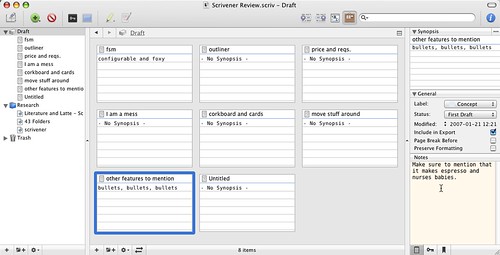
Personally, I like the excellent fullscreen mode, built-in (round-trip) outliner, tricked-out Inspector, and all-in-one form factor, but my favorite feature (which can be hard to explain without actually using the app for yourself) is Scrivener’s use of the index card and corkboard metaphor.

Scrivener - Corkboard view

If you write like I do (and I pray that you do not), you have a messy approach to drafting that is iterative, intuitive, and far from linear. You do a brain dump, then type a little, then research a little, then type a little more, then move a bunch of stuff around, then groan aloud, then 80% start over and so on until something is done. Yes, it would be more tidy if we all followed the mandate of our elementary school teachers and wrote perfect 5-paragraph essays straight from a completed outline. But, such is life. And Scrivener seems to get that.

Scrivener makes the anarchic approach to writing a little less chaotic by letting you create any number of “index cards” which contain a title and a short synopsis of what that index card is meant to contain. These cards live on a “cork board” and each can be moved around, nested, put into folders, and so on, very much like real index cards, but with a big bonus. (If you prefer, by the way, these same “cards” can be edited and moved around in the Outline view as well.) In addition to the title and synopsis, each card is associated with a given section of the actual draft you’re building. This section could be anything from a blank page to a single sentence to a few paragraphs to an entire chapter — whatever works for you. There’s no scarcity to the number of cards you use, so go nuts.

Once you get your head around this metaphor, consider how great it would be to write the parts you’re ready to write, scribble notes for a section that’s not quite there yet, and then eventually (yay!) declare this or that section finished and ready to go. Remember, at any point, using just the handy index cards, you can still re-arrange any of those pieces non-destructively and without having to manually copy and paste great gobs of text. Or — and this is what I love about the flexibility here — you can blow off the “index-cards-as-sections” idea altogether and just jump straight into drafting in a new folder. Whatever works. All I know is if I’d had this for my thesis back in the day, you’d all be working for me now.

As I say, this all makes a lot more sense when you try Scrivener, but it’s a powerful way to free up the process and give yourself permission to write in the stages that make sense to you.

Also not to miss in this version:

  • “Edit Scrivenings” lets you select discontinuous sections of your binder for editing or export.
  • “Snapshots” let you snatch a version of your draft in situ, much like creating a DMG image of your drive. Too many magic mushrooms during last night’s rewrite session? No problem: just roll back. 
  • Screenwriting support makes it easy to output your draft in a format that will suitably impress weasel Hollywood producers.
  • Research to your heart’s delight and shunt all the results right into Scrivener’s (wait for it) “Research” section, pulling in web pages, images, and what have you. Sort of like a very lightweight DevonTHINK or Yojimbo.
  • If you’re the fiddly type, there’s support for keywords (aka “tagging”), labeling, status, split screens, and more.
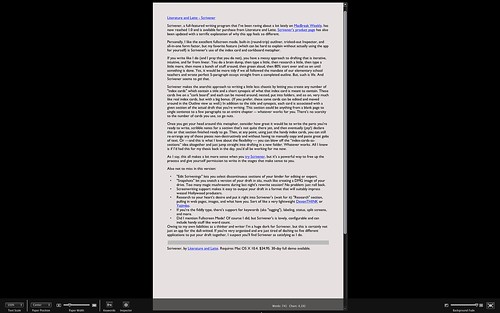
  • Oh, and did I mention the Fullscreen Mode? Of course I did, but Scrivener’s version of this is lovely, configurable and can include handy stuff like word and character count as well as level of opacity to your preferred blackout.

Scrivener - Fullscreen mode

My only substantial bitch about Scrivener so far is that it’s maybe not ideal for fast web writing. Although it has many configurable export options, I haven’t found an easy way to export super-simple plaintext or html that still honors the formatting and links you created back in the app’s native RTF style. The HTML it does put out can be pretty janky, littered with the kinds of whacky SPAN and P styles you’d get in Front Page’s dolorous heyday. (Correct me if I’m wrong on this, Keith, et al.)

Owing to my considerable liabilities as both a thinker and writer, I’m already a huge dork for Scrivener. But be assured that this is certainly not an app exclusively for employment by the dull-witted. Even if you’re already an organized thinker but are just tired of dashing to five different applications to tape your draft together, I suspect you’ll find Scrivener as satisfying as I have.

Scrivener, by Literature and Latte. Requires Mac OS X 10.4. $34.95. 30-day full demo available. Download now.


Comment viewing options

Select your preferred way to display the comments and click "Save settings" to activate your changes.
Tim's picture

Has anyone else noticed the...

Has anyone else noticed the site seems to be down? or is it just me?

Scrivener discussion at 43Folders | Brian Reilly’s oth's picture

[...] Over at 43folders, there...

[…] Over at 43folders, there is an active discussion following the release of Scrivener 1.0. The developer jumped in and responded to some questions and comments. In particular, one comment was that CopyWrite (not Copyright) was a better tool. Here’s how the developer of Scrivener responded: […]

Victor's picture

Hi, How not to like it?...

Hi,

How not to like it? It’s got Index cards and its edit button is an image of a Moleskine & pencil. ;-)

Hilarious.

br/vic

KB's picture

Could I please just make...

Could I please just make an official apology to bartastechnologies.com? In my earlier post, as somebody (who was actually being very kind - thank you) pointed out, I referred to Copywrite as “Copyright”. I had clearly been drinking too much Cava at that juncture upon celebrating finally getting Scrivener out. So: sorry.

Ron - I am the developer of Scrivener, and really, asking about Ulysses is in no way trolling. Scrivener owes a lot to Ulysses. I got the idea for Scrivener back when I used a PC, but when I moved to a Mac, Ulysses was the first writer’s app that blew me away. I ended up writing Scrivener only because Ulysses didn’t quite fit my own needs, but I know that a lot of folk swear by it (and I can understand why). I would strongly recommend downloading all of the writing programs you can find and then seeing which one fits you best. I hope I have listed most of them on http://www.literatureandlatte.com/links.html. The main ones - aside from Scrivener, of course :) - are Ulysses, CopyWrite, Avenir, Jer’s Novel Writer and newcomer Storyist. I may be missing some though. Then, of course, there are the fantastic non-dedicated writing apps such as Mori, DevonThink etc. See what works for you - I hope you find the tool you are looking for. Be sure to let me know what you think of Scrivener if you do try it.

All the best, Keith

Ron's picture

How does this compare to...

How does this compare to Ulysses? I’m not trolling, I’m curious, since I’m about to buy either of those.

Scrivener: The OS X writer’s app of choice - sidereall's picture

[...] Merlin Mann has beat...

[…] Merlin Mann has beat me to the review punch with this pretty good tire-kicking of Scrivener. […]

Greg's picture

I've tried several apps, including...

I’ve tried several apps, including Scrivener, for “organising” my writing. Full screen mode seems to be a gimmick offered by them all. I fail to understand all the fuss about full screen. If I sit down to write, full screen doesn’t improve my level of concentration; neither does it improve the quality of my writing.

Apps that claim to help organise my process also seem a little “gimmicky” to me. My Mac, with Spotlight or Quicksilver, is one big organising machine. Why do I need an app to do what my Mac does already?

The only thing that seems to help my writing process is simplicity. I use TextMate. Plain text works great for me. I can open a window and just start writing without having to navigate through the front end of a complex app before beginning to type.

Brian's picture

I've been using this as...

I’ve been using this as a beta, and really like it. I’m so glad it is finally official.

mike's picture

On windows you can use...

On windows you can use a cool app called Writers Cafe. The author even integrated the open format from Sun Open Office.

http://www.writerscafe.co.uk/

Chris Baskind's picture

This reminds me of CopyWrite,...

This reminds me of CopyWrite, which has been my primary writing tool for the past year.I haven’t composed anything in Word for ages, and won’t be buying the next MS Office suite.

Scrivener looks interesting. CopyWrite has a robust notes function, but it looks like notes will be easier to manipulate in Scriv.

I’ll give it a spin. :-)

brenda's picture

I've been using "The Guide",...

I’ve been using “The Guide”, an outliner (but only for Windows!) that’s fast and useful. It exports to RTF also, which I find quite helpful.

http://theguide.sourceforge.net/

Scrivener goes 1.0 at Tobias S. Buckell Online's picture

[...] Merlinn Mann of 43...

[…] Merlinn Mann of 43 Folders has much the same impression as I do. […]

GTD Power Links 01-23-06 « geeks guide to getting thin's picture

[...] GTD Power Links 01-23-06 ...

[…] GTD Power Links 01-23-06 Scrivener the perfect app to encourage your brain dumping? […]

FloatingBones's picture

One nit: I do not...

One nit: I do not like that deleting a section forces me to drag that section back from the trash bin in order to resurrect it. One should be able to UNDO that operation; it’s too much thinking to fix one fumble-finger error.

I do like the concept of a trash bin for an entire document that must be manually emptied. That has me think in a particular way about a document. I also like that there’s a separate cursor for each section. I’m not quite sure why the selected text becomes unselected when I move to another section.

—phil

Scrivener: Powerful OS X app for writers « Universe_JD's picture

[...] read more | digg story [...] ...

[…] read more | digg story […]

John's picture

I’ve been tinkering with the...

I’ve been tinkering with the beta version of Scrivener for a while now and just ponied up the money to buy it.

I’m a university prof. in the social sciences, and Scrivener fits with how I do my own writing for academic projects. I also think it meshes nicely with GtD sensibilities: make it easy to dump the junk from your brain and then focus where you’re ready to do work.

I also own WriteRoom, which is a great app, but I’ve found that with this latest version I prefer the full-screen mode of Scrivener and am using that instead. Now, if Mellel or Nissus Writer could add support of Word’s “Track Changes” features, I could ditch the MS bloat-ware entirely.

Tim's picture

Thanks for posting this, Merlin....

Thanks for posting this, Merlin. I’ve been using Scriv for about four months now, working on a complex book project. I’m on it between three and five hours a day, and it hasn’t even hiccuped once.

With Scrivener, I actually find it fun to write (never said that before). I get up in the morning and look forward to tapping away.

Keith has really turned out a remarkable app. And for those concerned about the version number. It’s been rock-steady since I first encountered it at 0.4. The 1.0 is simply due to the fact that this man has taken a very deliberate and careful approach to designing, implementing, and testing his work. Would that all developers were as meticulous!

As I said in another review, when I drive, I drive a BMW 545i. I do that because I love it’s power, it’s safety, the way it handles a tough road, its sensuality. When I write, I write in Scrivener.

If you’re a writer, you will not find a better tool. It may not fit everyone’s writing style, just as teh BMW won’t fit everyone’s driving style, but it has transformed not only the way I work, but the way I feel about working.

Give it a spin. You might even smell the leather.

vs's picture

As I'm writing this scientific...

As I’m writing this scientific paper in that semi-random way you described above, I could totally see the use of such an app. Thanks for the tip!

Jim Jones's picture

You should check out Papel...

You should check out Papel ( http://www.freewarefiles.com/downloads_counter.php?programid=20709 )

My latest find, and the one I’m leaning towards as a work environment, is Papel (which is Spanish and Portugese for ‘paper’). It seems basically to be a simple word processor, but with writing-related icons and its own desktop. You can write chapters, scenes, dialogue ideas, snippets of ideas, then iconize each one and organize them visually on the desktop. For instance you might have in one spot Chapter One and around it you put various scenes, notes and dialogue that will pertain to that chapter. This appeals to me, so we will see how it works out. http://fencer.wordpress.com/2006/07/07/the-search-for-the-perfect-writing-tool/

Jim RunFatBoy ( http://www.runfatboy.net ) - Exercise for the rest of us.

Darrell R.'s picture

I fear this is getting...

I fear this is getting hyped a little too much. I’m looking at the demo, and what I sense is a simple outliner with a rigid left-to-right corkboard view with a number of simple extras. I would sure like to be able to move those index cards about and draw links to and from them. I think the combination of a mind mapper/outliner and CopyWrite does what Scrivener offers quite well already, and are not at a 1.0 status.

Lee's picture

Darrell, you can move the...

Darrell, you can move the index cards around, it’s a simple drag and drop operation. You can’t draw links between the cards, but they can be labelled, if that will help. For what it’s worth, I wouldn’t be put off by Scrivener’s 1.0 status. It is far more stable and feature-laden than the version number normally suggests. Why it’s just like a real app!

Heather's picture

Sorry,Craig, you're right. Hog Bay...

Sorry,Craig, you’re right. Hog Bay must have started charging for WriteRoom when they realeased version 2 a couple of weeks ago. It was free before that. I didn’t know about the change in pricing.

Yann's picture

From the documentation, looks like...

From the documentation, looks like it supports MultiMarkdown, so that should cover you for HTML output…

Chris Miller's picture

J.C. Hutchins turned me on...

J.C. Hutchins turned me on to this a few weeks ago, and I’ve been playing with the Gold (beta) version. Color me impressed. Glad to see your review of it, Merlin, and that you find it as useful as you do. I don’t write nearly us much as you do, I bet, but my goal it certainly to write more this year. Programs like this make it so easy to organize your thoughts that failure becomes less and less of an option.

Sugar's picture

I'm a huge fan of...

I’m a huge fan of Scrivener since its beta days.

It’s the absolute writing app for OSX in my opinion. A terrific tool.

LifeDev » Scrivener Helps Manage Idea Dumps While Writ's picture

[...] Merlin at 43F points...

[…] Merlin at 43F points us to a terrific (mac only) resource for writers: Scrivener. Scrivener is more or less a project management tool for writers. It allows you to: […]

KB's picture

Hi Merlin, Thank you so much...

Hi Merlin,

Thank you so much for the great review! And thank you to those who have given me such great feedback, too. As for HTML - currently Scrivener uses Apple’s built-in HTML exporters, which is where all the wacky P and SPAN stuff comes from. I have heard rumours that this could improve with Leopard, though - and if the OS X Cocoa exporters improve, then so will Scrivener’s. As someone else has already pointed out, though, for HTML export MultiMarkdown is probably a better way to go. I am no MultiMarkdown expert, but Fletcher Penney, the creator of MultiMarkdown, has been on board helping for the past few months and has helped me integrate MMD into Scrivener. Thus there are some expert MMD users on the forum, so it might be worth posting there and asking them if you are interested.

To the user who asked if Scrivener is Apple-scriptable - I’m afraid it is not just yet. You are not alone in wanting that, though, and I hope to look into it in a future release.

Darrell - it is a little more than a simple outliner, as the main intention is that it lets you move synopses around which represent full documents, along with many other features, such as being able to view arbitrary and separate document “chunks” as though they are one, combined document. But I’m not trying to convince anyone! Copyright is a great app, and the developer is a good guy, so I certainly would not try to persuade anybody to drop Copyright for Scrivener, no way. Everybody has their own way or working, and hopefully Scrivener will fit some writers whilst Copyright, Ulysses, Avenir, Jer’s and so on will fit others. I’m glad you have found what works for you - I wrote Scrivener because nothing really fitted the way I work as a writer.

Thanks again, Merlin! All the best, Keith (Scrivener developer)

Sean Coffee's picture

RE: WriteRoom -- 2.0 does...

RE: WriteRoom — 2.0 does indeed cost money, but I believe WR 1 remains available for free. I’ve been reading through the Hogbay forums lately, and there are a few people who claim that WR1 is the better of the two options. Then again, there are some who claim that the Mac operating system peaked at 7.5, so take that for what it’s worth. I love the hell out of WR 2, and I’m glad I paid for it.

“I’m glad I paid for it” but… I also just ponied up for Scrivener. In part because I want to support anyone who makes it their life’s work to help me write; in part because PayPal is ridiculously easy and doesn’t seem like real money; but largely because Scrivener is a damn good app. The person who said it’s not you average 1.0 is right — it’s really quite polished. What I like about it (and here I equate it to the superb VoodooPad) is that it’s one of those apps that is what you need it to be. It’s less like a piece of software, and more like a binder, a three-hole punch, a typewriter, a never-ending stack of paper, a pile of index cards and a molskine notebook (the kind with the pockets in the back). Oh, and because it’s Mac-based and Cocoa, add a great pen to that list.*

*Because the words on the screen look pretty, a function that means a lot when you write all day, and is still ignored by some. I’m talking to you, Final Draft.

Scott's picture

I wrote my last two...

I wrote my last two books solely using Word’s outline feature (its finest attribute, and yet to be duplicated). I remember checking out a beta of Scriviner during the last part of the last one, and thinking it could be a good side tool. I hope to never write another book in this lifetime, but I’m intrigued enough to check Scrivener out. Thanks for posting this.

Heather's picture

Thanks for the tip about...

Thanks for the tip about Scrivener, Merlin. There’s two writing programs that I’m quite fond of myself:

WriteRoom is great for the full-screen mode and has some nice other little features (http://www.hogbaysoftware.com/product/writeroom)

Celtx is a very cool cross-platform screenwriting software. Great tools for creating characters, tracking props and actors and other things you may need to deal with in pre-production (http://www.celtx.com/)

And both are FREE.

About Merlin Mann

Merlin Mann's picture

Bio

Merlin Mann is an independent writer, speaker, and broadcaster. He’s best known for being the guy who started the website you’re reading right now. He lives in San Francisco, does lots of public speaking, and helps make cool things like You Look Nice Today. Also? He looks like this, answers questions, and has something like a life.

 
EXPLORE 43Folders THE GOOD STUFF

An Oblique Strategy:
Distorting time


STAY IN THE LOOP:

Subscribe with Google Reader

Subscribe on Netvibes

Add to Technorati Favorites

Subscribe on Pageflakes

Add RSS feed

The Podcast Feed

Inbox Zero

The original 43 Folders series looking at the skills, tools, and attitude needed to empty your email inbox — and then keep it that way. Don’t miss the free video of Merlin’s Inbox Zero presentation.

Making Time

3-part series on attention management for artists and makers. Read Bad Correspondence, The Job You Think You Have, and One Clear Line.