Merlin’s weekly podcast with Dan Benjamin. We talk about creativity, independence, and making things you love.
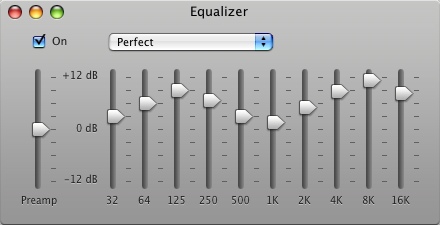
"Perfect" iTunes equalizer setting
Merlin Mann | Aug 27 2007
I noticed a lot of people are favoriting this screen grab of the "Perfect" iTunes equalizer setting (I posted it to Flickr, so I won't keep forgetting it when I need it).
Ever since I saw this in that Mac OS X Hints article, I've used it as my default equalizer in iTunes -- it seems to give a nice pop to MP3 tracks in particular. HOWTO and specific settings from the original article:
52 Comments
POSTED IN:
 I'm extremely tempted to spout...Submitted by cr0ft (not verified) on August 28, 2007 - 4:00am.
I'm extremely tempted to spout a lot of vitriol and sarcasm here, but I'll settle for noting that a) this looks like a horrible equalizer setting and b) the point of an equalizer is to compensate for distortions introduced by the speakers or the room. Get decent speakers, lower the volume of MP3's by running MP3Gain on them to avoid clipping (as virtually all the mastering engineers these days should be shot en masse for mixing albums ridiculously loud, thus slaughtering dynamic range) and set the equalizer according to your own preferences, is my advice. » POSTED IN:
|
|

| EXPLORE 43Folders | THE GOOD STUFF |


