Merlin’s weekly podcast with Dan Benjamin. We talk about creativity, independence, and making things you love.
iTunesBorges on iTunes. Sort of.grant balfour | Dec 27 2007Quote:
For one of those gnostics, the visible universe was an illusion or, more precisely, a sophism. Mirrors and fatherhood are abominable because they multiply it and extend it. For Christmas, I was quite pleased to get a Zen Stone Plus in my stocking. I'm one of those people - the ones who exist between platforms. (I lost my true allegiance decades ago, and have been a switch-hitter ever since.) One of the things this means is that I do some things by hand that other people - the loyalists - are used to having done automatically. So there I was, Christmas afternoon, moving playlists from the iTunes on our Windows machine onto the cute little non-iPod. Grab, drag, copy. The process immediately reminded me of Jorge Luis Borges' riffs on mirrors. read more »5 Comments
POSTED IN:
Jacob Marley vs. Bob Marley: Shutting Out the Ghost of Music PastMatt Wood | Nov 16 2007In the few weeks since I wrote my first plea to trim the fat from your iTunes library, I've continued purging my own collection. On the first pass, I simply deleted the clearly objectionable stuff, things that I couldn't understand what made me want to keep them in the first place. It was rather easy, and like I said, it slimmed my corpulent media collection by a third. Now though, it's getting down to brass tacks, and I'm making some hard decisions about what to keep. I don't need to do this for disk space, mind you, but as I've been trying to do a better job of organizing all my music and video with smarter lists and ratings, I've come to a simple conclusion: even if I still think it's good, I just have too much. read more »POSTED IN:
Put Your iTunes Library on a DietMatt Wood | Oct 15 2007My music buying habits have slowed considerably since my college days, when I'd rush down to the music store every Tuesday and spend every penny I hadn’t guzzled through a beer bong the previous weekend, but I still managed to amass a rather prodigious CD collection. When I got a Mac and an iPod, this turned into a rather prodigious iTunes library, and quickly became a major thorn in my side. Having suffered through a couple hard drive crashes, upgrades, and subsequent backing and re-backing up lately, I've really been feeling the weight of that 100+ GB media millstone around my neck. I felt so great when I ripped that last CD and put all those unsightly jewel cases into storage, thinking it would simplify my life. Instead, it just created bigger headaches. I know, I know, there are a bazillion ways I can slice and dice my iTunes library, storing it on different drives, shunting the videos off to a server, pimping out my machines with terabyte drives, etc, but it begs the question: do I really need all that crap in my life? read more »POSTED IN:
Amazon launches sale of DRM-free MP3sMerlin Mann | Sep 25 2007Daring Fireball: The Amazon MP3 Store and Amazon MP3 Downloader
I'm with Gruber -- this is a welcome and fan-friendly addition to the marketplace. And, frankly, I'm glad there's finally somebody out there who can really give Apple some competition in this area. read more »POSTED IN:
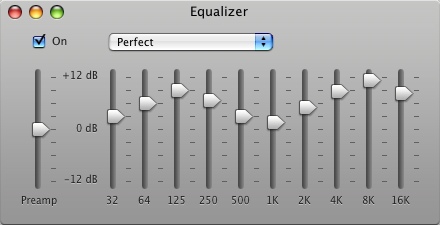
"Perfect" iTunes equalizer settingMerlin Mann | Aug 27 2007I noticed a lot of people are favoriting this screen grab of the "Perfect" iTunes equalizer setting (I posted it to Flickr, so I won't keep forgetting it when I need it).
Ever since I saw this in that Mac OS X Hints article, I've used it as my default equalizer in iTunes -- it seems to give a nice pop to MP3 tracks in particular. HOWTO and specific settings from the original article:
POSTED IN:
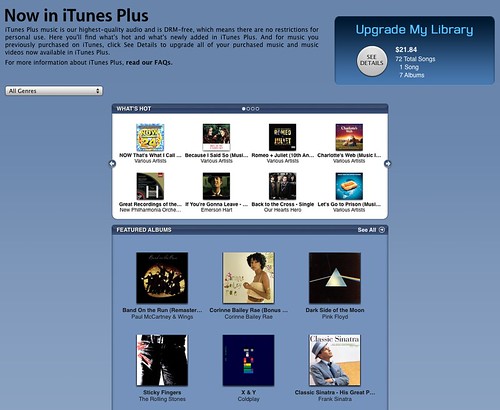
iTunes Plus, DRM-free tracks, arrive on iTunes StoreMerlin Mann | May 30 2007iTunes Plus (iTunes link)
For help getting set up with "iTunes Plus" (giving you access to buying/upgrading EMI's DRM-free tracks), don't miss this handy helper from MacUser.
POSTED IN:
Microsoft to boldly go where Apple is already going...eventuallyMerlin Mann | Apr 7 2007Microsoft changes tune on selling DRM-free songs Exciting news on the digital music front. Microsoft plans to follow Apple's plan to sell DRM-free tracks from EMI to its extant army of Zune enthusiasts. Welcome to the social:
Way to innovate, Redmond. Once the period of EMI's exclusive deal with Apple has ended, this should make both Zune owners very happy. [via: Boing Boing: Microsoft dropping DRM from Zune Music Store] POSTED IN:
MacBreak Weekly Special: the iTunes & EMI dealMerlin Mann | Apr 2 2007MacBreak Weekly Special Edition: Fixing A Hole
Here's a few links related to this very cool story: read more »POSTED IN:
Vox Pop: Want HD video from iTunes and Apple TV?Merlin Mann | Mar 25 2007
Since the new TV can handle video up to HD's 720p resolution, there's been a lot of speculation about whether the iTunes store will eventually start selling HD content, such as TV shows and movies. You can bet that the desire for that quality of presentation is theoretically out there (at least it is for this HD TV owner). The problem, as many folks have discussed at length, is that the file size for HD movies, in particular, may be prohibitively large for the garden-variety home broadband user. As Greg Keene notes, "With simple math, we can extrapolate that a 2-hour movie would be about 3.9 GB." That's not only a substantially lengthy download for, say, a residential DSL subscriber, it also represents the investment of over 10% of the available space on the Apple TV's drive (as well as, it should be noted, an equivalent chunk of space back on your Mac or PC's disk). read more »POSTED IN:
TechDigs: Mac-friendly RAID 5 setup with Infrant ReadyNASMerlin Mann | Jan 25 2007Help, My Hard Drive is Full! - TechDigs.net
One of my ongoing rants on MacBreak Weekly revolves around how hard I've found it to keep up with the spiraling need for responsible personal backup. Photos, movies, audio, documents, you name it. As Mark Pilgrim asked last May, "How do you back up 100 GB of data per year for 50 years?" And don't get me started on media rotation and offsite copies. The mind boggles. I mean, remember when a shoebox full of Zip disks and a copy of Retrospect was all you needed? Good times. I don't have the long-term solution I'm after just yet (although, I sometimes think Amazon S3 is heading us in the right direction), but for the middle-term, my call for help has been answered handsomely by Greg Keene of TechDigs, who's put together a detailed breakdown on how he wires things together around his Infrant ReadyNAS NV (amzn) -- it's Mac-friendly, Raid 5-able, and has an assload of configurable options. Greg lays out the problem he's trying to solve: read more »POSTED IN:
|
|





| EXPLORE 43Folders | THE GOOD STUFF |


