43 Folders

43 Folders feed subscription icon - Shiny! Drowning in email? Try Inbox Zero to learn sane tips for dealing with high-volume email. And don’t miss the free Inbox Zero video. »

Login or register

Register for free on 43 Folders to comment on articles, post to our forum, customize your visits, and much more. Current users can login now.

Clippings intelligently convert "stuff" into OmniFocus tasks

[Disclosure: I’m a volunteer contributor on the development of the OmniFocus app]

You could be forgiven for being exhausted by my harangues about the importance of putting actions into their own special place outside of email, web sites, or other action-bearing media (“Email is just a series of tubes,” Senator Ted Stevens, might one day say).

In fact, liberating actions from the email in which they arrived and putting them into a system that you trust is arguably the most important tenet of Inbox Zero. But it’s also advice that leaves a lot of people scratching their heads: “OK, big shot, so where do I put this new task, and how exactly is it supposed to get there?”

Well, I’m happy to say that recent sneaky peaks of OmniFocus now have a pretty neat way to help with this problem. It’s called “Clippings,” and if you’re familiar with the similar feature in OmniOutliner, you can imagine how it might work in the context of a task-tracking app and the complementary apps whose contents you want to direct to it.

Alongside the recently-added Perspectives, this is a feature that is making me very happy right now.

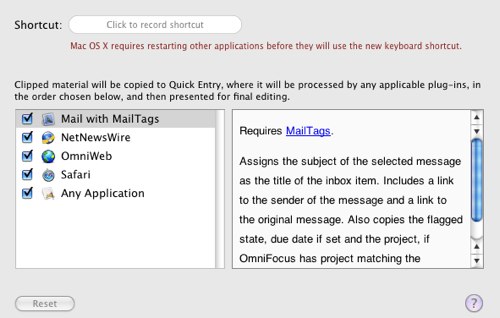
Once lightly configured, via the OF Preferences, Clippings allow you to select text and images from inside most OS X applications and send it to the OF QuickEntry box, where it gets munged into an inbox task automagically.

My favorite way to use this right now is inside Mail.app and alongside Scott Morrison’s wonderful MailTags plugin.

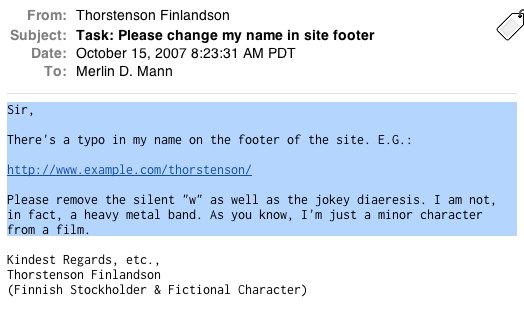
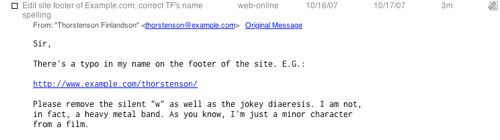
Let’s say I get a message from my client, Thorstenson Finlandson, containing some bit of work that he wants me to do.

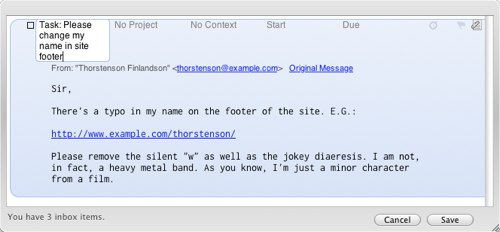
See how I selected some of the text? Now I select “[Mail] > Services > OmniFocus: Send to Inbox” (n.b.: you can also define a system-wide key command for this in OF Preferences). And, waa-lah, the selection gets sent to my OF QuickEntry box.

Note that the message Subject is the default name of the task, the selection is added as a “Note,” and (this is huge) the sender’s email address is added as a link, as well as an URL that points me back to the original message (thanks for that one, MailTags!).

Since Thorstenson thoughtfully used an awesome subject line, I’ll need only a bit of light editing and the addition of a few task details to turn this into a real thing.

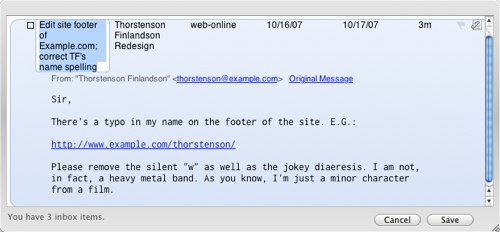
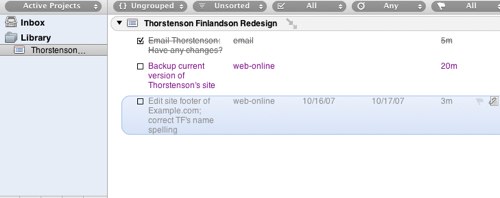
I hit “Save” and I’m good to go. Back in OmniFocus, I’m ready to get to work:

All that note stuff I added is safely shunted away in its currently-hidden field, but I can bring it up any time by selecting the task row and hitting “CMD-[apostrophe]” or by clicking the “Expand Note” icon on the far right.

Happily, this works right out of the box in many other popular OS X apps (I’ll go out on a limb and guess that it works in most Cocoa apps that play nice with OS X Services; feel free to correct me). But this already feels like a really healthy, Quicksilver-like habit to me. I love a) that it’s super-fast, and b) that I keep that wonderful link back to the item the task came from. Disco.


Could I do things like this inside a Single Heavyweight Application? Yes, probably. But, personally, that’s not my gig. I love Mail.app for email, Safari for web browsing, NetNewsWire for feed reading, and so on. I’ve chosen a series of super-sharp paring knives over one monstrous Swiss Army Knife, because, frankly, that’s just how Daddy rolls.

I love how Clippings capitalizes on standard OS X technologies to lightly glue things together for me, regardless of my app preference. Personally, I don’t need a massive robot to try and do a bunch of thinking for me; I just need a few very simple tools that shorten my path from cognition to completion.

Anyhow, as you can see, I’m a little giddy about this and wanted to share it with you guys. If you’re in on the sneaky peak, be sure to give Clippings a spin (along with the hugely useful Perspectives). If I may say, my OmniGroup friends are doing a swell job on what feels to me like a very solid and non-fiddly app.

Rumor

A little bird tells me that a certain fast-talking new OmniGroup employee with hip glasses and a buzz cut may soon have a new OmniFocus screencast for you. Watch this space later this week for details.

[Again with the disclosure: I’m a volunteer contributor on the development of the OmniFocus app]


27 Comments

Comment viewing options

Select your preferred way to display the comments and click "Save settings" to activate your changes.
devon's picture

How does this compare...

to iGTD’s quick add function? I use it (F6) all the time, and it seems to do about 90% of what you’re describing, except that I can invoke it from the keyboard instead of mousing around through the services menu.

The only things it’s missing is that is takes the full text of the e-mail, and while it does create a link to the e-mail item, it doesn’t load up the contact information automatically (although I assume this would be a pretty easy addition).

I liked Kinkless GTD a lot, and I really like Omni products in general, however I’m curious what the features that OmniFocus will bring to the table that will potentially lure me away from the free iGTD.

Thoughts?

patnotz's picture

iGTD

I’ve been meaning to ask some of the same questions that devon just asked. And, now that I see you’re a volunteer contributor (does that mean no financial stake?), perhaps I’ll ask too. I’m curious about the real benefits of OmniFocus over iGTD. Like devon, I see a lot of the same features but possibly with OmniGroups beautiful UI. I’m a big fan of OmniGroup so I’ll be trying the sneaky peak but it seems like you (Merlin) may have the most insight at this point.

On a related note, an iGTD importer (exporter too?) if it’s not already there would be huge in luring iGTD users to give OF a spin.

Alas, competition is good and I’m all for paying developers for their work. I’m just really interested in hearing your take on iGTD vs. OF.

patnotz's picture

volunteer

Ah, I see from your linked post that you’re not getting paid. Thanks.

Tabula Rasa's picture

iGTD --> Omnifocus Exporter

On a related note, an iGTD importer (exporter too?) if it’s not already there would be huge in luring iGTD users to give OF a spin.

There’s an applescript and applet available that exports iGTD to Omnifocus available at: http://web.mac.com/robinfrancistrew/Site/iGTD2Omnifocus.html

MikeVardy's picture

Thanks!

This little “lifehack” just saved me a lot of re-entry!

benbr's picture

I've used iGTD and OmniFocus

I like both but I have been able to work OmniFocus into my flow a little better. Something about it has helped me fiddle with the settings less and actually do stuff more. I wish I could be more specific but it’s not so much a feature thing as the feel and ‘naturalness’ of the interactions.

berchman's picture

So when is the app going "live"

I’ve used kinkless and now iGTD, and have been waiting for the final stable release of OmniFocus for what seems like forever. I do want to give it a try but cannot trust my data to beta releases.

I believe Omni’s website says fall release. Here we are in the fall. Anyone know when OmniFocus is going to go v1.0?

Merlin Mann's picture

Re OF "vs." iGTD

I haven’t used iGTD enough to feel qualified to compare it to OmniFocus, but iGTD has been discussed here before and I do know a lot of people love it lots.

I’m happy to host and highlight a fresh discussion on the forum, if it’s something people want to participate in. Also if a super-talented writer wanted to draft a thoughtful comparison, it might make for a good guest post.

Personally, I think there’s not that much to be gained from “which is better?” discussions about apps unless they’re focused on “which is better for me or for you and why.”

Sometimes that kind of discussion can degrade into the equivalent of an argument over condiment preferences, but if someone who’s very familiar with both wanted to provide guidance on deciding which to try first, that’d be swell (although maybe not in this particular post’s comments, please. :-) )

Epicurean's picture

The wait is killing me

Oh how I long for the release of the often talked about but never touch (by me - “bitter pill” to follow) OminFocus. Kinkless has been my friend to be sure. But having just moved into a new job after 23 years on that oh-so-lovely-Dilbert-cartoon of corporate worlds, I would so liked to have begun my new adventure with a nice squeaky clean GTD app. But, alas, my signing up VERY early in the alpha days has gone unmet with an invitiation to inbibe in the joys of Omni-mania.

47 years old and the patience of a 2 year old! Quite pathetic isn’t it!?

Tabula Rasa's picture

Alpha

I read a blog posting saying that they were all caught up on the requests, ie. that everyone who wants to use Omnifocus has been extended an invite. I’d look into that again if I were you, after all you ain’t getting any younger ;-)

Ethan's picture

Absolutely do sign up for

Absolutely do sign up for the alpha if you are interested.

We’re pretty good about sending invites out in a timely manner :)

Tabula Rasa's picture

iGTD vs. OmniFocus

How topical. I’ve been pondering this very topic myself as I’ve played around with OmniFocus extensively in the last week. Unfortunately, for true GTD adherents I don’t think that OmniFocus is the proper solution. In my experience, it takes the existing ideas and implementations of GTD and tweaks them enough to be annoying and painful for iGTD users.

I love the UI and generally love the stuff that Omni develops, but after a week of use it just wasn’t for me. That’s not to say that it won’t be for you. There’s no excuse NOT to try it, especially since there’s a convenient importer from iGTD.

Two things that I specifically missed were:

  • ability to focus on JUST what’s due today, or 2 days from now. In iGTD I primarily work from a smart folder that shows everything I have due in the next two days. In Omnifocus you cannot limit your view to JUST that. It will show you things that are due in a day, a week, etc., but there is no perspective for STRICTLY what’s due today or in X number of days.

  • The concept of subprojects is turned into action groups. However, action groups do not show up in your project panel on the left side. Imagine you have one large project, and several subprojects inside of that large projects. You have tasks that are assigned to the general project, as well as tasks assigned to specific subprojects. In omnifocus the subprojects are called action groups, but instead of populating the left side panel (planning panel) they are only displayed when you show the general project in the right-panel.

Anyhow, You can read the thread comparing the two on the OmniFocus forums.

Those were my two biggest gripes…

I did raise those shortcoming on the forums and was reminded that Omnifocus isn’t a GTD app per se, which is a good point. If you’re expecting a pure GTD centric app, it’s not necessarily that.

Merlin Mann's picture

Re: iGTD vs. OmniFocus

Thanks for this! Very useful.

wreising's picture

Clippings are great!

I just tried this and ended up pulling 20 projects/actions out of the last 4 days of email alone. Very impressive.

Of course, now I can’t ignore those 20 next actions.

Now I need to spend some time getting project names to match between Mailtags and OmniFocus.

Merlin - What key command do you use? I’ve been trying ctrl+option+f (for focus) but don’t like it.

skylarp's picture

Key Commands

I’ve been trying to get key commands to work with Clippings, but I have yet to hit on one that seems to work in Mail. I’ll give Ctrl-Opt-F a whirl this evening, though.

I generally prefer it when software companies define a default key command for things like this (e.g., Yojimbo’s use of F8). I end up having too much trouble deciding on one that makes sense to me. Paradoxically, I find it easier to learn a new stroke than to invent one on my own.

dominiquejames's picture

the settling dust

i imagine myself in an endless desert. not a single soul in sight. no matter how loud and for how long i cry out, no one came to my rescue. i was alone. in a fit of rage and frustration, i furiously started kicking the sand off my feet. i was kicking so hard and for so long that a cloud of dust enveloped me until i couldn’t see a thing. i stood there, in the middle of the giant cloud of dust i created, and marveled at how beautifully and lightly they hung in midair. i stood so still and for so long that slowly, the cloud of dust surrounding me started to thin, and i realized that it was settling down. i looked down at my feet, and i marveled again that there was still the hole that i inadvertently dug, and i was right inside the empty hole. and i looked around me, and there, i saw, all the dust that settled. it didn’t go away. it just moved somewhere else. it was still there. and i have only myself to blame for all the effort of kicking without successfully making it go away. as i looked around at the remaining settling dust, i shook my head: what a waste of time; what a waste of effort.

Maluktuk's picture

OmniFocus How-To's Very Much Appreciated

I’ve been playing around with the OF Sneaky Peak for a few months now, but I feel like I’m not fully utilizing all of the great tools it contains. That’s why posts like this are great. Ethan Schoonover had a few screencasts that were great in showing how OF looks and works, but those have become quickly outdated. Does anyone know of a good source, somewhat like iGTD’s forum, that discusses how to use OF most effectively? It’s been something I’ve been missing dearly.

Ethan's picture

OmniFocus Screencast

Rumors of a new how-to quickstart video are true. We should have something this week. I’m currently stockpiling caffeine in order to get up to my standard number of barely intelligible words per minute on these things.

cmeijburg's picture

Re: OmniFocus Screencast

Any info on the new video-how-to’s? I can’t find them yet on the OF-site…

slinberg's picture

*tap* *tap* *tap*

*tap*
*tap*
*tap*

terrence p's picture

Perspectives

Merlin

Your posts “Smart Folders set-up for Mail” and “Smart Playlists for iTunes” were real lifesavers for a numbskull like me. I’m curious if you’d be willing to do the same for “How To” for OF’s Perspectives.

Would me saying please oh please oh please over and over until I turn blue in the face make your decision any easier?

teepeecee

SpiralOcean's picture

Not sure if MailTags is involved in this

Beautiful walkthrough! Thank you for this tip! I cannot wait to start processing emails this way. This will save me gobs of time.

In response to this part of the post

“and (this is huge) the sender’s email address is added as a link, as well as an URL that points me back to the original message (thanks for that one, MailTags!).”

I don’t have MailTags installed, and had the same behavior happen with the clippings.

I keep toying with installing MailTags, but haven’t taken the leap yet.

Another cool feature is when I move the email to a different folder, and go back to click on the original message link in omnifocus, the original message is found.

Beautiful.

SpiralOcean's picture

I stand corrected

turns out the sneaky mail tags preference does reside in my mail application.

I haven’t tried it out yet… I’ll look around for a walk through of the tags. Maybe there is one on this site. :-o

Anyway, my apologies for adding noise to the signal.

ampersandee's picture

Mail Act-On rule?

now if there was a way to invoke the Clipping with Mail Act-on - or is there?

Craig's picture

Re: Mail Act-On rule?

I don't think the application's Clipping function can be invoked with Act-On, but a tester has written an Applescript that does the same thing, and can.

http://www.rose-hulman.edu/~clifton/software.html#OF-Mail

BMEguy's picture

Intelligent?

When I read the title proclaiming “intelligent” clipping in OmniFocus, I was pretty excited. However, I have to say that the threshold for me to designate the clipping as “intelligent” would be for Omnifocus to parse the email body for a date and set that to the due or event date. Even if it picks out the wrong date, I lose nothing between changing it from today’s date to the correct one, or from the incorrectly assumed date to the correct one.

MikeVardy's picture

So far, so good...

I’m really liking OF right now, and am moving stuff from iGTD over as we speak…

The documentation is just getting developed, and from what’s there already, it looks like it will answer most of what we’re looking for very soon as far as direction.

 
EXPLORE 43Folders THE GOOD STUFF

An Oblique Strategy:
Discard an axiom


STAY IN THE LOOP:

Subscribe with Google Reader

Subscribe on Netvibes

Add to Technorati Favorites

Subscribe on Pageflakes

Add RSS feed

The Podcast Feed

Inbox Zero

The original 43 Folders series looking at the skills, tools, and attitude needed to empty your email inbox — and then keep it that way. Don’t miss the free video of Merlin’s Inbox Zero presentation.

Get Started with ‘GTD’

David Allen’s popular productivity book and the system on which it’s based help turn ‘stuff’ into actions that support valuable outcomes.