Drowning in email? Try Inbox Zero to learn sane tips for dealing with high-volume email. And don’t miss the free Inbox Zero video. »
Register for free on 43 Folders to comment on articles, post to our forum, customize your visits, and much more. Current users can login now.
Address BookAddress book, ipod touch and groupsJeremy Scott-Joynt | Nov 14 2007I’ve just acquired an iPod touch and I’m in love. One small issue, though. I’ve added a bundle of addresses in the past few weeks using the touch, but only yesterday did I realise that they could be placed in groups if you were IN the group already when you started adding the new entry. So there’s a whole load of ungrouped entries in my (frighteningly big) address book. The logical thing would be to make a smart group for stuff that, say, isn’t in a dumb group. But I couldn’t see a smart group option for that. Any bright ideas? POSTED IN:
Address book, ipod touch and groupsJeremy Scott-Joynt | Nov 14 2007I’ve just acquired an iPod touch and I’m in love. One small issue, though. I’ve added a bundle of addresses in the past few weeks using the touch, but only yesterday did I realise that they could be placed in groups if you were IN the group already when you started adding the new entry. So there’s a whole load of ungrouped entries in my (frighteningly big) address book. The logical thing would be to make a smart group for stuff that, say, isn’t in a dumb group. But I couldn’t see a smart group option for that. Any bright ideas? POSTED IN:
Dansays: Put all your customer service numbers into Address BookMerlin Mann | Oct 5 2007This morning, like a lot of other people, I was locked out of using my PayPal debit card while the site (and apparently its glass-jawed transaction processing network) took a total dirtnap. So it goes. That’s only indirectly the point of this post (although I did kind of feel like opening a “Can of Cory” on The Pal). Point is, my pal dansays left a great comment on my whiny Flickr post laying out why he’s put all the customer service numbers of products and sites he uses right into his Apple Address Book. Great advice that I’ll be taking this weekend: read more » POSTED IN:
Is my Address Book missing something?Sal K | Sep 22 2007Hi all, Glad to be a part of this community. I was reading the following post: http://www.43folders.com/2007/08/20/purging-infopoor-entries-address-book And when I came upon the last critria: “IM Username,” I realized I didn’t have that in the drop down list of my Addressbook. I’m running AddressBook 4.0.5 on 10.4.10 I even tried adding a custom field labeled “IM Username” thinking that it would populate the filtering drop down menus, but no such luck. Am I missing something, or just blind to something so simple? Thanks! -Sal POSTED IN:
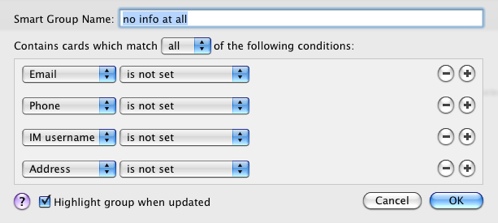
Purging info-poor entries from Address BookMerlin Mann | Aug 20 2007You may share my Address Book pollution problem — having too many orphaned names that got scribbled on a PDA or were manually added but never fleshed out (like: 10 years ago!). Here’s a really stupidly useful Smart Group for Address Book that helps identify entries without any real information attached to them. POSTED IN:
Some handy Mail.app Smart MailboxesMerlin Mann | Apr 23 2007It took me a while, but ever since I’ve gotten my head around Smart Folders (and Smart Playlists and Smart Groups, etc.), I’ve started to think about the way I use my Mac a bit differently. Clearly iTunes is the winner in this regard (watch for an upcoming multi-part series about Smart Playlists on The Merlin Show), but the Finder, and Address Book, and Mail.app also have an amazing amount of power rumbling under the hood. So, in the interest of spreading the love, here’s four Mail.app Smart Mailboxes that have been rocking my world over the last months. read more » POSTED IN:
|
|
| EXPLORE 43Folders | THE GOOD STUFF |