43 Folders

43 Folders feed subscription icon - Shiny! Drowning in email? Try Inbox Zero to learn sane tips for dealing with high-volume email. And don’t miss the free Inbox Zero video. »

Login or register

Register for free on 43 Folders to comment on articles, post to our forum, customize your visits, and much more. Current users can login now.

"Perfect" iTunes equalizer setting

Perfect

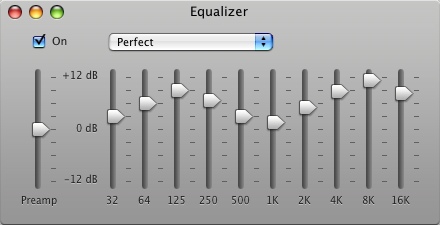
I noticed a lot of people are favoriting this screen grab of the “Perfect” iTunes equalizer setting (I posted it to Flickr, so I won’t keep forgetting it when I need it).

Perfect

Ever since I saw this in that Mac OS X Hints article, I’ve used it as my default equalizer in iTunes — it seems to give a nice pop to MP3 tracks in particular.

HOWTO and specific settings from the original article:

Open the equalizer, and from the pop-up menu, select “Make Preset.” Call it “Perfect,” because it is, and set the following levels, from left to right (skip the Preamp section):

db +3, +6, +9, +7, +6, +5, +7, +9, +11, +8 db


Comment viewing options

Select your preferred way to display the comments and click "Save settings" to activate your changes.
jim's picture

is this perfect for desktop/ipod/laptop? ...

is this perfect for desktop/ipod/laptop?

Guido's picture

You are kidding, right? If...

You are kidding, right? If not: this is ridiculous. +9db at 125Hz? In most cases, this just adds mushy bass and kills most mixes. And: equalizing should match speakers. Since everyone uses different ones, no equalizing will be perfect for everyone.

If you are listening to this and think this sounds perfect, you should invest in new speakers or have your ears checked.

Mike's picture

Remember that these kinds of...

Remember that these kinds of settings can overload the input to your amp. I’d suggest being less dramatic and making changes in the +4 to +6dB range. If you really need to do extreme EQ try lowering the overall volume slightly to avoid clipping.

Keith Peters's picture

I'm no audio expert but...

I’m no audio expert but this seems ridiculous? Shouldn’t equalizer settings be based on your actual sound equipment such as amplifiers, speakers, and room acoustics? How can one setting be “perfect” for everything? It’s like saying x mph is the “perfect speed” for a car.

Cari's picture

Great tip. Am I...

Great tip. Am I missing something, or do your 500 - 2K not match their suggestions?

gr's picture

Perfect? Which band? Which song?...

Perfect? Which band? Which song? Which speakers? Which room? Whose ears? Whose taste????? ;-(

Guido's picture

Just re-read my comment; the...

Just re-read my comment; the last sentence sounds really condecending. Sorry, not a native speaker. But actually, I am serious: the older you get, the less responsive your ears are, especially to high frequencies.

So if you need a boost of +11db at 8kHz, which is really a lot, then maybe the old ears aren’t working very well anymore.

Either that, or the speakers are old and can’t reproduce high frequencies very well anymore.

Jarick's picture

Well if you have REALLY...

Well if you have REALLY bad MP3 compression, it may help, but it may also make the bad compression even more apparent. Then again, most people can’t notice bad mp3 compression, even down to 128 kbps.

If it sounds better, all the best, but with good compression (at least 192 kbps) and a decent set of speakers, those settings would be extreme.

Merlin Mann's picture

My audiophile tip -- as...

My audiophile tip — as with all things — would be to choose the settings that work best for you. And to breathe deeply. Always very deeply.

Debi's picture

Thanks a bunch! I think...

Thanks a bunch! I think it sounds great. It really makes the vocals pop - helps a bunch for these cheap headphones I use at work.

Me's picture

Sorry to rain on the...

Sorry to rain on the parade, but this is so ridiculous that it’s simply stupid. No EQ setting is “perfect”. It depends on your equipment, your room, and, most of all, your ears.

I marvel sometimes at the anal retentiveness of this site, and the obsessive-compulsive attitudes expressed here, but this one takes the cake. Spend some time thinking rather than just blindly following what others do.

dthree's picture

You risk clipping when setting...

You risk clipping when setting all the equalizer bands to positives. SInce the intent of an equalizer is to adjust the freqency of the sound without affecting the overal levels, I suggest subtracting 7 from each band. That will give you the same equalizer contour but balanced between + and -.

Merlin Mann's picture

Okay, howzabout this: Post our own...

Okay, howzabout this:

Post our own favorite Hamburger Helper settings — either post yr dBs here or link to a screen grab.

What’s your preference?

Tomas Varaneckas's picture

The most perfect equalizer setting...

The most perfect equalizer setting is totally flat. Professional music which most of you listen to is post-produced to sound best on all possible sound systems, so unless you know the flaws of your audio setup that equalizer can correct, leave it off for your own sake.

Eli Sarver's picture

Following this on OS X...

Following this on OS X (and they have it for windows as well) will yield the closet to recorded reproduction of the sound:

http://extra.benchmarkmedia.com/wiki/index.php/OSXAudioPlayback-SetupGuide

Summary: EQ off, iTunes volume at full, no Sound Check or Sound Enhancer.

Ryan's picture

I actually kind of like...

I actually kind of like this on my MacBook.

brett's picture

I agree with everyone, this...

I agree with everyone, this can’t be perfect, except for one install. And I’ve got a few curves of my own for each setting (phones, my laptop speaker (which nothing can really help sound good) and my home stereo).

But here’s a question: every mac laptop of a specific type, every ear bud headphone set, every iMac has a specific set of speakers, specified in the manufacturing documents. Is there any list of “perfect” settings for each of them? There should be!

cr0ft's picture

I'm extremely tempted to spout...

I’m extremely tempted to spout a lot of vitriol and sarcasm here, but I’ll settle for noting that a) this looks like a horrible equalizer setting and b) the point of an equalizer is to compensate for distortions introduced by the speakers or the room.

Get decent speakers, lower the volume of MP3’s by running MP3Gain on them to avoid clipping (as virtually all the mastering engineers these days should be shot en masse for mixing albums ridiculously loud, thus slaughtering dynamic range) and set the equalizer according to your own preferences, is my advice.

Robb Neumann's picture

Why all the rage? ...

Why all the rage? The equalizer settings don’t work for you? Don’t use them!

Yes, you can make plenty of arguments about clipping, about the advice of recording engineers, or whatever else, but ultimately, isn’t this sort of thing about making you happy? These are personal settings. What settings make you happy? Use those. Ignore everyone else. Make sure you’re not making yourself deaf, of course, but otherwise… listen to what makes you happy.

Jack's picture

People are trying too hard...

People are trying too hard to explain why this is one of the worst tips posted here.

If you CANNOT SEE for yourself, without understanding the lightest bit about audio, how HORRIBLY BAD such a fucked up generalization is, then you’re too stupid to be be breathing.

I always wondered if LH readers come in shades of total sheep, but i guess even the posters do. Get a clue.

Jack's picture

Oh, and pink shaded, "can't...

Oh, and pink shaded, “can’t we all just get along”, “well, that’s just your opinion”, weak willed and weak minded people such as Robb Neumann can suck it and get a clue. Some things might be subjective, but fucking common sense isn’t. And yes, it is my place to be judging you (that’s you Robb), by virtue of being alive and having a fucking brain.

Sean's picture

Wow...who could have guessed something...

Wow…who could have guessed something as trivial as iTunes Equalizer settings would spout such a vehement flame war?

Perfection is subjective…(although this setting has improved the sound in my headphones)

Reef's picture

I agree with cr0ft. Generally,...

I agree with cr0ft. Generally, music today is produced with an ever increasing volume level. However, eq levels have been enginerred with a particular sound in mind. Using eq settings (which are volume levels for different frequencies) distorts the way in which the artist wants you to hear the music. If you mess about with the eq too much, you change the music in a way that it doesn’t represent the way in which the artist wanted you to hear it in the first place.

Merlin Mann's picture

Thanks to everyone for the...

Thanks to everyone for the comments and conversation. Well leave Reef with the last word on this one.

Dexter's picture

VolumeLogic makes my ears happy...

VolumeLogic makes my ears happy since over 3 years. Best $20 I ever spent on software.

dadsp33k's picture

Great tip. This actually sounds...

Great tip. This actually sounds great on my mac. Everything “pops” nicely.

Eric H's picture

As it has been mentioned...

As it has been mentioned here a few times…get volume logic. Been using it for several years now, and it is the only thing you’ll ever need for iTunes.

Kim Hunter's picture

This is probably more productive...

This is probably more productive for every one to just use this script i whipped up.

tell application “iTunes” make new EQ preset with properties {name:”Perfect”, band 1:3, band 2:6, band 3:9, band 4:7, band 5:6, band 6:5, band 7:7, band 8:9, band 9:11, band 10:8} set the current EQ preset to EQ preset “Perfect” end tell

Cristiano Betta's picture

I'm sorry, but isn't this...

I’m sorry, but isn’t this completely relative to the kind of music and kind of speakers you play music with? I mean: a person with a macbook (which has crappy speakers) has different issues than a person with an iMac.

John Trainor's picture

Merlin, You could not be more...

Merlin,

You could not be more wrong. I take all of your settings, lower them by 3dBs and then raise the preamp by 3dBs. It makes all of the difference.

Of course, I ignored it when you posted it to Flickr, but I just had to try it once you posted a blog entry. I couldn’t resist.

Andrew WK sounds so much better now.

John

About Merlin Mann

Merlin Mann's picture

Bio

Merlin Mann is an independent writer, speaker, and broadcaster. He’s best known for being the guy who started the website you’re reading right now. He lives in San Francisco, does lots of public speaking, and helps make cool things like You Look Nice Today. Also? He looks like this, answers questions, and has something like a life.

 
EXPLORE 43Folders THE GOOD STUFF

An Oblique Strategy:
Distorting time


STAY IN THE LOOP:

Subscribe with Google Reader

Subscribe on Netvibes

Add to Technorati Favorites

Subscribe on Pageflakes

Add RSS feed

The Podcast Feed

Inbox Zero

The original 43 Folders series looking at the skills, tools, and attitude needed to empty your email inbox — and then keep it that way. Don’t miss the free video of Merlin’s Inbox Zero presentation.

Making Time

3-part series on attention management for artists and makers. Read Bad Correspondence, The Job You Think You Have, and One Clear Line.