Merlin’s weekly podcast with Dan Benjamin. We talk about creativity, independence, and making things you love.
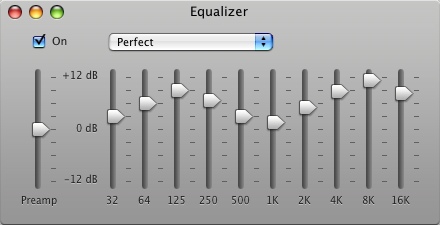
"Perfect" iTunes equalizer setting
Merlin Mann | Aug 27 2007
I noticed a lot of people are favoriting this screen grab of the "Perfect" iTunes equalizer setting (I posted it to Flickr, so I won't keep forgetting it when I need it).
Ever since I saw this in that Mac OS X Hints article, I've used it as my default equalizer in iTunes -- it seems to give a nice pop to MP3 tracks in particular. HOWTO and specific settings from the original article:
52 Comments
POSTED IN:
 Don't mean to be rude...Submitted by yann (not verified) on August 27, 2007 - 6:44am.
Don't mean to be rude but... I've seen better tips on here... First off, it doesn't make sense to have "one setting to end all settings" since it 100% depends on your physical setup. Second: on another level, it completely depends on the type of music your listening. Third: those settings are just... how can I put this... bad? If audio is not your field of expertise, maybe you should leave the tips to others? Yes, it's subjective, as subjective as someone posting "The Perfect Photoshop settings" recommending "Saturation +75, unsharp mask 5px 90%" and says it works especially well on a 72 dpi image... » POSTED IN:
|
|

| EXPLORE 43Folders | THE GOOD STUFF |


