Merlin’s weekly podcast with Dan Benjamin. We talk about creativity, independence, and making things you love.
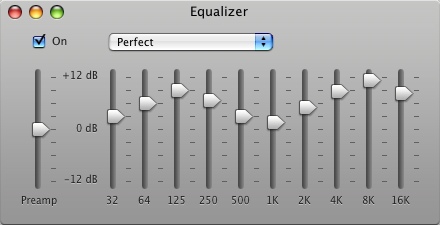
"Perfect" iTunes equalizer setting
Merlin Mann | Aug 27 2007
I noticed a lot of people are favoriting this screen grab of the "Perfect" iTunes equalizer setting (I posted it to Flickr, so I won't keep forgetting it when I need it).
Ever since I saw this in that Mac OS X Hints article, I've used it as my default equalizer in iTunes -- it seems to give a nice pop to MP3 tracks in particular. HOWTO and specific settings from the original article:
52 Comments
POSTED IN:
 You might want to give...Submitted by Jordan (not verified) on August 27, 2007 - 6:06am.
You might want to give SRS iWow a try. I was really surprised by how much it really seemed to improve the audio I was listening to, and it comes with different presets for using laptop speakers, headphones, and bigger speakers. http://www.srs-store.com/store-plugins/mall/iwow-plugin.asp » POSTED IN:
|
|

| EXPLORE 43Folders | THE GOOD STUFF |


